



APG Withdrawal for WooCommerce

What it is

APG Withdrawal for WooCommerce gives your shop the withdrawal form the law obliges you to have, and everything needed around it: the register of each declaration, the emails, the order status, the refund and the proof that you handled it as you should.

The customer goes to a page, chooses their order —or the specific lines they are withdrawing from, down to the unit—, reviews what they are about to send and confirms it. You get a notification, the request is stored with its date, its time and its fingerprint, and from there you accept it, reject it or complete it with the money returned.

Article 11a of Directive 2011/83/EU, introduced by Directive (EU) 2023/2673, has applied across the European Union since 19 June 2026: every online shop has to offer an online withdrawal function, prominent and easy to find. This is that.

It is a free plugin published in the official WordPress repository.

Requirements

  • WordPress 6.0 or later.
  • PHP 7.4 or later.
  • WooCommerce 7.0 or later.

It works with the classic order store and with HPOS, high-performance order storage, without your touching anything.

Installation

  • Search for APG Withdrawal for WooCommerce in Plugins -> Add New and press Install Now; or upload the ZIP from Plugins -> Add New -> Upload Plugin; or copy the folder into /wp-content/plugins/ over FTP.
  • Activate it from the Plugins menu.
  • Set it up in WooCommerce -> Withdrawal.

On activation, the plugin creates the form’s page on its own with the [apg_withdrawal_form] shortcode inside it and leaves it selected in the settings. If you already have a page of your own, you point the setting at it and the spare one stays where it is: the plugin deletes nothing.

Important: WooCommerce 11.1 brings its own withdrawal feature, switched off as it comes, under WooCommerce -> Settings -> Advanced -> Features. With both running, your customers reach two different forms at two different addresses, each with its own register and its own acknowledgement, and neither knows about the other. The plugin detects it and warns you with a link to the screen where it is switched off.

The settings
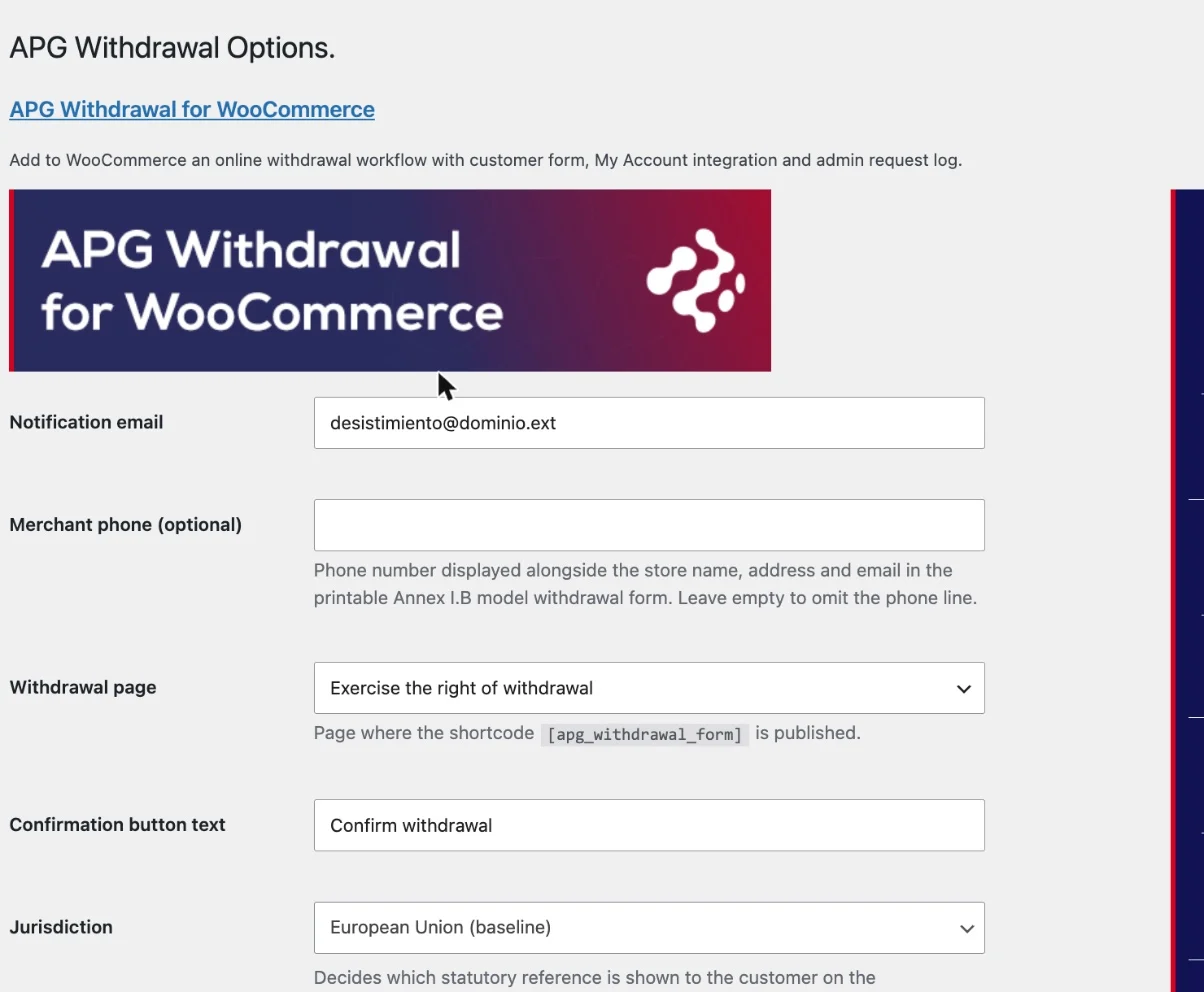
The settings screen, with the notification email, the form's page and the deadline. Everything is on a single screen, in WooCommerce -> Withdrawal, laid out in blocks. That screen also has WordPress’s Help tab, at the top right, with one panel per block.

The shop and the form

Who receives the declarations and where the customer writes them. These details are also the ones that come out on the Annex I(B) model.

  • Notification email: the address that receives a copy of each request. As it comes, the site administrator’s.
  • Merchant phone (optional): shown next to the shop’s name, address and email on the printable model. Empty, that line does not come out.
  • Withdrawal page: the page where the form’s shortcode is published. The plugin creates it on activation; here you point it at another one if you move it.
  • Confirmation button text: what the final button says, the one that registers the declaration. As it comes, Confirm withdrawal.
  • Jurisdiction: which rule is cited to the customer on the confirmation screen. Spain had not transposed Directive (EU) 2023/2673 when this was written, so both options apply the same thing today; the Spanish one also cites the TRLGDCU, the Spanish consumer act, and it is where the national extras will be switched on when they reach the official gazette.

The deadline and the register

How long the customer has and what is stored of each declaration. Fourteen days is the legal minimum in the European Union: you can give more, never less.

  • Withdrawal window (days): once those days have passed, the order stops showing the withdrawal button. The form still accepts a request out of time, with its warning, because deciding whether it is out of time is for you and not for the form.
  • Extra grace days: days of courtesy on top of the window, for the time a carrier takes or simply to be generous with your customer. As it comes, zero.
  • Deadline source: which date it is counted from. Completed date, which is the closest thing to the delivery date, or the order date. With an order that is not completed yet, the plugin changes source on its own.
  • Store IP address?: stores the address the declaration was sent from, as proof of who sent it and when. On as it comes.
  • Store browser identifier?: stores the browser’s identifier, for the same reason. On as it comes. Both are personal data: keep them only if you are going to use them, and say so in your privacy policy.
  • Delete all data on uninstall?: unticked, uninstalling the plugin leaves the requests and the settings where they are. Ticked, it takes the lot with it, and there is no coming back from that.

Handling the requests
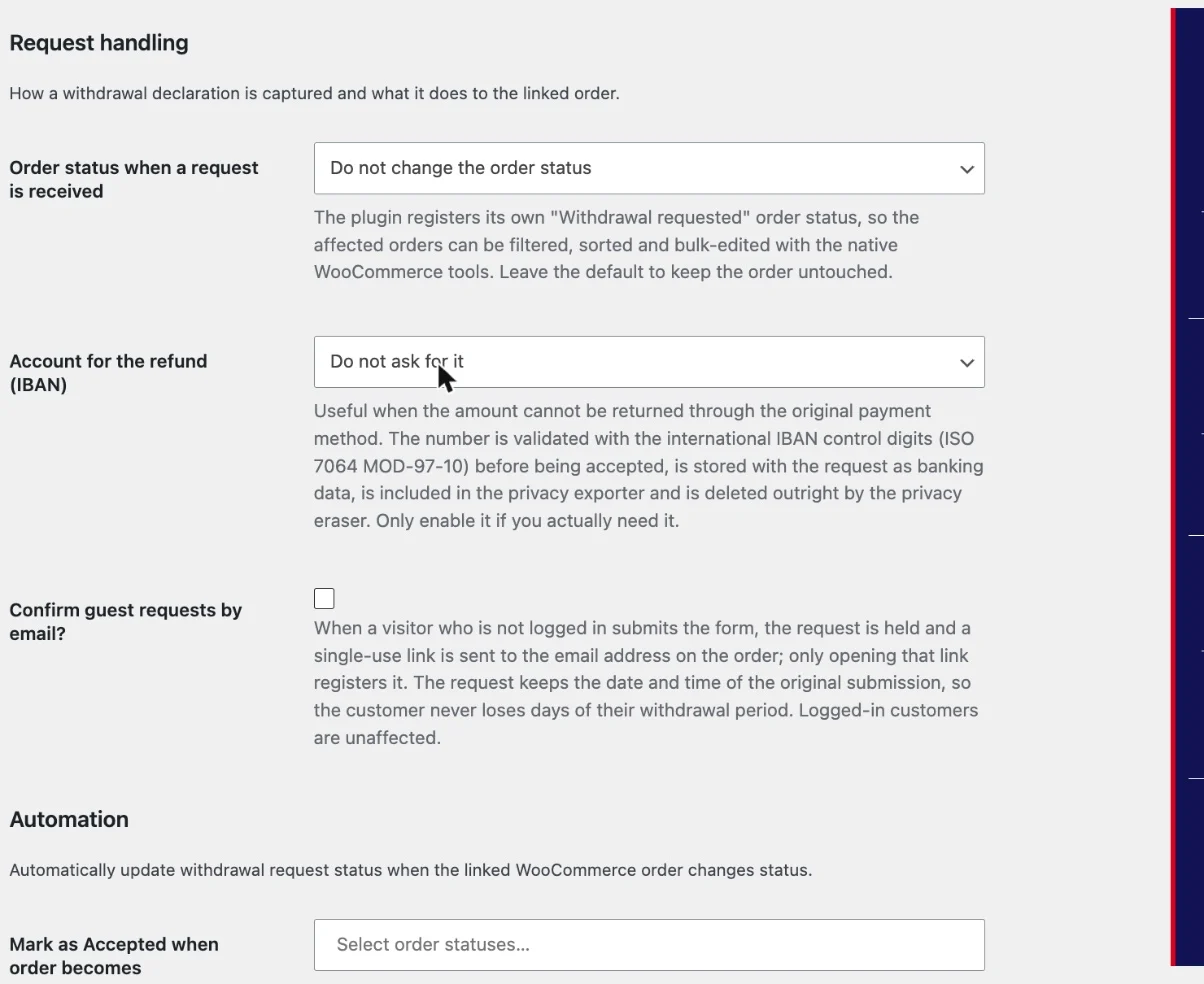
The handling settings, with the order status, the refund account and the guest confirmation. What happens the moment a declaration arrives.

  • Order status when a request is received: the plugin registers its own order status, Withdrawal requested, so that those orders are filtered, sorted and edited in bulk with WooCommerce’s usual tools, and any integration that reads order statuses —an ERP, a shipping plugin, the analytics— sees it. Leave it as it comes and the order is not touched.
  • Account for the refund (IBAN): asks the customer for an account for when the money cannot go back the way it came. The number is checked with its international check digits (ISO 7064 MOD-97-10), stored alongside the request as banking data, included in the privacy exporter and removed entirely by the eraser. Ask for it only if you really need it. As it comes, it is not asked for.
  • Confirm guest requests by email?: a visitor who has not signed in receives a single-use link at the address on the order, and the request does not count until they open that link. It keeps the date and time of the original submission, so nobody loses days of their deadline. Whoever is signed in is unaffected, because WordPress has already authenticated them.

Automation

A withdrawal has two parallel lives: the request, with its own status, and the WooCommerce order. Here the two are tied together so that you do not have to update both by hand.

There is one line for each request status —Accepted, Rejected and Completed—, and on each one you choose which order statuses move it. The usual thing is for a refunded order to leave its request as completed. It takes several statuses per line and, if you choose none, that line does nothing.

Emails to the customer

Which status changes write to the customer. As it comes, Rejected and Completed write and Accepted does not, because an accepted withdrawal is usually told with the money already returned.

The content of those emails is edited where all WooCommerce’s are, in WooCommerce -> Settings -> Emails: the plugin adds its three emails there as three more on the list, with their templates overridable from the theme.

Wording of the exclusion notices

What the customer is told when a product does not allow withdrawal. There is one field per type —Withdrawal excluded (generic), Digital content, Personalised product and Manual review required—, and that text comes out in two places: on the product page, between the price and the add to cart button, and again inside the withdrawal form.

The fields come filled in with the text the plugin brings, translated. Edit the one you want to say in your own way and empty the one you want back as it was.

Waiver for digital content

Downloadable content loses the right of withdrawal only if the customer accepted that before the download began, and the shop can prove it. That checkbox at checkout is the proof.

  • When to show the checkbox: never, only on the products classified as digital content, or on every order. The middle one is the usual choice. As it comes, it is switched off.
  • Custom checkbox text: comes filled in with the waiver’s wording. Edit it to say it in your own way, or empty the field to go back to the one the plugin brings.

Which products set it off is decided solely by the withdrawal type of the product and of its categories, never by the product being virtual or downloadable. The checkbox works just the same on the classic checkout and on the block one, and what the customer answers is stored in the order’s metadata with the exact text they saw, the timestamp in UTC, their IP, their browser and the kind of checkout screen.

What can be withdrawn from and what cannot

The withdrawal tab of the product data, with its type and its own notice. The law leaves some things outside the right of withdrawal: what is made to measure, what has been unsealed, digital content already downloaded. Each product carries its type on the Withdrawal tab of its data, and a category can set it for everything that hangs off it.

  • Withdrawal allowed (default): the normal one, and what a product inherits while neither it nor its categories say otherwise.
  • Withdrawal excluded: this product has no right of withdrawal, and the customer is told so before buying it.
  • Digital content: the right is lost when the download starts, provided the customer accepted that beforehand. It is the type that sets off the waiver at checkout.
  • Personalised product: made to the customer’s measure, so the law leaves it out.
  • Manual review required: neither yes nor no. The request comes in and you decide. For the cases the law leaves to the state the goods come back in.

Below the type there is a Custom exclusion notice (optional) for writing that particular product a notice of its own, different from the general one for its type.

When a product is left on Withdrawal allowed (default), the type is inherited from its categories, and among several the most restrictive wins: a product in one ordinary category and in another marked as personalised comes out personalised.

The form the customer sees
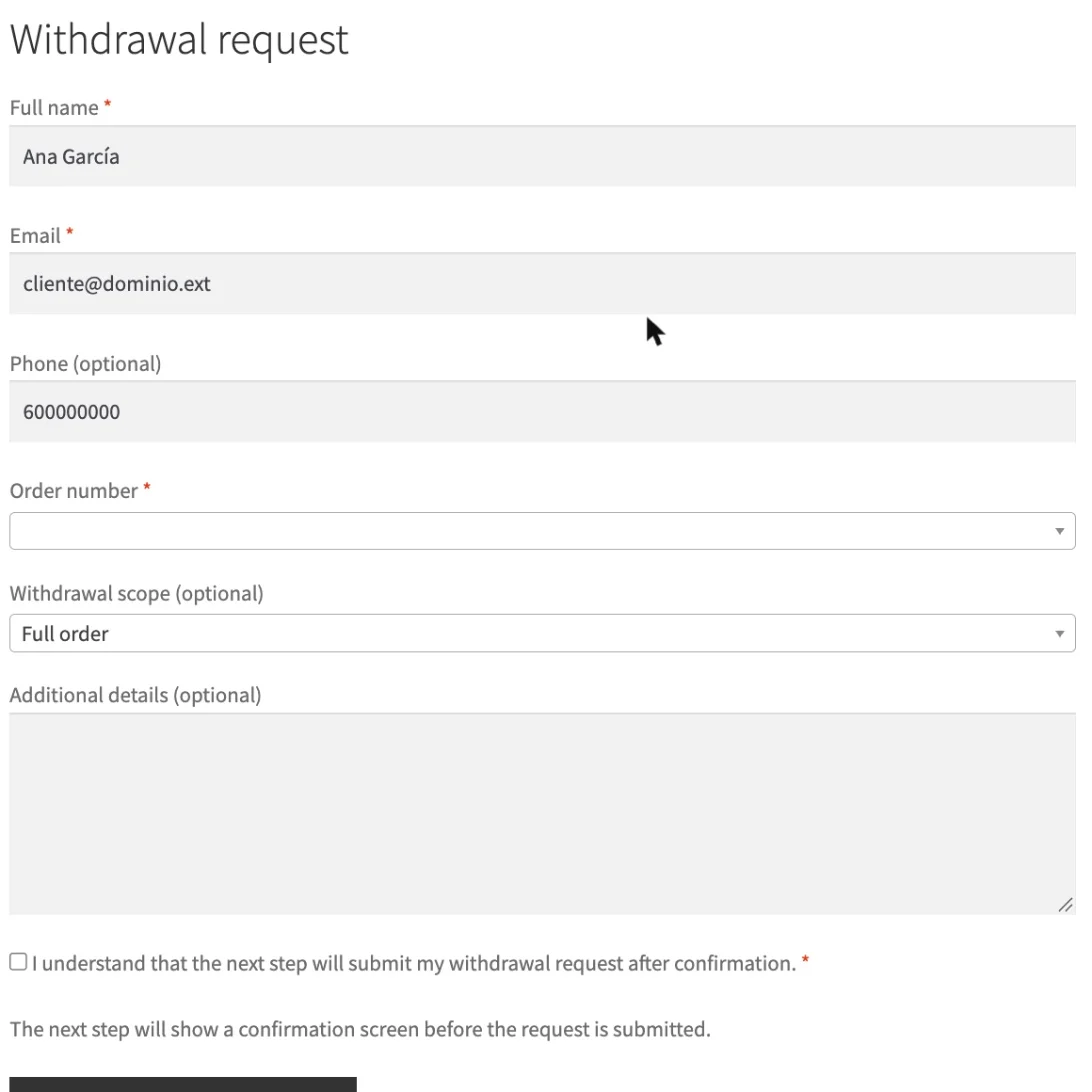
The form the customer fills in, with their details, the order and the scope of the withdrawal. The form goes in two steps, always: it is filled in, it is reviewed on a confirmation screen and only then is it sent. Nobody withdraws from an order by pressing a button by accident.

Whoever is signed in finds their details in place and chooses their order from a dropdown. Whoever comes as a guest writes the order number and the email address on that order, which is the pair the plugin validates before accepting anything —the same proof WooCommerce’s order tracking asks for—. The plugin never lists the orders of somebody who has only given an email address.

In Withdrawal scope you choose between the whole order or specific products. With the second, the list of the order’s lines appears, each with its box and its number of units, to withdraw from two of the five shirts and keep three. The quantities are trimmed to what the order really has.

If the order carries something excluded, that type’s notice comes out right there. If the deadline has passed, so does that, and the request can be sent anyway: it is marked as out of time for you to review.

The form is built to target WCAG 2.1 level AA, which is what EN 301 549 requires today, the standard the European Accessibility Act refers to, and it also meets WCAG 2.2’s target size criterion.

The Annex I(B) model

Below the form there is a link to the model withdrawal form of Annex I(B) of Directive 2011/83/EU, the one the law obliges you to make available to the customer. It opens as a printable page, with your shop’s details at the top and ruled gaps for writing by hand, and it is saved as a PDF with the browser itself. No library and no further plugin is needed.

Where to put the link to the form

The law asks for the link to be prominent and easy to find. Where to put it is for you to decide; the plugin gives you the tools:

  • The page’s fixed address, the one in Withdrawal page.
  • The [apg_withdrawal_link] shortcode, with the label, class and target attributes, for a post, a page, a footer widget or an HTML block.
  • The equivalent block, for block themes and the site editor.
  • The Withdrawal request action that appears on its own on every order that allows it, in My account -> Orders.
  • The Withdrawal tab the plugin adds to the My account menu, with the form inside it.
  • The processing order and completed order emails, where the link is injected on its own, except on the orders whose products are all excluded.

With no attributes, the shortcode writes exactly the sentence Article 11a suggests, so a bare [apg_withdrawal_link] already complies. If you give it an ambiguous label, the plugin warns you about it in the error log.

The requests
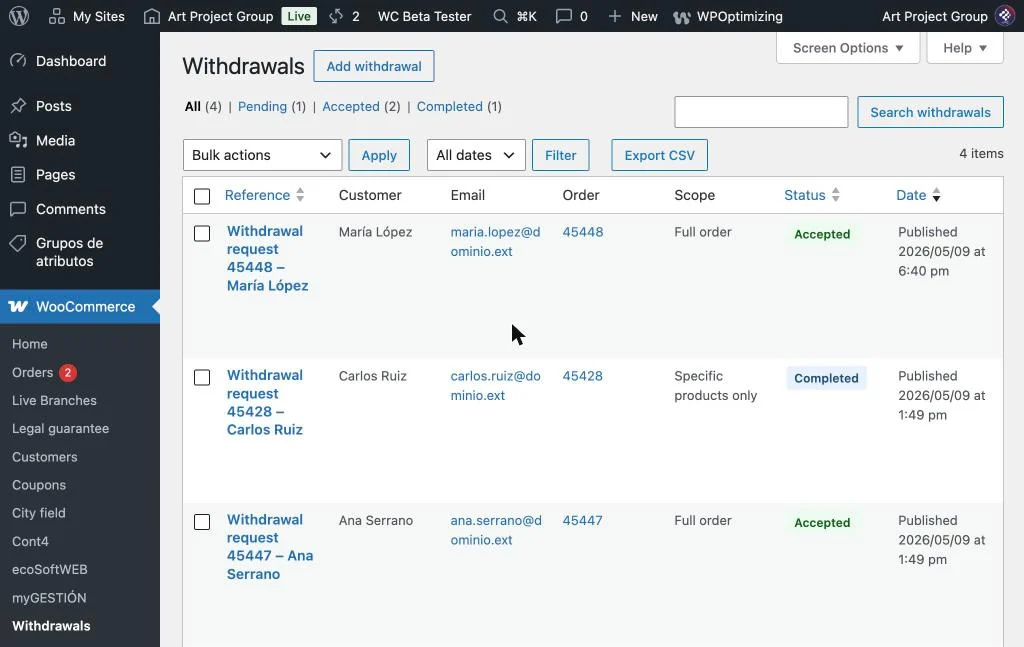
The register of requests, with the statuses, each one's order and the export button. Every declaration your customers send is stored in WooCommerce -> Withdrawals, with its order, its date, the products it covers and what the customer wrote. It is the register you can show if you are ever asked to prove how you handled a withdrawal.

Above the list are the four statuses with their counters, which act as a filter:

  • Pending: it has arrived and nobody has looked at it yet. It is the status every request is born in.
  • Accepted: the withdrawal is valid. The refund comes from here.
  • Rejected: out of time, excluded product or whatever it may be. Put the reason in writing, because the customer can ask you for it.
  • Completed: all done, refund included.

The status column sorts, and the status is changed in bulk from the list’s actions dropdown, without going into each one.

The detail of a request
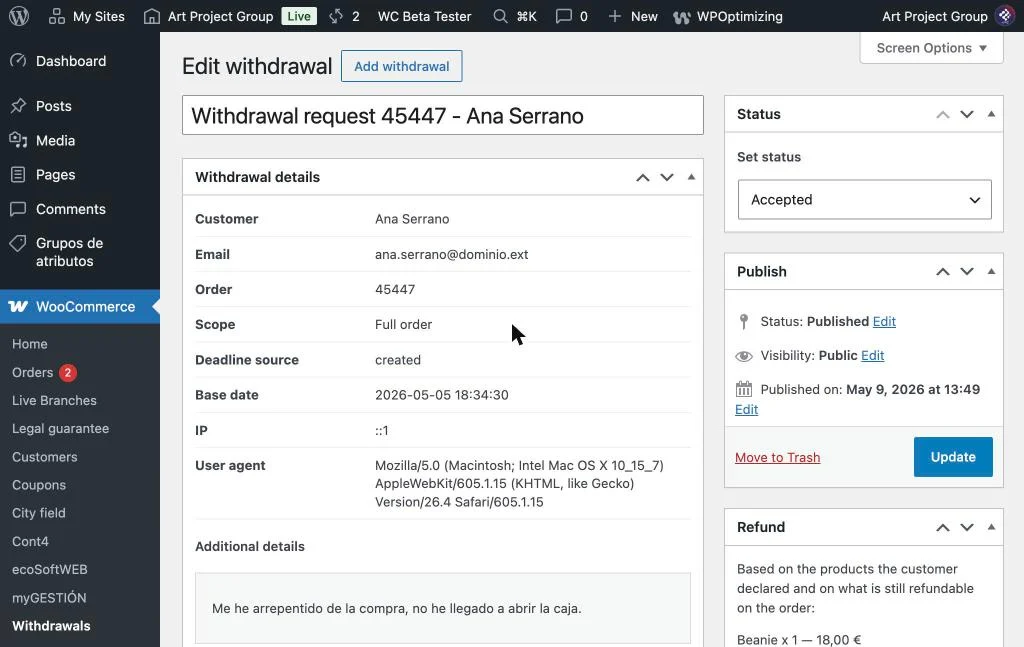
The detail of a request, with the customer, the order, the scope and the deadline's base date. Inside each request is everything that was stored: the customer, their email address, their phone number, the order, the scope, the account for the refund if you asked for it, the deadline’s base date with its source, the time the email was confirmed if you use the guest confirmation, the IP and the browser.

Below are the selected products with their quantities, the detail the customer wrote, the acknowledgement that was sent to them and the status history: each change with its date, who made it and whether the matching email went out or failed.

Each request also stores a SHA-256 fingerprint of the acknowledgement, worked out over the data the customer saw and the date declared. It is what turns the register into evidence for the burden of proof of Article 16a(8): if anybody disputes what was sent and when, the fingerprint settles it.

The refund
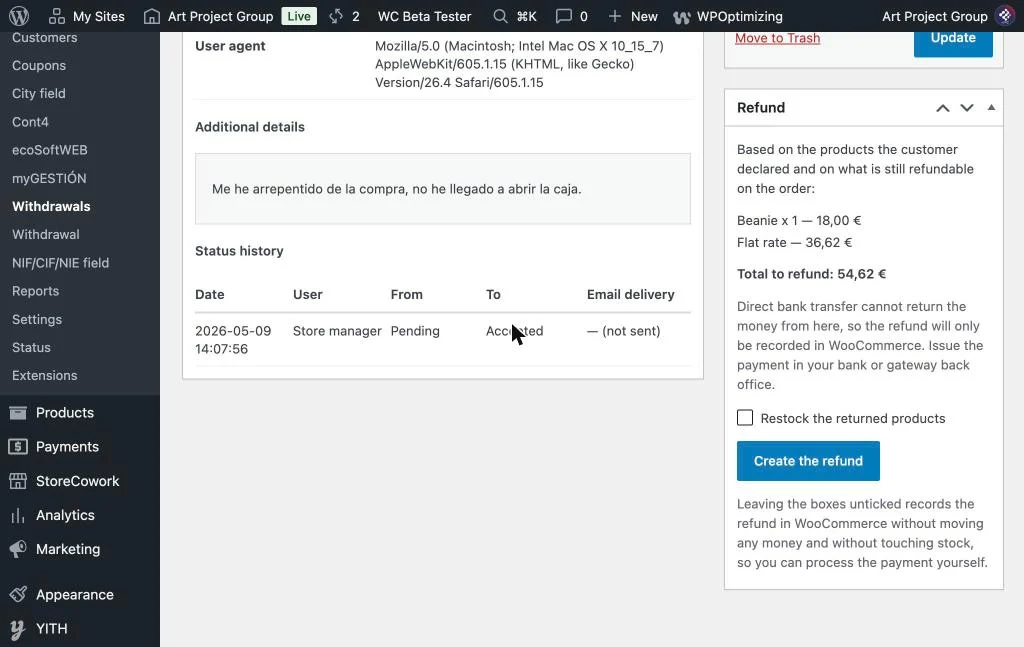
The refund panel, with the declared lines, the total and the button to create it. Each request brings a Refund panel with what the declaration implies: the declared lines with their quantities and, when the withdrawal covers the whole contract, the cost of the standard delivery too, as Article 13(1) of Directive 2011/83/EU requires. All of it limited by what is left to refund on the order, so that a refund you already made by hand is not handed over twice.

Nothing happens until you press Create the refund. As it comes, the refund is only recorded in WooCommerce, without moving money or touching the stock. Two boxes change that:

  • Send the money back through …: sends it through the payment gateway, with the gateway’s name written right there so that you know where the money is going. It only comes up when that gateway supports refunds; when it does not, the panel tells you so and lets you issue the payment from your bank.
  • Restock the returned products: puts back the stock of what comes back.

It works with Redsys and Bizum without installing anything else, because the Redsys implementations for WooCommerce handle refunds through the standard refunds API and the panel uses that same API. Redsys supports full and partial refunds, so a partial withdrawal is refunded just as it was declared. When the customer sees the money depends on their bank, usually between 2 and 31 days: the 14-day deadline obliges you to issue the refund, it does not oblige your customer’s bank to credit it.

If the gateway refuses the refund, the reason it gives —the SIS code, in Redsys’s case— comes out in the error notice, so that you have something to act on.

The CSV export

The list’s Export CSV button downloads the whole register as a spreadsheet, with everything: the customer’s details, the order, the scope, the status, the out-of-time warning, the IP, the browser, the products, the refund account, the email confirmation time and the SHA-256 fingerprint.

It exports what you are looking at: with a status filtered, only that status. The file goes out in UTF-8 with its mark at the start, and the cells that begin with a formula character come out neutralised, so opening it in Excel, Numbers or LibreOffice runs nothing.

On the orders

WooCommerce’s order list gains a Withdrawal column with the status of each order’s request, and a filter of its own at the top to keep only the orders that have one. Inside the order, a side box links to its requests.

And there is the order status of its own, Withdrawal requested, which is placed right after Processing because it is a half-way status, not an end. It is applied only if you ask for it in the settings, it is available as a bulk action and the integrations that read order statuses see it.

Privacy and personal data

The plugin hooks into WordPress’s privacy tools, the ones under Tools -> Export Personal Data and Tools -> Erase Personal Data.

The exporter takes out all the requests for an email address with their data. The eraser does not delete them: it anonymises them. The personal data is replaced, and the request keeps its date, its status and its order, because that register is the evidence Article 16a(8) of the directive requires of you and deleting it would leave you without it. The order’s reference is kept for the same reason: it is a detail of the contract, not a personal identifier.

The plugin does not delete old requests on its own. As a general rule it is worth keeping them for at least 5 years, which is the usual limitation period for consumer claims across much of Europe, but check the one that applies in your country before throwing anything away.

The help inside the plugin
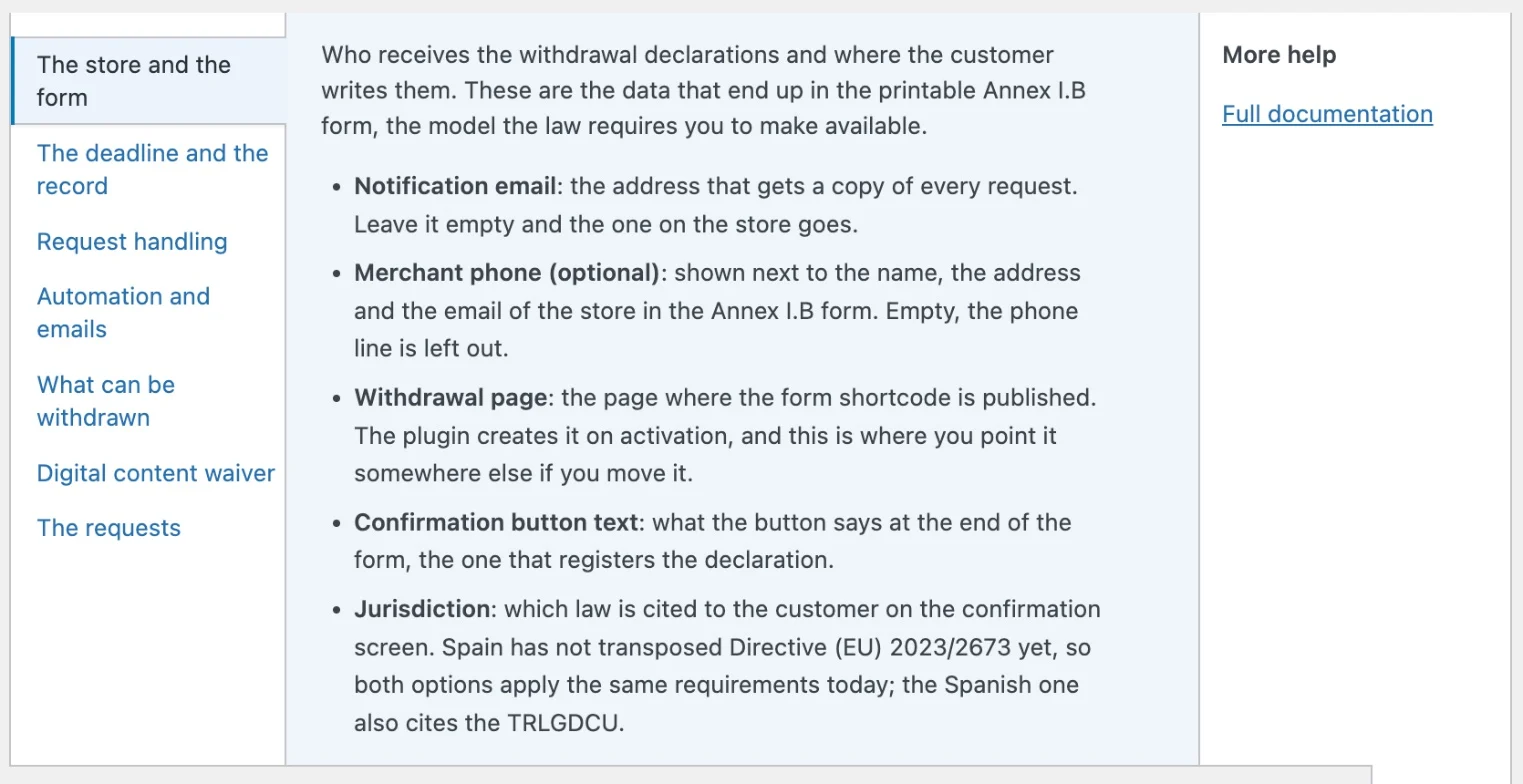
The settings screen's Help tab, with one panel per block. The settings screen and the requests list carry their own Help tab, at the top right, WordPress’s native one. In the settings there is one panel per block of the screen, and in the list one that explains the four statuses.

It is the short version of this page, without leaving the dashboard and in whatever language yours is set to. The side of that tab links here.

Frequently asked questions

If you sell to consumers in the European Union, yes. Article 11a of Directive 2011/83/EU, added by Directive (EU) 2023/2673, has applied since 19 June 2026 regardless of whether each country has transposed it. Spain had not done so at the date of this version —the European Commission opened a reasoned opinion against it in June 2026—, but the obligation applies by direct effect and failing to meet it is penalised under the general regime of the TRLGDCU, the Spanish consumer act, with fines reaching €100,000 for minor infringements, €1,000,000 for serious ones and €4,000,000 or 4% of turnover in Spain for very serious ones. Check the regime in your own country: this is informative and it is not legal advice.
You can, but you should not. With both running your customers reach two different forms at two different addresses, each with its own register and its own acknowledgement, and neither knows about the other: the same declaration can end up registered twice and answered twice. The plugin detects it and warns you with a link to the screen where it is switched off.

The core feature covers the basics: a form, a review step, the acknowledgement emails, the matching with the order and a note on it. This plugin adds what a shop needs around that: the withdrawal type per product and per category with inheritance and the notice on the product page, the digital content waiver at checkout with its record, the printable Annex I(B) model, the SHA-256 fingerprint of the acknowledgement, the refund panel, the GDPR exporter and anonymisation, and the REST API. Choose one of the two and switch the other off.

Yes. Whoever is signed in finds their details in place and chooses their order from a dropdown. Whoever comes as a guest writes the order number and the email address on that order, which is the pair the plugin validates before accepting anything, the same proof WooCommerce’s order tracking asks for. The plugin never lists the orders of somebody who has only given an email address.
By switching Confirm guest requests by email? on. From then on, the request of a visitor with no session is held while a single-use link is sent to the address registered on the order, and the declaration is only recorded when they open it. It keeps the date and time of the original submission, so the customer loses no days of their deadline. Whoever is signed in is unaffected.
Yes, and down to the unit. In Withdrawal scope choose Specific products only, tick the lines they are withdrawing from and lower the number of units of each one if they are keeping some. The quantities are trimmed to what the order really has, and the refund panel works the amount out over what was declared.
On the Withdrawal tab of the product data, by choosing its type. It can also be set on the category, and then every product that hangs off it inherits it while they do not say otherwise; among several categories the most restrictive wins. Mind this: a product being virtual or downloadable does not exclude it from anything, that is decided solely by the type you give it.
Yes. Each request shows a Refund panel with what the declaration implies —the declared lines with their quantities, plus the standard delivery when the withdrawal covers the whole contract—, limited by what is left to refund on the order, so that a refund you already made by hand is not handed over twice. Nothing happens until you press the button, and as it comes the refund is only recorded in WooCommerce, without moving money or touching the stock: two boxes let you send it through the gateway and put the stock back.
Yes, and nothing else has to be installed. Bizum runs on Redsys in e-commerce, and the Redsys implementations for WooCommerce handle refunds through the standard refunds API, which is the one the panel uses. Redsys supports full and partial refunds, so a partial withdrawal is refunded just as it was declared. When the customer sees the money depends on their bank, usually between 2 and 31 days: the 14-day deadline obliges you to issue the refund, it does not oblige your customer’s bank to credit it. And if you use a Redsys gateway that does not implement refunds, the panel tells you so and records the refund for you to issue from your bank’s back office.
The law asks for it to be prominent and easy to find; where to put it is for you to decide. The usual places are the footer, so that it can be reached from anywhere, the My account menu and the terms and conditions pages. The plugin already places the action on each order in My account -> Orders, the My account tab and the link in the processing and completed order emails on its own; for the rest you have the [apg_withdrawal_link] shortcode and its block.
It comes in all the same. Once the window has passed, the order stops showing the button, but the form still accepts the declaration with a warning to the customer that it may be out of time, and the request is marked as such in its detail and in the export. Deciding whether it stands or not is yours, not the form’s: there are cases where the deadline runs longer, and a form that shuts the door leaves you none the wiser.
The plugin deletes none of them on its own. As a general rule it is worth keeping them for at least 5 years, which is the usual limitation period for consumer and contractual claims across much of Europe. Check the period that applies in your own country before throwing old records away.
Whatever you say. The Delete all data on uninstall? setting decides whether uninstalling takes the requests, their data and the settings away, or whether they stay where they are. Before deleting anything, remember the CSV export and the retention period.
Yes, completely. It works just the same with the classic order store and with high-performance order storage, and the order status of its own is registered in both.
It is a free plugin and it does not come with free technical support. If you need help, APG has a paid technical support service for installing and setting it up. For questions about this page, the comments below are open.

For developers

The plugin has a REST API under the apg-withdrawal/v1 namespace, for headless shops and back-office integrations:

  • GET /requests lists the requests, with status, order_id, page and per_page.
  • GET /requests/<id> returns one.
  • PUT /requests/<id> changes its status.
  • POST /requests registers a declaration.

The first three ask for the manage_woocommerce capability. The fourth is public, just like the form, and goes through the same processor: the order has to match the email address, the attempt limiter is applied and, if you have it switched on, the guest confirmation comes in.

And it leaves these hooks:

  • apg_withdrawal_request_registered: fires with each registered request, with its ID and its data.
  • apg_withdrawal_refund_plan: changes the refund’s figures before showing them, for example to deduct the depreciation of what comes back.
  • apg_withdrawal_gateway_info: changes what the panel believes about the payment gateway.
  • apg_withdrawal_excluding_types: which types count as excluded when deciding whether a whole order is.
  • apg_withdrawal_show_order_link: decides whether the link to the form goes into that order’s email.
  • apg_withdrawal_jurisdiction and apg_withdrawal_jurisdiction_supports: work the jurisdiction out yourself, for example according to the customer’s country in a multi-country shop.
  • apg_withdrawal_guest_verification_required and apg_withdrawal_verification_ttl: when confirming by email is needed and how long the link is good for, which as it comes is one day.
  • apg_withdrawal_rate_limit_max and apg_withdrawal_rate_limit_window: the attempt limiter, which as it comes is five every ten minutes.
  • apg_withdrawal_client_ip and apg_withdrawal_trusted_proxy_headers: where the customer’s IP is taken from behind a proxy.
  • apg_withdrawal_account_title: the title of the My account tab. Return an empty string and none is drawn.
  • apg_withdrawal_rest_request: the data the REST API returns for a request.

The requests are a content type of their own, apg_withdrawal, with the capabilities of WooCommerce’s orders and not the generic ones of posts: whoever does not administer the shop does not see them. A product’s exclusion notice has a shortcode of its own, [apg_withdrawal_notice], and its block, for the themes that rebuild the product page on their own.

The plugin is ready for WPML and Polylang, with its wpml-config.xml and the registration of the settings’ strings at run time, so the texts you write yourself are translated too.

Version history

0.8.0

  • Ayuda contextual en la pantalla de ajustes y en el listado de solicitudes, que explica cada opción sin salir de ellas.

0.7.4

  • Una solicitud de desistimiento ya registrada deja de registrarse por segunda vez cuando el cliente envía el formulario más de una vez.
  • Un pedido del que ya se ha desistido por completo deja de admitir nuevas solicitudes, ni del pedido entero otra vez ni de parte de sus productos.
  • El campo antispam ya no desplaza la página a lo ancho en sitios que se leen de derecha a izquierda (árabe, hebreo, persa).
  • Los pedidos cuyos productos están todos excluidos del derecho de desistimiento dejan de llevar el enlace de desistimiento en sus correos, con un nuevo filtro `apg_withdrawal_show_order_link` para forzarlo.
  • Compatibilidad con WooCommerce 11.2.1 verificada.

0.7.3

  • La pestaña "Desistimiento" de Mi cuenta abre ahora con su propio título, como el resto de las secciones de la cuenta, en lugar de empezar directamente con un aviso. Nuevo filtro `apg_withdrawal_account_title` para cambiarlo o quitarlo.
  • El formulario carga ya su hoja de estilos cuando se inserta con el shortcode en un widget o en una plantilla de bloques, donde antes pedía un handle que solo existe en la administración y se quedaba sin estilos.
  • Compatibilidad con WooCommerce 11.1.2 verificada.

0.7.2

  • El formulario público ya no deja a la vista pedidos ajenos: una dirección de correo en la URL de la página listaba el historial de compras de esa persona, y un número de pedido por sí solo mostraba su contenido y su importe.
  • Las solicitudes pasan a los permisos de pedidos de WooCommerce, así que el perfil Editor ya no puede leer ni modificar los datos del consumidor que contienen.
  • El límite de intentos ya no se esquiva falseando una cabecera de proxy, y la pantalla de revisión pasa a tener su propio techo.
  • La pantalla de revisión vuelve a funcionar sin JavaScript: se imprimía con un filtro que elimina los formularios y dejaba al cliente sin nada que enviar.
  • La Edición rápida de una categoría de producto ya no restablece su tipo de desistimiento a "permitido".
  • Los avisos de resultado de las acciones en lote y del reembolso los firma la redirección que los emite y se comprueban antes de mostrarse.
  • Rehecho el escapado de salida y la verificación de nonces: el plugin ya no lleva ninguna excepción de seguridad marcada sobre su salida.
  • Aviso cuando la función de desistimiento propia de WooCommerce 11.1 está activada a la vez, con enlace a la pantalla donde se desactiva, y nueva entrada del FAQ sobre qué cubre cada una.
  • Compatibilidad con WooCommerce 11.1 verificada.

0.7.1

  • Traducción al español revisada frente a la redacción aprobada en translate.wordpress.org: 27 cadenas corregidas de terminología y ortografía —"artículo" en minúscula, como pide el español; "al finalizar la compra" en lugar del anglicismo "checkout"; "servicio de envío" en lugar de "mailer"; "solo" sin la tilde que suprimió la RAE—. Como desde la 0.6.1 la traducción empaquetada tiene preferencia sobre el paquete de idioma centralizado, estas correcciones solo llegan a la tienda mediante una actualización del plugin, que es para lo que sirve esta versión. El modelo de formulario de desistimiento del Anexo I.B se ha dejado deliberadamente sin tocar, a la espera de contrastar su redacción con el Anexo B del TRLGDCU. Sin cambios en el código.

0.7.0

  • Desistimiento parcial hasta la unidad. El alcance "Solo productos concretos" deja de comportarse como un selector de todo o nada por línea: el formulario muestra ahora una fila por línea del pedido con una casilla y un campo de cantidad limitado a las unidades originalmente compradas, de modo que quien compró tres unidades y devuelve una declara exactamente eso. Las unidades se guardan en `_apg_withdrawal_quantities`, viajan por la pantalla de confirmación y se muestran en el correo de acuse de recibo, en la ficha de la solicitud y en la exportación CSV como "Producto x 1 de 3". Además se incorporan al hash SHA-256 del acuse como pares `línea:unidades`, para que el resumen criptográfico cubra las cantidades y no solo qué líneas se seleccionaron. Las solicitudes registradas antes de esta versión siguen funcionando y se leen como "todas las unidades de las líneas seleccionadas", que es lo que significaban.
  • Flujo de estados en el listado de solicitudes. Las vistas por estado de publicación ("Todo | Publicado"), que no significaban nada para este tipo de contenido, se sustituyen por un enlace por cada estado de desistimiento con su contador, resuelto en una única consulta agrupada. La columna de estado pasa a ser ordenable, una acción en lote por estado permite tramitar varias solicitudes a la vez —pasando por `apg_withdrawal_change_status()`, así que cada una sigue generando su entrada en el historial y, si está activado, su aviso al cliente— y el botón *Exportar CSV* exporta ahora el estado que se está viendo en pantalla en lugar de todo el registro.
  • Estado de pedido propio de WooCommerce `wc-apg-withdrawal` ("Desistimiento solicitado"), registrado tanto para el almacenamiento clásico como para HPOS, disponible en el desplegable del editor de pedidos, en las vistas del listado de pedidos, como acción en lote y dentro de la propia automatización del plugin. Un ajuste nuevo, *Estado del pedido al recibir una solicitud*, mueve opcionalmente el pedido asociado a cualquier estado —el nuevo o uno existente— en cuanto se registra una declaración. Viene desactivado, así que actualizar no cambia nada hasta que lo actives.
  • Cuenta para el reembolso (IBAN) opcional en el formulario público, configurable como oculta (por defecto), opcional u obligatoria. El número se normaliza y se comprueba contra la estructura ISO 13616 y los dígitos de control ISO 7064 MOD-97-10 antes de aceptarse, y aparece en la pantalla de confirmación, en el correo de acuse de recibo, en la ficha de la solicitud y en la exportación CSV. El exportador de privacidad lo incluye y el borrador, a diferencia del resto de campos personales, lo elimina en lugar de redactarlo: un marcador dentro de un campo de IBAN se leería como un número de cuenta mal formado, y la cuenta no tiene valor probatorio de la declaración en sí.
  • Doble confirmación opcional para las declaraciones de invitados. El formulario público ya rechaza cualquier pedido cuya dirección de facturación no coincida con la que teclea el visitante, pero en una compra como invitado ese par puede ser conocido por alguien distinto del consumidor. Con *¿Confirmar por correo electrónico las solicitudes de invitados?* activado, el envío de un visitante sin sesión iniciada se retiene en el servidor y se manda un enlace de un solo uso a la dirección del pedido; la declaración solo se registra al abrirlo. Y lo esencial: el momento que cuenta jurídicamente es aquel en el que el consumidor envió el formulario, así que la marca de tiempo original viaja dentro del contenido retenido y se convierte en la fecha de la solicitud y en la marca temporal que cubre el hash del acuse — el cliente no pierde días de su plazo por culpa de su bandeja de entrada. Los tokens se guardan como resúmenes SHA-256, son de un solo uso y caducan a las 24 horas (filtrable mediante `apg_withdrawal_verification_ttl`).
  • Capa de jurisdicción. Un ajuste nuevo, *Jurisdicción* (base `EU` / `ES`), determina la referencia normativa que se muestra en la pantalla de confirmación y en el correo de acuse de recibo. España todavía no ha transpuesto la Directiva (UE) 2023/2673, así que ambas opciones aplican hoy los mismos requisitos y la española cita además el TRLGDCU; el sentido de la capa es que toda ramificación por jurisdicción pase por `apg_withdrawal_jurisdiction_supports()`, para poder activar los añadidos nacionales en un único punto cuando lleguen al BOE en vez de repartirlos por el código. Tanto la jurisdicción como la matriz de requisitos son filtrables.
  • API REST bajo el espacio de nombres `apg-withdrawal/v1`. `GET /requests` (paginada y filtrable por estado y pedido), `GET /requests/<id>` y `PUT /requests/<id>` requieren `manage_woocommerce`; `POST /requests` es pública para que una tienda desacoplada pueda registrar una declaración, y pasa exactamente por el mismo procesador que el formulario público — correspondencia pedido/correo electrónico, limitador de intentos y, si está activada, verificación por correo electrónico de invitados —, de modo que un envío retenido responde `202` con `pending_verification`. La cuenta para el reembolso solo se devuelve a quien puede gestionar WooCommerce. Se añade la acción `apg_withdrawal_request_registered`, que se dispara cuando una declaración queda completamente registrada.
  • Reembolso al cliente directamente desde la solicitud de desistimiento. Cada solicitud incorpora un panel *Reembolso* que calcula lo que implica la declaración —las líneas declaradas con sus cantidades, más el coste del envío estándar cuando el desistimiento abarca todo el contrato, como exige el artículo 13.1 de la Directiva 2011/83/UE— y limita cada cifra por lo que quede por reembolsar en el pedido, de modo que un reembolso hecho a mano antes no se puede duplicar. Nunca se reembolsa nada automáticamente: lo lanza el comerciante, y por defecto el reembolso solo se registra en WooCommerce sin mover dinero ni tocar el stock, con casillas opcionales para enviarlo por la pasarela de pago (que solo se ofrecen si la pasarela admite reembolsos) y para reponer el stock. Crearlo exige la misma capacidad que pide WooCommerce para reembolsar un pedido, deja nota en el pedido y es filtrable mediante `apg_withdrawal_refund_plan`.
  • Redsys y Bizum llegan al panel de reembolso sin integración adicional, porque esas pasarelas implementan la API estándar de reembolsos de WooCommerce y el panel se apoya en esa API. El panel indica ahora con nombre la pasarela que va a usar, en lugar de hablar de una "pasarela de pago" anónima; detalla para Redsys y Bizum que se admiten devoluciones parciales y que el banco del cliente tarda entre 2 y 31 días en abonar el dinero —el plazo del artículo 13.1 obliga al comerciante a emitir el reembolso, no al banco a abonarlo—; y, cuando la pasarela activa no puede devolver por programa (la edición Light gratuita de Redsys, por ejemplo), lo advierte y registra el reembolso sin mover dinero. La detección de pasarela es filtrable mediante `apg_withdrawal_gateway_info`.
  • Un reembolso que la pasarela rechaza muestra ahora el motivo que ha dado la pasarela —el código SIS, en el caso de Redsys— en lugar de un aviso de error genérico.
  • Corregido: el modelo imprimible del Anexo I.B no dejaba sitio para escribir. La altura mínima estaba en el contenedor del campo, que ya llenaba el propio rótulo, así que cada raya acababa pegada a su etiqueta. Ahora el espacio de escritura pertenece a las propias rayas y cada campo recibe tantas como necesita su respuesta: tres para la descripción del bien y para el domicilio del consumidor, dos para la firma y una para las fechas y el nombre.
  • Corregido: la página del Anexo I.B ya no abre por su cuenta el diálogo de impresión. Imprimir automáticamente al cargar era a la vez un cambio de contexto no solicitado y el origen de un fallo de Safari por el que, tras cancelar una impresión, el navegador seguía imprimiendo hojas en blanco. Ahora la impresión parte siempre del botón, después de que se hayan asentado las tipografías web y un repintado. Un repintado en `afterprint` —y al dejar de cumplirse la consulta de medios de impresión, porque Safari es inconsistente sobre cuál de las dos emite al cerrar el diálogo— corrige también que la ventana se quedase en blanco al cerrarlo. El enlace del formulario público pasa a llamarse "Abrir el modelo de formulario" y anuncia que se abre en una pestaña nueva.
  • Retoques de impresión del Anexo I.B: caja de página A4 con márgenes de 16 mm y rótulos que no se separan de sus rayas al saltar de hoja.
  • Revisión de accesibilidad del formulario público, con WCAG 2.1 AA como objetivo. El selector de líneas es ahora un `fieldset` etiquetado de casillas y campos numéricos nativos en lugar de un desplegable múltiple, así que se maneja con el teclado y lo anuncian los lectores de pantalla; los avisos dinámicos pasan a ser regiones activas (`role="alert"` para el error de pedido, `role="status"` para el aviso de producto); y el foco se desplaza al contenido recién insertado tras cada paso AJAX, que hasta ahora lo dejaba sobre un botón que ya no existía (3.2.2 y 4.1.3). Las filas de líneas se espacian además de forma que cumplen ya el criterio de tamaño de objetivo de WCAG 2.2 (2.5.8), que no forma parte de WCAG 2.1 AA pero llega con la versión 4.1.1 de la EN 301 549, la norma a la que remite el Acta Europea de Accesibilidad y que obliga al comercio electrónico desde el 28 de junio de 2025.
  • Se incluye `wpml-config.xml` en el plugin, de modo que WPML y Polylang detectan las seis cadenas configurables por el comerciante y los metadatos de tipo de desistimiento sin necesidad de que se ejecute código. El registro en tiempo de ejecución mediante `wpml_register_single_string` añadido en 0.6.0 se mantiene para las instalaciones que leen las cadenas por esa vía.
  • Compatibilidad declarada con WooCommerce 11.0.
  • Nuevas preguntas frecuentes sobre el régimen sancionador por no ofrecer la función de desistimiento, la cuenta para el reembolso, la doble confirmación de invitados y la API REST.

0.6.1

  • La traducción empaquetada con el plugin pasa a tener prioridad sobre el paquete de idioma centralizado: cuando el plugin viaja con un `.mo` (o `.l10n.php`) para el locale actual bajo `/languages`, el filtro `lang_dir_for_domain` devuelve esa carpeta sin condiciones, en lugar de hacerlo solo cuando WordPress no encuentre nada en `wp-content/languages/plugins/`. Resultado: el locale empaquetado por el plugin (actualmente `es_ES`) siempre se renderiza con las cadenas incluidas en la versión publicada, así que los textos nuevos y los retoques del changelog llegan a los usuarios el mismo día que se publica el plugin, sin esperar a que translate.wordpress.org regenere su paquete de idioma. Los locales para los que el plugin no empaqueta traducción se siguen cargando desde el paquete centralizado del sistema, igual que antes.

0.6.0

  • Corregido: la traducción al español empaquetada con el plugin (y cualquier futuro idioma que viaje bajo `/languages`) no se cargaba en los sitios para los que translate.wordpress.org aún no había generado un paquete de idioma. El cargador just-in-time de WordPress solo inspecciona `wp-content/languages/plugins/`, así que el `.mo` incluido dentro del plugin se ignoraba. Ahora el plugin se engancha al filtro `lang_dir_for_domain` introducido en WordPress 6.6 para devolver la carpeta `/languages` empaquetada cuando no haya paquete de idioma disponible, sin recurrir a la llamada `load_plugin_textdomain()` desaconsejada por WP.org. En WordPress 6.5 y anteriores la traducción empaquetada seguirá sin cargarse hasta que se publique un paquete de idioma, pero el plugin sigue funcionando en el idioma de origen.
  • Integración con el log de emails transaccionales de WooCommerce 10.9: las tres clases `WC_Email` del plugin (acuse al cliente, notificación al administrador, cambio de estado) las recoge automáticamente el nuevo `EmailLogger` integrado. Cada entrada del log se enriquece mediante `woocommerce_email_log_context` con el ID de la solicitud de desistimiento, el alcance y el hash SHA-256 del acuse junto con su timestamp UTC, de forma que la entrada del log se puede contrastar con el email realmente entregado al cliente. El filtro se ignora silenciosamente en versiones anteriores de WooCommerce.
  • Red de seguridad para el etiquetado del Artículo 11 bis: un nuevo helper (`apg_withdrawal_label_is_ambiguous()`) detecta etiquetas de desistimiento que no cumplen el requisito de redacción inequívoca del Artículo 11 bis de la Directiva 2011/83/UE. Se utiliza en dos sitios: (a) el texto configurable del botón de confirmación (`Ajustes → Texto del botón`) muestra ahora un aviso en el admin si el comerciante guarda un texto ambiguo (por ejemplo "Contáctanos", "Gestionar pedido" o "Volver"); la elección no se bloquea, solo se señala; (b) el shortcode `[apg_withdrawal_link]` y el bloque `apg-withdrawal/link` lanzan `_doing_it_wrong()` (visible con `WP_DEBUG`) cuando se usa un atributo `label` ambiguo. Las listas de términos "válidos" y "vetados" se pueden personalizar vía los filtros `apg_withdrawal_label_unambiguous_terms` y `apg_withdrawal_label_ambiguous_terms`.
  • Rediseño del enlace al Anexo I.B en el formulario público: se sustituye el enlace largo inline por una frase descriptiva corta ("Si lo prefieres, puedes utilizar el modelo oficial (Anexo I.B).") y un botón "Imprimir" estilado con las clases nativas de botón de WooCommerce. El botón añade `?print=1` a la URL del Anexo I.B para que el diálogo de impresión del navegador se abra automáticamente al cargar la página (el botón "Imprimir o guardar como PDF" ya existente en la propia página sigue funcionando para quien llegue a la URL directamente).
  • Mejora del bloque del destinatario en el Anexo I.B: el estado y el país del comerciante se muestran ahora con sus nombres legibles (vía `WC()->countries->get_countries()` y `get_states()`) en lugar del código ISO `XX:YY` que almacena `woocommerce_default_country`, cada uno en su propio párrafo. Todos los párrafos del bloque terminan en punto, como corresponde a una comunicación formal.
  • Integración con WPML / Polylang para los textos configurables por el comerciante: el texto del botón de confirmación, la etiqueta personalizada de la renuncia al desistimiento de contenido digital y los cuatro avisos de exclusión por tipo se registran ahora con String Translation de WPML (Polylang incluye una capa de compatibilidad para la misma acción `wpml_register_single_string`) en el hook `init`. Cuando ninguno de los dos plugins está activo, el registro es un no-op y se renderiza el valor original sin cambios.
  • Rate limiting + honeypot en el formulario público: nuevo helper `apg_withdrawal_is_rate_limited()` que limita los envíos repetidos por par IP + email (política por defecto: 5 intentos cada 10 minutos, ambos valores filtrables vía `apg_withdrawal_rate_limit_max` y `apg_withdrawal_rate_limit_window`). Se renderiza un campo honeypot oculto en los dos pasos del formulario que descarta silenciosamente los envíos automatizados antes de persistir nada. La detección de la IP del cliente respeta las cabeceras comunes de proxies inversos y es filtrable mediante `apg_withdrawal_client_ip`.
  • Verificada la visibilidad continua del Artículo 11 bis durante los 14 días: la acción "Desistir del contrato aquí" en Mi cuenta → Pedidos se muestra para todo pedido cuyo plazo de desistimiento siga abierto, con independencia del estado de WooCommerce, cayendo automáticamente de `completed_date` a `created_date` para pedidos aún sin marcar como completados. No requiere cambio de código.

0.5.0

  • Cumplimiento de la Directiva (UE) 2023/2673 (que modifica la Directiva 2011/83/UE sobre derechos de los consumidores). El plugin pasa a cubrir las obligaciones adicionales introducidas por el nuevo Artículo 11 bis (función de desistimiento online) y los requisitos relacionados de información precontractual y carga de la prueba.
  • Nuevo meta a nivel de término *Tipo de desistimiento* en `product_cat`, con herencia automática en los productos que mantienen el valor "Desistimiento permitido (por defecto)". Cuando un producto pertenece a varias categorías con tipos en conflicto, gana el tipo más restrictivo (orden de prioridad: `excluded` > `personalized` > `digital` > `manual` > `allowed`).
  • Nuevo shortcode `[apg_withdrawal_notice]`, bloque Gutenberg `apg-withdrawal/notice` y enganche automático a `woocommerce_single_product_summary` con prioridad 20 (entre el precio y el botón Añadir al carrito) que muestran el aviso de exclusión en la ficha del producto cuando el tipo de desistimiento efectivo es distinto de `allowed`.
  • Nueva sección de ajustes "Textos de aviso de exclusión" con una textarea editable por tipo no permitido (`excluded`, `digital`, `personalized`, `manual`) y un texto por defecto traducido para cada uno. Campo opcional por producto en la pestaña *Desistimiento* del producto para sobrescribir el aviso solo en ese producto.
  • Sección "Renuncia al desistimiento de contenido digital" simplificada a un único selector excluyente con tres modos — `Nunca (desactivado)`, `En productos clasificados como contenido digital`, `En todos los pedidos` — gobernado exclusivamente por el tipo de desistimiento por producto/categoría. Las instalaciones con el modo `virtual` se migran a `digital`; las que estaban en `specific` se migran a `digital` y las categorías/productos previamente seleccionados se marcan automáticamente con `_apg_withdrawal_type = digital` para conservar el comportamiento. Los ajustes antiguos `digital_waiver_categories` / `digital_waiver_products` dejan de mostrarse (la migración única corre en `init`, marcada por la opción `apg_withdrawal_migrated_to_0_5`).
  • Modelo de formulario de desistimiento del Anexo I.B imprimible servido en `?apg_withdrawal_model_form=1` con `@media print`, rellenado automáticamente con el nombre, dirección y correo electrónico de la tienda (de los ajustes de WooCommerce) y un teléfono del comerciante opcional (nuevo ajuste `Teléfono del comerciante (opcional)`). El formulario público de solicitud enlaza al modelo como "Descargar el modelo oficial de formulario de desistimiento (Anexo I.B)".
  • Nuevo shortcode `[apg_withdrawal_link]` y bloque Gutenberg `apg-withdrawal/link` que renderizan un enlace al formulario público de desistimiento con atributos opcionales `label`, `class` y `target`. La etiqueta por defecto usa el texto literal sugerido por el Artículo 11 bis(1) ("Desistir del contrato aquí"). La acción por pedido de Mi cuenta pasa a usar ese mismo texto por defecto en instalaciones nuevas.
  • El correo de acuse al cliente incluye ahora un hash SHA-256 verificable del contenido del acuse (calculado sobre nombre + email + pedido + alcance + productos + detalles + timestamp UTC) y el timestamp UTC utilizado para verificarlo. El hash y el timestamp también se persisten en post meta (`_apg_withdrawal_receipt_hash`, `_apg_withdrawal_receipt_hash_timestamp`) y se exponen en la exportación CSV.
  • El consentimiento de la casilla de renuncia digital en el checkout se persiste ahora como log estructurado (`_apg_withdrawal_digital_waiver_log` en el meta del pedido) que incluye el texto exacto mostrado al cliente, timestamp UTC, IP, user agent y tipo de checkout (`classic` o `block`). El meta booleano legado `_apg_withdrawal_digital_waiver` se sigue escribiendo por retrocompatibilidad.
  • Indicador de entrega de email: cada correo de cambio de estado y el acuse inicial al cliente registran ahora si se invocó `wp_mail()`, si la llamada devolvió éxito (= "aceptado por el mailer", no entrega real al destinatario), el timestamp UTC y cualquier error capturado vía `wp_mail_failed`. La información se muestra en la pantalla de detalle de la solicitud y se exporta como dos columnas adicionales del CSV.
  • Integración RGPD: el plugin registra ahora un exportador y un borrador de datos personales con las herramientas nativas de privacidad de WordPress. El borrador **anonimiza** las solicitudes de desistimiento (sustituye nombre, correo electrónico, teléfono, IP, user agent y el texto libre del cliente por `[redactado]`) y conserva la solicitud y su referencia `_apg_withdrawal_wc_order_id` como evidencia legal, conforme a la carga de la prueba del Artículo 16 bis(8). La misma anonimización se dispara automáticamente cuando se elimina un usuario de WordPress (desde *Usuarios → Borrar*, desde un botón "Eliminar mi cuenta" añadido por plugins de terceros como `apg-gdpr-texts-for-forms`, o desde cualquier otro flujo), evitando que los registros de desistimiento sobrevivan al usuario con datos personales.
  • La exportación CSV se defiende ahora contra la inyección de fórmulas en hojas de cálculo: a las celdas cuyo primer carácter es `=`, `+`, `-`, `@`, tabulador o retorno de carro se les antepone un apóstrofe antes de escribirlas con `fputcsv`.
  • Nuevas entradas de FAQ que documentan dónde debe colocar el enlace al formulario de desistimiento el comerciante o su diseñador web y que recomiendan un plazo mínimo de conservación de 5 años para los registros de solicitudes de desistimiento.

0.4.0

  • Nuevo ajuste "Texto personalizado de la casilla" en la sección Renuncia al desistimiento de contenido digital: permite sobrescribir el texto por defecto que se muestra en el checkbox del checkout con una cadena de texto plano. Si se deja vacío se conserva el texto traducible por defecto.
  • La página por defecto que crea el plugin pasa a tener el título "Ejercer derecho de desistimiento" ("Exercise the right of withdrawal" en inglés) y deja que WordPress derive el slug del título automáticamente. Las páginas ya existentes no se modifican; solo se aplica a instalaciones nuevas.
  • Interno: corregida la lista blanca de modos en el saneador de ajustes (`disabled`, `virtual`, `all`, `specific`) para que coincida con los valores reales del selector.

0.3.0

  • Nuevo: casilla de renuncia al derecho de desistimiento para contenido digital en el checkout. Los clientes que compran contenido digital o servicios virtuales ven una aceptación opcional reconociendo que solicitar el suministro inmediato implica la pérdida del derecho de desistimiento (requisito de la legislación de protección al consumidor de la UE). La casilla es informativa: marcarla no es obligatorio ni bloquea el envío del pedido.
  • La casilla se inyecta en ambos checkouts: shortcode clásico (vía `woocommerce_checkout_before_terms_and_conditions` con prioridad 999) y bloques (vía JavaScript que se reposiciona con `MutationObserver` para quedar siempre justo antes de la casilla nativa, tras cualquier otra personalizada).
  • En el checkout de bloques se aplica una limpieza genérica que elimina el contenido inyectado junto a nuestro envoltorio por plugins de terceros con selectores demasiado amplios (por ejemplo, los que usan `.wp-block-woocommerce-checkout-terms-block .wc-block-components-checkbox` con jQuery `.after()`), evitando avisos de privacidad o marketing duplicados.
  • La elección del cliente se guarda en el meta del pedido `_apg_withdrawal_digital_waiver` (`'1'` o `'0'`) en ambos checkouts: el clásico lee el valor del POST en `woocommerce_checkout_create_order`, y el de bloques inyecta el valor en el cuerpo de la petición de StoreAPI bajo `extensions['apg-withdrawal']['digital_waiver']`, que el hook `woocommerce_store_api_checkout_update_order_from_request` persiste con el mismo meta.
  • El script del checkout de bloques reacciona a los cambios del carrito durante el flujo: observa las mutaciones de StoreAPI y, mediante un endpoint AJAX nonceado (`apg_withdrawal_check_cart_waiver`), revuelve a comprobar en el servidor si el carrito actual sigue calificando, mostrando o quitando la casilla sin recargar la página.
  • Nueva sección de ajustes "Renuncia al desistimiento de contenido digital" con un selector SelectWoo único de cuándo mostrar la casilla: nunca (por defecto), solo en productos virtuales, en todos los pedidos, o en productos de categorías seleccionadas o productos seleccionados (estas dos opciones se pueden combinar). Los selectores de categorías y productos se muestran solo cuando son relevantes. El modo "Solo en productos virtuales" también detecta productos con el ajuste por producto `_apg_withdrawal_type = digital`, tratando ambos (la marca nativa de virtual de WooCommerce y la clasificación explícita como digital) como disparadores equivalentes.

0.2.0

  • El formulario del frontend hereda ahora la hoja de estilo nativa de WooCommerce (avisos, campos, botones) sin necesidad de personalización CSS adicional.
  • Los avisos se renderizan con `wc_print_notice()` para que adopten la plantilla correcta de WooCommerce tanto en temas de bloques (`block-notices/*.php`) como en temas clásicos (`notices/*.php`).
  • Los avisos dinámicos (error de "pedido no encontrado" y aviso de producto) se pre-renderizan en el servidor con `wc_print_notice()` y solo se muestran/ocultan desde JavaScript, en lugar de construirse a mano con marcado legacy que se rompe en temas de bloques.
  • El aviso de "pedido no encontrado" sigue el patrón nativo de WooCommerce: aviso al inicio del formulario más la clase `woocommerce-invalid` en el campo de correo electrónico.
  • Los botones usan `wc_wp_theme_get_element_class_name( 'button' )` para compatibilidad con temas y temas de bloques.
  • Se ha eliminado el CSS en línea inyectado desde JavaScript en favor de las clases nativas de avisos de WooCommerce.
  • Traducción al español actualizada al tratamiento informal "tú" conforme al libro de estilo de WooCommerce.

0.1.0

  • Versión inicial.

Support

APG Withdrawal for WooCommerce is a free plugin and APG does not give free technical support. If you need help with the installation or the setup, there is our technical support service.

Bear in mind that this page is informative and it is not legal advice: how the right of withdrawal applies to your shop, what retention periods you keep and which products are left out is something you have to check with whoever handles your legal affairs.

For questions about what you read here, the comments below are open. And if you find it useful, you can make a donation or leave a review in the WordPress repository, which is what keeps the plugin alive.

Help

APG Withdrawal for WooCommerce is a completely free plugin for WooCommerce, so if you want to help APG keep it free, you can make a donation towards its improvement and maintenance.

Comments

Suscríbete
Notificar de
0 Comments
Más antiguos
Más recientes Más votados

On this page

Ask us about our services

