


WC - APG myGESTIÓN
Sync your WooCommerce orders with myGESTIÓN
APG offers you its first premium WooCommerce plugin, which will make managing your invoices in myGESTIÓN much simpler.
WC - APG myGESTIÓN automatically sends your new WooCommerce orders to myGESTIÓN so you can manage them there comfortably.
Now it also syncs the inventory and the prices!
Information
APG offers you the simplest, easiest way to sync your orders with myGESTIÓN:
- License management with activation and deactivation from the settings panel.
- Automatic sending of orders to myGESTIÓN from WooCommerce.
- Mapping of order statuses WooCommerce > myGESTIÓN.
- Order status updated in myGESTIÓN when it changes in WooCommerce.
- Customer creation and updating.
- Support for the free plugin WC - APG NIF/CIF/NIE Field to map customers on the NIF/CIF/NIE field instead of the e-mail address.
- Creation in myGESTIÓN of products that are not there yet, from WooCommerce orders.
- Support for variable products: creation of attribute groups, attributes (terms) and combinations.
- Scheduled automatic stock sync from myGESTIÓN to WooCommerce.
- Automatic price sync (at the frequency and the time you choose).
- Import of new items from myGESTIÓN into WooCommerce as drafts, at the frequency and the time you choose.
- Imported items arrive with their stock, description, brand, barcode, weight, dimensions, tax class and low stock threshold.
- Import of only the items myGESTIÓN flags for the shop.
- Import of items with attributes as variable products, with one variation per combination.
- Mapping of myGESTIÓN VAT rates to WooCommerce tax classes.
- Cache-optimized sync: only products with changes are updated.
- Cache updated on WooCommerce sales to keep the stock consistent.
- Bulk action to send in one go orders not previously sent to myGESTIÓN.
- Manual send button to myGESTIÓN on the order.
- Advanced debug output with quick copy and full output.
- Button to reset the sync cache and reload the fields read from myGESTIÓN.
- E-mail warning 15 and 7 days before the license expires, with seven days of grace if it cannot be verified.
- Compatible with WooCommerce high-performance order storage (HPOS).
Just follow these simple steps:
- Buy WC - APG myGESTIÓN.
- Complete the order and the payment.
- Download the ZIP file that contains the plugin for WooCommerce.
- Install the plugin on your WordPress.
- Enter and activate the license generated automatically by APG so you can use and update the plugin.
Handle the invoicing of your orders directly in myGESTIÓN.
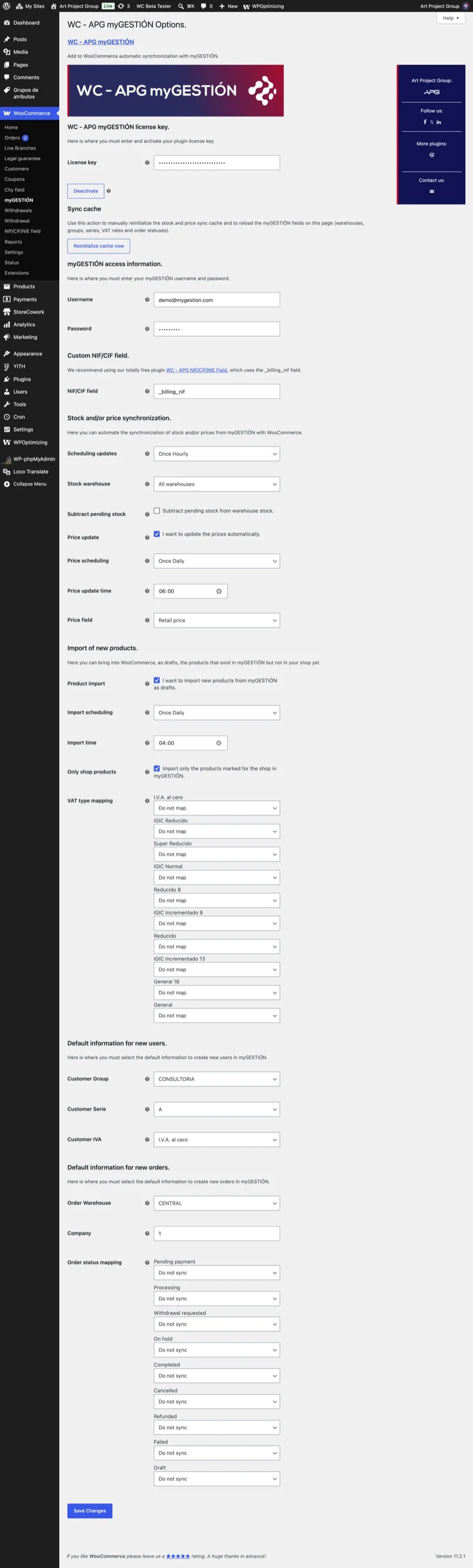
The settings of WC - APG myGESTIÓN are divided into several sections:
- WC - APG myGESTIÓN license: this is where you have to enter and activate your plugin license.
- License: enter the license that APG gives you automatically when you buy this plugin.
- Activate/Deactivate: activating the license is essential in order to use WC - APG myGESTIÓN. It is the first thing you have to do so that it can read from myGESTIÓN the information needed during the setup. Do not forget to deactivate it if you want to use it on a new website.
- Expiry date: once activated, the license is shown hidden, like a password, with the date it expires underneath.
- Sync cache: here you can reset the sync cache and reload the fields WC - APG myGESTIÓN reads from myGESTIÓN.
- Reset cache now: forces the next sync to write the stock and the prices of every product again, even if they have not changed in myGESTIÓN, and reloads the warehouses, the groups, the series, the VAT rates and the order statuses shown on this very page. Use it after correcting the stock by hand in WooCommerce, or when you have created something new in myGESTIÓN and it does not show up in the lists yet.
- myGESTIÓN access details: here you have to enter your myGESTIÓN username and password. It is very important that you use an account you do not use, or use only very occasionally, because the session is unique and it will give you trouble if you share your everyday account with WC - APG myGESTIÓN.
- Username: enter the account you use to sign in to myGESTIÓN. The demo account is filled in by default.
- Password: enter the password you use to sign in to myGESTIÓN. The demo password is filled in by default.
- Custom NIF/CIF field: we recommend using our completely free plugin WC - APG NIF/CIF/NIE Field, which uses the _billing_nif field.
- NIF/CIF field: enter the name of the custom NIF/CIF field you use; if you use our plugin you have to enter _billing_nif. Remember that this field is essential for WC - APG myGESTIÓN to work properly.
- Stock and/or price sync: here you can automate the sync of stock and/or prices from myGESTIÓN to WooCommerce.
- Update schedule: pick the timer you need to update the inventory. To sync stock and to send orders it is essential that the SKU field of the products matches their code in myGESTIÓN. We recommend that you do not use intervals shorter than one hour unless you really need to.
- Stock warehouse: pick the warehouse you want to use to read the inventory in myGESTIÓN.
- Subtract pending stock: you can choose whether to subtract pending stock from the warehouse stock.
- Price updates: you can choose whether the prices are updated automatically.
- Price schedule: pick how often you want the prices updated.
- Price update time: set the time of day of the first run. With a daily schedule it is the time it runs every day.
- Price field: pick the price field you want to use to read the prices in myGESTIÓN.
- Import of new items: here you can bring into WooCommerce, as drafts, the items that exist in myGESTIÓN and are not in your shop yet.
- Item import: you can choose whether to import the new items from myGESTIÓN. They are always created as drafts, never published, so you can complete their page before they go out to the shop.
- Import schedule: pick how often you want new items looked for in myGESTIÓN.
- Import time: set the time of day of the first run. With a daily schedule it is the time it runs every day.
- Shop items only: myGESTIÓN flags which items go to the shop. Leave it on unless you want to import the whole catalogue.
- VAT rate mapping: set which WooCommerce tax class each myGESTIÓN VAT rate corresponds to, just as you do with the order statuses.
- Default information for new users: this is where you have to pick the default information used to create new users in myGESTIÓN. These fields update in real time from the data you have in myGESTIÓN. If they are empty it is because either you do not have a valid, active license in WC - APG myGESTIÓN, or there is a connection problem with the myGESTIÓN API.
- Customer group: pick the default group you want from the options you have configured in myGESTIÓN.
- Customer series: pick the default series you want from the options you have configured in myGESTIÓN.
- Customer VAT: pick the default VAT rate you want from the options you have configured in myGESTIÓN.
- Default information for new orders: this is where you have to pick the default information used to create new orders in myGESTIÓN.
- Order warehouse: pick the default warehouse you want from the options you have configured in myGESTIÓN.
- Company: enter your company number in myGESTIÓN.
- Order status mapping: you can map the various WooCommerce order statuses to the myGESTIÓN statuses so that orders are created or updated according to each status.
The post How do you set up WC - APG myGESTIÓN? walks you through it step by step, with screenshots.
That is everything you need to get WC - APG myGESTIÓN fully up and running.
When an order reaches one of the statuses you have mapped, WC - APG myGESTIÓN sends it to myGESTIÓN automatically:
- Customer: looked up in myGESTIÓN by their NIF/CIF and, if they do not exist, created with the billing details of the order and with the group, the series and the VAT you have configured.
- Lines: one per product, with its reference (SKU), its quantity and its price, creating the item in myGESTIÓN if it does not exist yet.
- Carriage and charges: the shipping costs of the order arrive as carriage, and the additional fees as charges.
- Status: every status change in WooCommerce updates the order status in myGESTIÓN according to the mapping you have made.
Each order is sent only once, so the ones already in myGESTIÓN are skipped automatically, and the result of each send is recorded in the order notes.
If you need to send an order by hand you have two ways:
- From the order itself: the order screen shows the WC - APG myGESTIÓN box with the Send order to myGESTIÓN button, which also shows you the data sent and the myGESTIÓN response with a button to copy them, and the Reset local myGESTIÓN status button so the order can be sent again from scratch.
- From the order list: select the ones you want and choose the Send to myGESTIÓN bulk action.
Remember that the reference (SKU) of each WooCommerce product has to match the item code in myGESTIÓN.
With WC - APG myGESTIÓN you will never have duplicate orders in myGESTIÓN.
WC - APG myGESTIÓN reads the stock and the prices from myGESTIÓN at the frequency you choose and writes them into WooCommerce, so the sync always goes from myGESTIÓN to WooCommerce and never the other way round.
Inventory management is switched on automatically on synced products that did not have it on, and to avoid rewriting the whole shop on every pass only the products whose value has changed in myGESTIÓN since the last sync are updated.
If the stock of a product in your shop does not match the one in myGESTIÓN, check these points:
- The reference: the SKU of the product or the variation has to be identical to the item code in myGESTIÓN, because a product without that match never gets either stock or price.
- The warehouse: only the stock of the warehouse you have selected is read, so units sitting in another one do not go on sale on the website.
- The units pending delivery: if you have Subtract pending stock ticked, the units committed to orders not yet delivered in myGESTIÓN are discounted from the ones you put on sale.
- Manual changes: if you have corrected the stock by hand in WooCommerce, the cache keeps it until the value changes in myGESTIÓN, so press Reset cache now for the next sync to leave it the same as in myGESTIÓN.
- The price field: if you have chosen one of the definable fields and in myGESTIÓN it contains text instead of a number, that item is skipped so it is not left at zero.
If you want to change a price or a stock level, always do it in myGESTIÓN.
If after checking it still does not add up, you have our technical support at your disposal.
When you buy WC - APG myGESTIÓN you get a license that can be active on a single WooCommerce online store at a time. To use the plugin on another online store you first have to deactivate the license so you can activate it again. If you need to use WC - APG myGESTIÓN on more than one online store at the same time you have to buy as many licenses as online stores you need to manage.
Never forget to activate and deactivate your licenses.
The license of the WooCommerce plugin WC - APG myGESTIÓN that APG gives you with your purchase is yearly, so you will have to renew it every year. Once 365 days have passed since the purchase, WC - APG myGESTIÓN stops working.
So it does not catch you by surprise, we warn you by e-mail 15 and 7 days before it expires, and the expiry date is always in plain sight on the plugin settings page.
Get your yearly WC - APG myGESTIÓN license and enjoy its updates for a whole year.
If you do not enter and activate the license that APG gives you automatically when you buy WC - APG myGESTIÓN, the WooCommerce plugin will never work and will not perform any operation with myGESTIÓN until you enter and activate the license. On top of that, while the license is not activated WC - APG myGESTIÓN will not receive any notice of available updates either, so you will not be able to keep the WooCommerce plugin properly updated.
Once activated, WC - APG myGESTIÓN checks the license with our shop periodically and, if at some point it cannot connect, it keeps working normally for seven days and checks again on its own, so a one-off outage never stops your orders.
If you want to keep WC - APG myGESTIÓN perfectly working and up to date, do not forget to activate the license.
WC - APG myGESTIÓN is compatible with every version of WooCommerce 5.6 or higher.
It is also compatible with WooCommerce high-performance order storage (HPOS).
If you need a version of WC - APG myGESTIÓN compatible with earlier versions, contact APG.
Buying the WooCommerce plugin WC - APG myGESTIÓN includes only the ZIP file needed to install it and the license needed to activate it. Buying the plugin never includes any kind of technical support or help with its installation or setup. All the information you need to configure it is on this page.
If you ever need help, you have our technical support at your disposal.
WC - APG myGESTIÓN has been tested enough to be sure it works properly on standard installations; even so, errors may occur on installations that use third-party plugins or that have specific customizations which can cause failures in the native behaviour of WooCommerce. At APG we will always be glad for you to report any error or incompatibility you find while using WC - APG myGESTIÓN on your WooCommerce installation.
If you have found an error in WC - APG myGESTIÓN you can report it on contact.
All the documentation for WC - APG myGESTIÓN, with the installation, the license, each setting explained one by one and the frequently asked questions, is in the WC - APG myGESTIÓN documentation.
2.0.3 (11/04/2026)
- Un pedido ya no se crea dos veces en myGESTIÓN cuando un reenvío se queda sin respuesta: el reenvío se vincula al documento que ya existe.
- Enviar un pedido a la papelera ya no borra en myGESTIÓN un documento que pertenece a otro pedido.
- Los artículos nuevos se crean en myGESTIÓN con el tipo de IVA de la dirección fiscal de la tienda, y con el de la asignación de tipos de IVA cuando la clase de impuesto está asignada.
2.0.2 (10/27/2026)
- La contraseña de myGESTIÓN se guarda cifrada en la base de datos en lugar de en texto plano.
- Ayuda contextual en la pestaña Ayuda de la página de ajustes, con enlace a la documentación completa.
2.0.1 (10/21/2026)
- Corregido que las tareas de precios e importación esperasen a la hora guardada antes de su primera pasada cuando la frecuencia no es diaria, lo que las dejaba paradas hasta un día.
2.0.0 (10/19/2026)
- La sincronización de precios ya puede ejecutarse más de una vez al día y a la hora que elijas.
- Los artículos que existen en myGESTIÓN y todavía no están en la tienda pueden importarse a WooCommerce como borradores, con la frecuencia y la hora que elijas.
- Los artículos importados llegan ya con su descripción, marca, código de barras, peso, medidas, clase de impuesto y aviso de pocas existencias, y sólo los que myGESTIÓN marca para la tienda.
- Los artículos importados llegan con sus existencias, y los marcados como kit o sin control de stock no gestionan inventario en WooCommerce.
- Los artículos con atributos en myGESTIÓN se importan como productos variables con todas sus variaciones.
- Puedes asignar cada tipo de IVA de myGESTIÓN a una clase de impuesto de WooCommerce, igual que se hace con los estados de pedido.
1.7.2 (09/30/2026)
- Corregido que el plugin se desactivara tras actualizarse, porque la actualización le cambiaba el nombre de la carpeta.
1.7.1 (09/30/2026)
- Corregido el error 461 al actualizar delegaciones en clientes que repiten pedido con la misma dirección de envío.
- Corregido el envío a myGESTIÓN de pedidos cuyo estado no tiene mapeo asignado.
- Los bloqueos de envío abandonados se limpian solos en lugar de acumularse en la base de datos.
- El token de actualización ya no se guarda en claro en la base de datos del sitio.
1.7.0 (09/17/2026)
- Una vez activada la licencia, la clave se muestra oculta en la página de ajustes igual que la contraseña, y solo se revela mientras el campo tiene el foco.
- Refuerzo de seguridad: el token de actualización se guarda ahora cifrado y bajo un nombre propio del plugin, el endpoint de licencia ya no permite a nadie confirmar la clave de la tienda y tiene límite de peticiones, los datos del cliente se codifican antes de viajar dentro de las peticiones a la API de myGESTIÓN, enviar un pedido exige permiso para editar pedidos, y los ajustes se validan antes de guardarse.
- Corregido que el campo NIF/CIF no se leyera nunca, con lo que los clientes se buscaban por correo y sus pedidos llegaban a myGESTIÓN sin el NIF/CIF. Ahora funciona tanto si el ajuste se escribe con el guion bajo inicial como sin él.
- Corregido que algunos pedidos se enviaran dos veces a myGESTIÓN cuando coincidían un cambio de estado y el envío en segundo plano.
- Corregida la sincronización diaria de precios, que se interrumpía a medias cuando myGESTIÓN devolvía algo que no es un número en el campo de precio elegido y dejaba el resto del catálogo sin sincronizar.
- El plugin deja de funcionar si no consigue verificar su licencia contra la tienda durante más de 7 días seguidos, y vuelve a funcionar solo en cuanto la tienda está accesible.
- Correcciones varias: los avisos sobre registros duplicados en myGESTIÓN ahora se muestran de verdad, el botón de activación de licencia ya no se queda en «Conectando» cuando la tienda responde algo inesperado, y se ha eliminado código de depuración olvidado.
1.6.2 (07/15/2026)
- Corregido que la página de ajustes mostrara campos incompletos o inconsistentes (por ejemplo una lista de grupos de clientes distinta) cuando myGESTIÓN estrangula las ráfagas de peticiones: las cinco lecturas que hace la página se espacian ahora ligeramente, y cualquier fallo de conexión (no solo los timeouts) se reintenta con un backoff progresivo. Esto blinda también el envío de pedidos frente al mismo throttling. En estos casos las credenciales, el servidor y la licencia nunca eran el problema.
- Corregido que la página de ajustes mantuviera los campos cacheados del usuario anterior tras cambiar el usuario/contraseña de myGESTIÓN: la caché de campos dinámicos va ahora ligada a las credenciales, de modo que al cambiar de usuario siempre se leen datos frescos. El botón «Reinicializar caché ahora» también borra esta caché bajo demanda.
1.6.1 (07/14/2026)
- Corregido que la página de ajustes se quedara permanentemente vacía (sin almacenes, grupos, series, tipos de IVA ni estados de pedido) cuando myGESTIÓN respondía sin error pero sin devolver datos, por ejemplo con credenciales incorrectas o con el servidor de myGESTIÓN degradado: ese resultado vacío se estaba cacheando y la página seguía sirviéndolo. Ya no se cachea un resultado vacío, se ignora una caché vacía previamente guardada, y se muestra un aviso indicando que myGESTIÓN no ha devuelto datos. La página de ajustes se recupera sola en cuanto myGESTIÓN vuelve a responder correctamente.
1.6.0 (07/01/2026)
- Los pedidos se envían ahora a myGESTIÓN en segundo plano (de forma asíncrona, mediante el Action Scheduler de WooCommerce), de modo que una myGESTIÓN lenta o caída ya no puede bloquear ni ralentizar el checkout, la pantalla de pedidos ni ninguna otra página de la tienda.
- Añadido un bucle de reintentos automático: si myGESTIÓN está caída o devuelve un error temporal, el envío del pedido se reintenta automáticamente con esperas crecientes hasta conseguirlo, en lugar de perderse. Los errores de autenticación (usuario/contraseña de myGESTIÓN incorrectos) detienen los reintentos dejando una nota en el pedido, y un número máximo de intentos evita reintentos infinitos.
- Añadido un timeout explícito a cada llamada a la API de myGESTIÓN, de forma que un servidor de myGESTIÓN colgado ya no puede dejar a WordPress esperando indefinidamente.
- La página de ajustes cachea ahora los campos dinámicos que lee de myGESTIÓN (almacenes, grupos, series, tipos de IVA y estados de pedido) y degrada con elegancia cuando myGESTIÓN no está disponible, por lo que la pantalla de configuración sigue cargando rápido y nunca se cuelga. Usa el argumento «apg_refresh» en la URL (o simplemente guarda los ajustes) para refrescar los valores cacheados cuando quieras.
1.5.1 (06/26/2026)
- Corregido un fatal durante la sincronización de stock programada (y otros contextos fuera del admin, como WP-Cron) cuando el plugin no podía inicializarse: el aviso de error de licencia/inicialización ya no llama a una función exclusiva del admin fuera de él, por lo que la sincronización de stock deja de fallar.
- Robustecida la acción manual «Enviar pedido a myGESTIÓN»: el botón usa ahora la propia URL de edición de pedido de WooCommerce (compatible con la pantalla clásica y con HPOS) y el metabox sale sin hacer nada si no hay un pedido válido, evitando la pantalla en blanco cuando la acción se lanzaba desde la pantalla de creación de pedido.
1.5.0 (06/25/2026)
- Añadido soporte para el checkout por bloques (bloque de finalizar compra de WooCommerce / Store API): los pedidos realizados a través de él ya se envían a myGESTIÓN.
- Corregido el envío de pedidos a myGESTIÓN sin líneas de producto cuando el envío se disparaba antes de que WooCommerce las guardara (p. ej. checkout por bloques o pedidos borrador de la Store API). El pedido ya no se vincula de forma prematura, por lo que se reenvía completo en el siguiente disparo.
- Actualizado el campo NIF/CIF por defecto a `_billing_nif` para coincidir con la nueva clave de metadatos de pedido nativa de WooCommerce que usa WC - APG NIF/CIF/NIE Field. Las instalaciones que usaban `billing_nif` se migran automáticamente.
1.4.0 (03/25/2026)
- Añade un bloqueo por pedido con caducidad para evitar bloqueos manuales obsoletos.
- Añade detección de sincronización parcial/completa en el metabox de myGESTIÓN.
- Añade una acción segura para restablecer el estado local de myGESTIÓN antes de reintentar un envío manual.
- Mejora la salida de errores en envíos manuales.
1.3.2 (03/10/2026)
- Pequeñas correcciones.
1.3.1 (03/06/2026)
- Los pedidos enviados a la papelera ya no se eliminan definitivamente en WooCommerce.
- Al restaurar un pedido desde la papelera, se intenta reenviarlo automáticamente a myGESTIÓN si no está vinculado.
1.3.0 (03/04/2026)
- Simplificación y mejora del log para reducir ruido y facilitar búsquedas.
- Al enviar pedidos a la papelera en WooCommerce, ahora se elimina también el pedido en myGESTIÓN si ya estaba sincronizado.
- Pequeñas correcciones.
1.2.4 (03/03/2026)
- Pequeñas correcciones.
1.2.3 (03/03/2026)
- Pequeñas correcciones.
1.2.2 (03/02/2026)
- Mejora la fiabilidad de la sincronización de myGESTIÓN: reintenta los errores transitorios de la API, evita la creación de duplicados y previene el envío simultáneo de flujos duplicados.
1.2.1 (02/18/2026)
- Pequeñas correcciones.
1.2.0 (02/18/2026)
- Añade aviso en ajustes cuando no se puede conectar con myGESTIÓN al cargar campos dinámicos, mostrando también el error devuelto por la API.
- Añade registro diario del flujo de envío de pedidos a myGESTIÓN en WooCommerce > Estado > Registros (origen: wc-apg-mygestion).
- Pequeñas correcciones.
1.1.1 (02/13/2026)
- Corrige el envío del transportista en pedidos.
- Pequeñas correcciones.
1.1.0 (02/11/2026)
- Al cambiar el estado del pedido, ahora se actualiza la cabecera completa del pedido y no solo el estado.
- Se sincronizan cliente y delegación durante los cambios de estado antes de actualizar el pedido.
- Pequeñas correcciones.
1.0.11 (02/11/2026)
- Añadida nueva opción para reinicializar la caché de sincronización.
1.0.10 (02/10/2026)
- Pequeñas correcciones.
1.0.9 (02/09/2026)
- Añadida nueva opción para restar el stock pendiente a servir.
- Pequeñas correcciones.
1.0.8 (02/06/2026)
- Corrige el cálculo de stock.
1.0.7 (02/06/2026)
- Pequeñas correcciones.
1.0.6 (02/05/2026)
- Se refuerza la gestión de licencias.
1.0.5 (02/05/2026)
- Se refuerza y securiza la gestión de licencias.
- Pequeñas correcciones.
1.0.4 (02/04/2026)
- Se muestra la fecha de caducidad de la licencia en la pantalla de ajustes.
- Pequeñas correcciones.
1.0.3 (02/02/2026)
- Corrige el cálculo de IVA.
- El campo de contraseña ahora se oculta y se muestra al enfocarlo.
- Pequeñas correcciones.
1.0.2 (01/28/2026)
- Nuevos avisos por correo electrónico 15 y 7 días antes de la fecha de vencimiento de la licencia.
- Pequeñas correcciones.
1.0.1 (01/19/2026)
- Evita crear atributos cuando el producto ya existe en myGESTIÓN al enviar pedidos.
1.0.0 (12/19/2025)
- Mejora el rendimiento de sincronización de stock/precios usando caché de cambios.
- Añade sincronización de atributos de myGESTIÓN para productos variables (grupos, términos y atributos de producto).
- Añade mapeo de estados de pedido y acción en lote para enviar pedidos a myGESTIÓN.
- Mejora la salida de depuración con botones de copia y salida agregada.
- Refuerza la seguridad con nonces y sanitización; mejora el escape de salidas.
- Corrige versionado de assets y cron; elimina el uso directo de cURL.
- Pequeñas correcciones.
0.13.0.2 (01/24/2025)
- Pequeñas correcciones.
- Mejora de la gestión de actualizaciones.
0.13.0.1 (12/02/2024)
- Pequeñas correcciones.
0.13 (11/29/2024)
- Añadido nuevo campo Almacén de existencias.
- Mejora de la seguridad.
- Actualización de captura de pantalla.
0.12 (10/14/2024)
- Añadidas nuevas programaciones de actualizaciones.
- Añadido nuevo campo Empresa.
- Añadido nuevo campo Campo de precio.
- Actualización de hoja de estilo.
- Actualización de captura de pantalla.
0.11 (01/11/2024)
- Actualizada la compatibilidad con HPOS.
0.10.0.1 (06/24/2023)
- Pequeñas correcciones.
0.10 (06/23/2023)
- Actualizada la compatibilidad con HPOS.
0.9.0.3 (02/15/2023)
- Actualización de cabecera.
- Actualización de hoja de estilo.
- Actualización de captura de pantalla.
0.9.0.2 (11/17/2022)
- Pequeñas correcciones.
0.9.0.1 (11/03/2022)
- Pequeñas correcciones.
0.9 (11/02/2022)
- Añadida compatibilidad con HPOS.
0.8 (10/30/2022)
- Añadida nueva opción para actualizar los precios desde myGESTIÓN.
- Pequeñas correcciones.
0.7.5.4 (06/27/2022)
- Pequeñas correcciones.
0.7.5.3 (05/30/2022)
- Pequeñas correcciones.
0.7.5.2 (04/06/2022)
- Pequeñas correcciones.
0.7.5.1 (03/21/2022)
- Pequeñas correcciones.
0.7.5 (12/09/2021)
- Añadido soporte para marcas.
- Pequeñas correcciones.
0.7.4.1 (12/01/2021)
- Pequeñas correcciones.
0.7.4 (11/30/2021)
- Corrección de descuento duplicado.
- Pequeñas correcciones.
0.7.3.1 (09/02/2021)
- Pequeñas correcciones.
0.7.3 (09/01/2021)
- Añadidas nuevas programaciones de actualización de inventario.
- Pequeñas correcciones.
0.7.2 (08/27/2021)
- Gestión de clientes en función del correo electrónico en caso de no existir NIF.
- Gestión de fecha de salida en base a la fecha de las citas de WooCommerce Appointments.
- Arreglo de la codificación de datos.
0.7.1 (03/03/2021)
- Pequeñas correcciones.
0.7 (02/17/2021)
- Pequeñas correcciones.
0.6.1 (03/03/2020)
- Corrección del redondeo de IVA.
0.6 (02/17/2020)
- Pequeñas correcciones.
0.5.5 (12/16/2019)
- Pequeñas correcciones.
0.5.4 (11/07/2019)
- Pequeñas correcciones.
0.5.3 (09/13/2019)
- Pequeñas correcciones.
0.5.2 (07/17/2019)
- Pequeñas correcciones.
0.5.1 (06/14/2019)
- Pequeñas correcciones.
0.5 (05/17/2019)
- Añadida lectura automática de los estados de pedido de myGESTIÓN.
- Añadida sincronización de inventario programable.
0.4.2 (05/15/2019)
- Añadido redondeo en el porcentaje de IVA en productos.
0.4.1 (05/09/2019)
- Añadido redondeo en el porcentaje de IVA en productos.
0.4
- Añadido soporte para la API 5.
0.3 (01/16/2019)
- Añadido soporte para Contactos.
0.2.2 (11/21/2018)
- Pequeñas correcciones.
0.2.1 (11/07/2018)
- Pequeñas correcciones.
0.2 (10/08/2018)
- Añadido soporte para Delegaciones de clientes.
- Añadido soporte para Agentes de clientes.
- Añadida nueva opción que permite seleccionar el estado de pedido que enviará el pedido a myGESTIÓN.
0.1 (07/01/2018)
- Versión inicial.
Technical consulting
Is your management software not on the list? We integrate WooCommerce with other systems to measure, such as a3ERP or Microsoft Dynamics 365 Business Central. Tell us which one you use.
We will advise you!
What do our clients say?
El servicio prestado supera las expectativas previas. Lo recomendamos y pensamos seguir trabajando con ellos.
Conocí a Emilio Calvo al poco de abrir mi página web y desde entonces sólo confío en él. Rapidez, eficacia y calidad. Cuando hay algún problema siempre recurro a él ya puede ser de configuración, limpieza, virus....
De lo mejor.
Great support, having developers like this, willing to help when this just dont seem to work like they should is always a pleasure.
Thank you, APG team!
Our products and services are 100% guaranteed
More products and services by APG

Data Import Starter Kit
121,00 €
Multilingual Starter Kit
121,00 €
GDPR compliance
From: 145,20 €Select options This product has multiple variants. The options may be chosen on the product page Details
Technical consulting
145,20 €Select options This product has multiple variants. The options may be chosen on the product page Details


