


What it is
WC - APG Free Shipping decides when your shop gives the shipping costs away, and to whom. WooCommerce’s free shipping only knows how to look at the order amount or a coupon; this one adds the weight and, above all, lets you leave whole product categories, tags, attributes, shipping classes or user roles out of the deal.
And it does something the built-in one does not: it hides the rest of the shipping costs when the order already travels free, so that the customer does not end up paying for something they did not have to pay for.
It is a free plugin published in the official WordPress repository.
Requirements
- WordPress 5.7 or later.
- PHP 7.4 or later.
- WooCommerce 5.6 or later.
If you are going to set a maximum weight, the products need to have their weight: one without a weight counts as zero.
Installation
- Search for WC - APG Free Shipping in Plugins -> Add New and press Install Now; or upload the ZIP from Plugins -> Add New -> Upload Plugin; or copy the folder into
/wp-content/plugins/over FTP. - Activate it from the Plugins menu.
- Go to WooCommerce -> Settings -> Shipping, open the shipping zone where you want it and add the APG Free Shipping method.
Like its sibling WC - APG Weight Shipping, this is not a settings page in the dashboard but a method inside each shipping zone: what you set up applies only to the countries, regions and postcodes of that zone. That is how you give the shipping away on the mainland and charge for it in the Balearics, with two zones and two copies of the method. 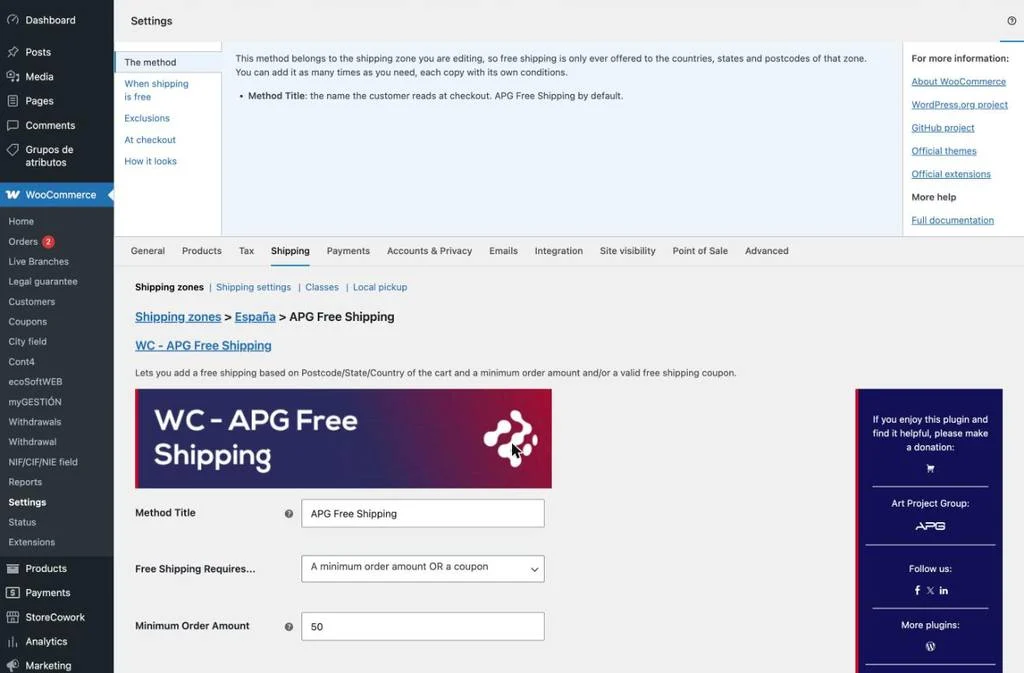
Settings
Every setting is on the method’s screen, inside its zone. That screen also has WordPress’s Help tab, at the top right, with a summary of each option without leaving it.
The method
- Method Title: the name the customer reads at checkout. APG Free Shipping by default, and it is worth changing it for a plain Free shipping.
When the shipping is free
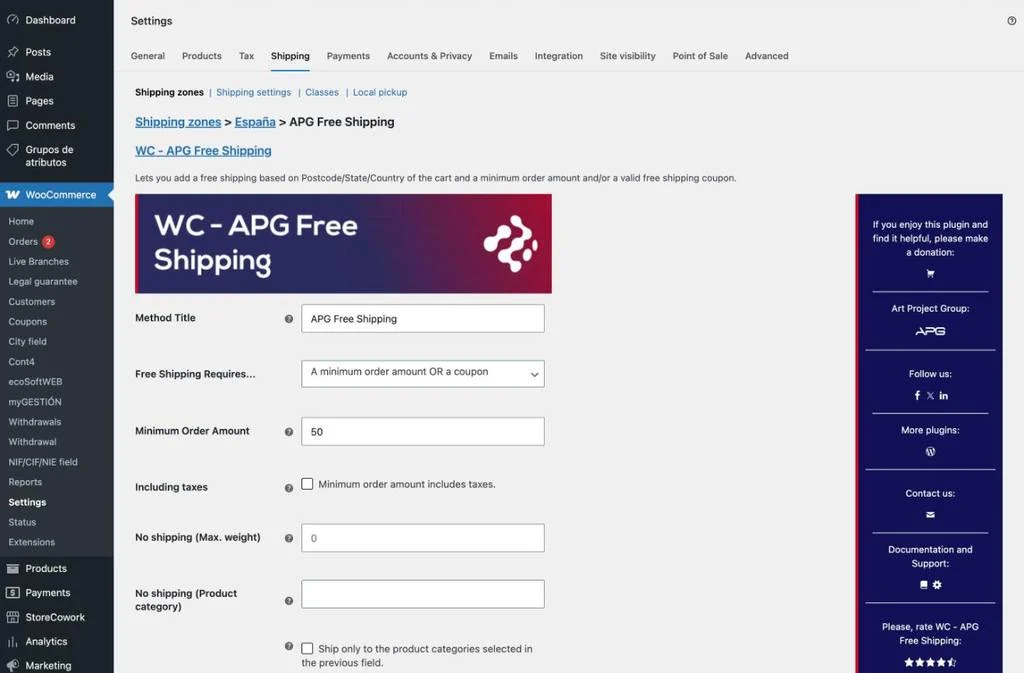 What the cart has to meet for this method to show up. With nothing set, the shipping is free for everybody inside the zone.
- Free Shipping Requires…: the condition. Nothing, a valid free shipping coupon, a minimum amount, either of the two, or both at once.
- Minimum Order Amount: how much the customer has to spend. It only counts when the condition above asks for an amount.
- Including taxes: whether that amount is compared with the total with taxes or without them. Unticked, which is how it comes, the taxes are left out, and that is the difference between giving the shipping away from €50 or from €60.50.
- No shipping (Max. weight): a weight above which the shipping stops being free, however much the order costs. Leave it at zero to switch it off. It is the way to stop a cheap but enormous order from carrying the shipping away with it.
The exclusions
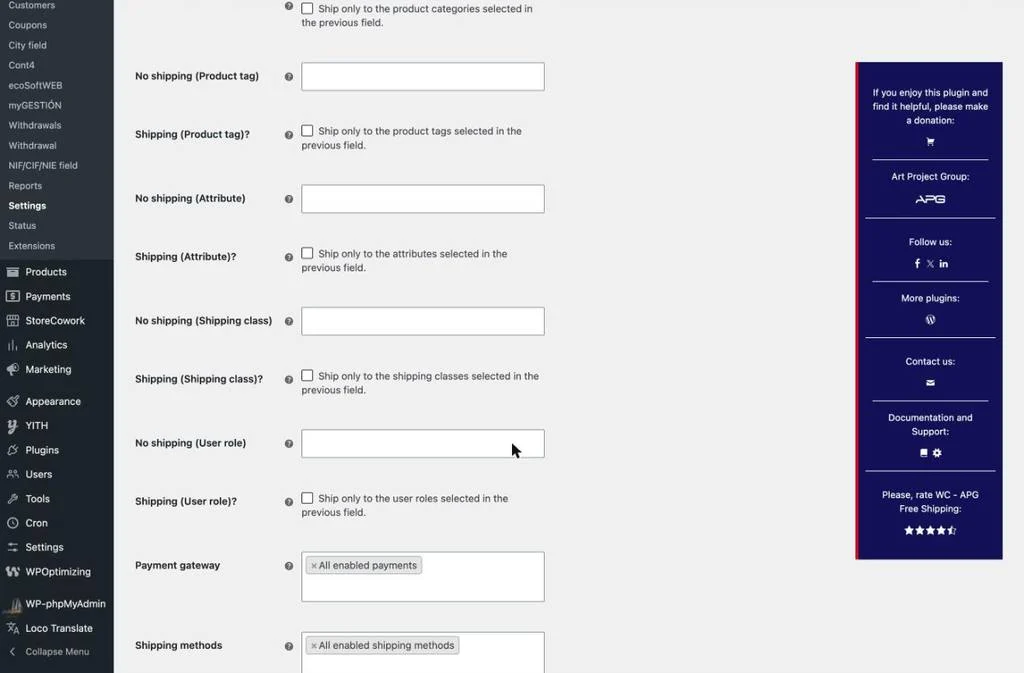 What never travels free. There are five pairs of settings —product categories, tags, attributes, shipping classes and user roles— and the two of each pair work together.
- No shipping (…): the list of what does not go into the free shipping. Leave a list empty and it excludes nothing. With more than five hundred entries, the list turns into a search box.
- Shipping (…)?: it turns the list round: ticked, the free shipping is offered only for what is in it.
With the user roles you set up free shipping for wholesalers, or for the customers on a particular price list, in two clicks and without touching anything else in the shop.
At checkout
- Payment gateway: the payment methods offered to the customer when they choose the free shipping. It is there to leave cash on delivery out, which usually has a surcharge of its own.
- Shipping methods: the other methods of the same zone that are shown alongside this one.
- Show only APG Free Shipping: hides every other shipping cost when the free one is available. It is what stops anybody paying for shipping they already had for nothing.
How it looks
- Icon image: the address of an image to show next to the method, usually the carrier’s logo. 60×21 pixels works well.
- How to show the icon image?: where the icon goes: before the title, after it, or on its own, with no title.
- Estimated delivery time: free text shown below the method, such as 24 to 48 hours. Leave it empty and nothing is shown.
- Show price: writes the price as zero after the title instead of leaving the method with no figure, which some customers take for a fault in the shop.
Frequently asked questions
For developers
The plugin leaves three filters for changing what the customer sees at checkout:
apg_free_shipping_label: changes the title of the method.apg_free_shipping_final_label: changes the whole label, with the title, the price, the icon and the delivery time already put together.apg_free_shipping_delivery: returnfalseand the delivery time is shown on its own, without the Estimated delivery time: text in front of it.
Version history
Support
WC - APG Free Shipping is a free plugin and APG does not give free technical support. If you need help with the installation or the setup, there is our technical support service.
For questions about what you read on this page, the comments below are open. And if you find it useful, you can make a donation or leave a review in the WordPress repository, which is what keeps the plugin alive.
Help
WC - APG Free Shipping is a completely free plugin for WooCommerce, so if you want to help APG keep it free, you can make a donation towards its improvement and maintenance.
Comments


