





Taxes in WooCommerce
A few months ago we already saw how to configure VAT correctly in the post How do you configure VAT for the Canary Islands, Ceuta and Melilla in WooCommerce 2.0?, but in that post we used a standard tax rate of 10% for the products, and when our followers and readers want to replicate it in their online shops with a standard tax rate of 21% they come across problems caused by the programming error that means WooCommerce does not handle standard VAT correctly and, although we have solved it in a few comments, we see that you do not quite understand it, so we are going to go into the matter in a little more detail.
The problem we have detected in WooCommerce is that the standard tax rate returns an empty value for the VAT total on the shipping costs, at least with our plugin WC - APG Weight Shipping.
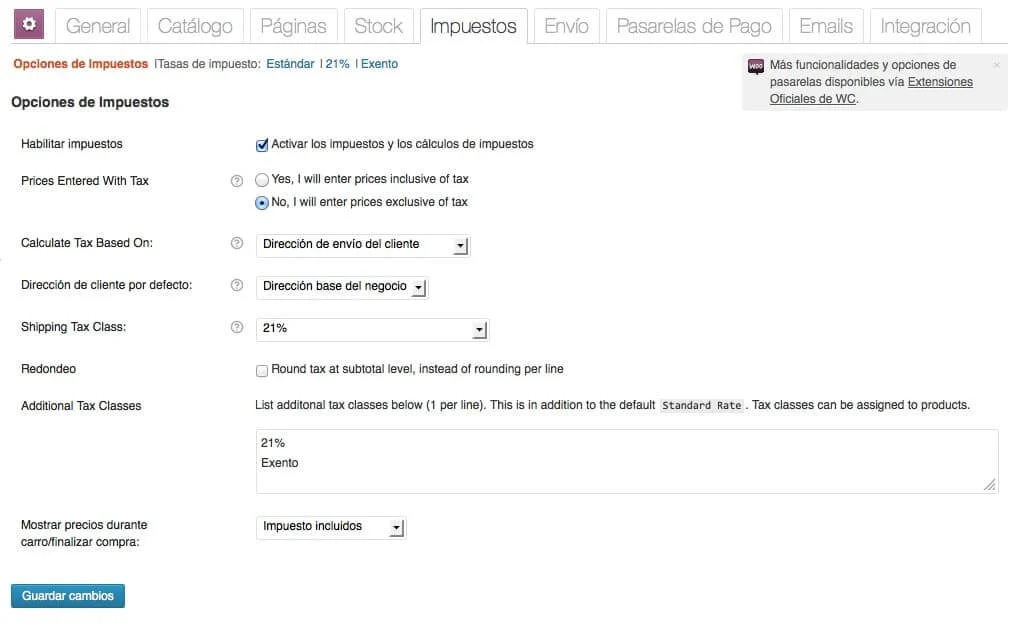
When it comes to creating our online shop we can enable taxes and tax calculations or not, in the Enable taxes field in WooCommerce -> Settings -> Tax. If we do not enable them we have no problem of any kind, since WooCommerce will use the prices configured both for the products and for the shipping, without taking any kind of VAT into account.
In the event that we enable the Enable taxes field, we can do it with VAT included in the price, or with VAT added to the price. In both cases we must create a standard tax rate of 21% with the Shipping field disabled, and a second tax rate of 21%, which we will call whatever we want, for example 21%, with the Shipping field enabled, since we will use this second tax rate for the calculation of the shipping costs. In the event that we want to use what is explained in How do you configure VAT for the Canary Islands, Ceuta and Melilla in WooCommerce 2.0?, we must create a third tax rate of 0% for the calculation of VAT in the Canary Islands, Ceuta and Melilla, also with the Shipping field enabled.
Therefore, as long as WooCommerce does not solve this programming fault, we must create two tax rates at 21%, one to be used on the products and another to be used solely and exclusively for the shipping costs. This way we will get WooCommerce to resolve the various VAT totals correctly.
We hope the matter is now much clearer to you.
Related posts




Comments
Products and services
-
 Data Import Starter Kit
121,00 €
-
 WC - APG Cont4
-
 Multilingual Starter Kit
121,00 €
-
 Virus removal
From: 242,00 €
-
 GDPR compliance
From: 145,20 €

Art Project Group is now available in English. The whole site is translated: every plugin page, the full documentation and the support centre.
artprojectgroup.com #WordPress #WooCommerce

How do you set up WC - APG Cont4?

Se ha publicado #WooCommerce 11.2.2: actualización de seguridad que refuerza las API REST y Store, mejora la validación de CSV y corrige problemas en pagos y pedidos. Incluye cambios en la base de datos.
¡Actualiza cuanto antes!
¿Cómo se configura WC - APG myGESTIÓN?

¿Cómo se configura APG Multisite Suite?



Muchas gracias esto me ha ayudado muchísimo!
Muchas gracias, estaba en problemas con esto jeje, y pues aunque todas las soluciones estaban para España ha salido muy bien para Colombia, de nuevo gracias.