




 Having learnt how to configure its big brother WC - APG Weight Shipping in How to configure WC - APG Weight Shipping 2.0?, we are now going to learn how to configure WC - APG Free Shipping correctly.
To learn how to configure the plugin for WooCommerce we are going to start from the configuration we created in the tutorial we devoted to its big brother, and we are going to carry out the following configuration:
- Free shipping costs for orders over €100.00 except in the Canary Islands, Ceuta, Melilla, Gibraltar and the Azores.
Installation
The first thing we have to do, in case you have not already done so, is, obviously, to install the plugin for WooCommerce WC - APG Free Shipping. We remind you that to do so you can upload the folder woocommerce-apg-free-postcodestatecountry-shipping to the /wp-content/plugins/ directory by FTP, or upload the complete ZIP file via Plugins -> Add New -> Upload in the administration panel of your WordPress installation, or simply by searching for WC - APG Free Shipping in Plugins -> Add New. Once it has been uploaded, or installed, you have to activate it.
Configuration
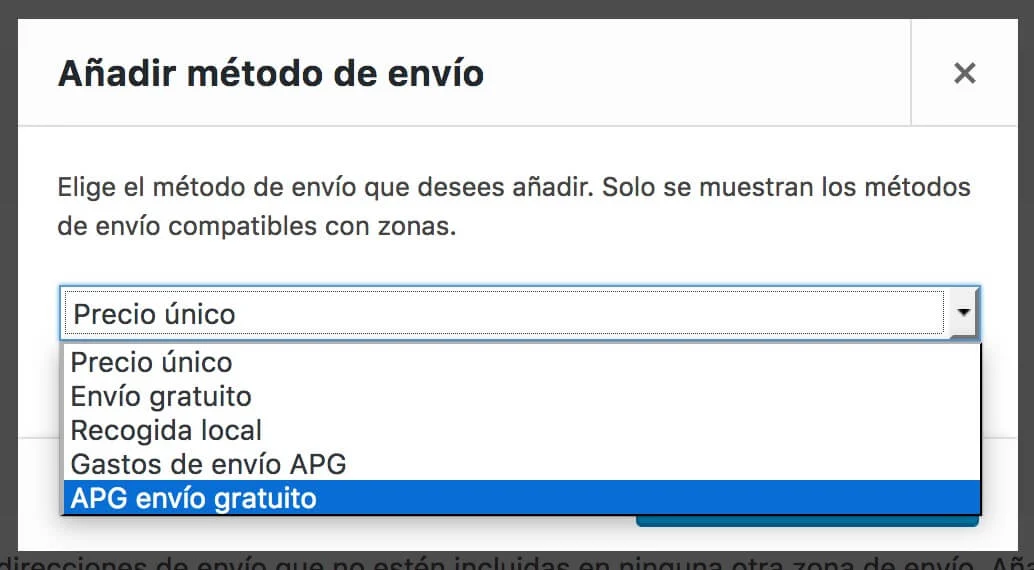
Once we have WC - APG Free Shipping installed and active, you can begin its configuration in WooCommerce -> Settings -> Shipping. There you will come across the new Shipping zones, and that is where we are going to start.
To begin with, we are going to select the Mainland shipping zone and we are going to add a new shipping method to it; to do so we click on the icon with the + symbol, in this case we select APG free shipping and we click on Add shipping method. In this very simple way we will add a second shipping method to the Mainland shipping zone.
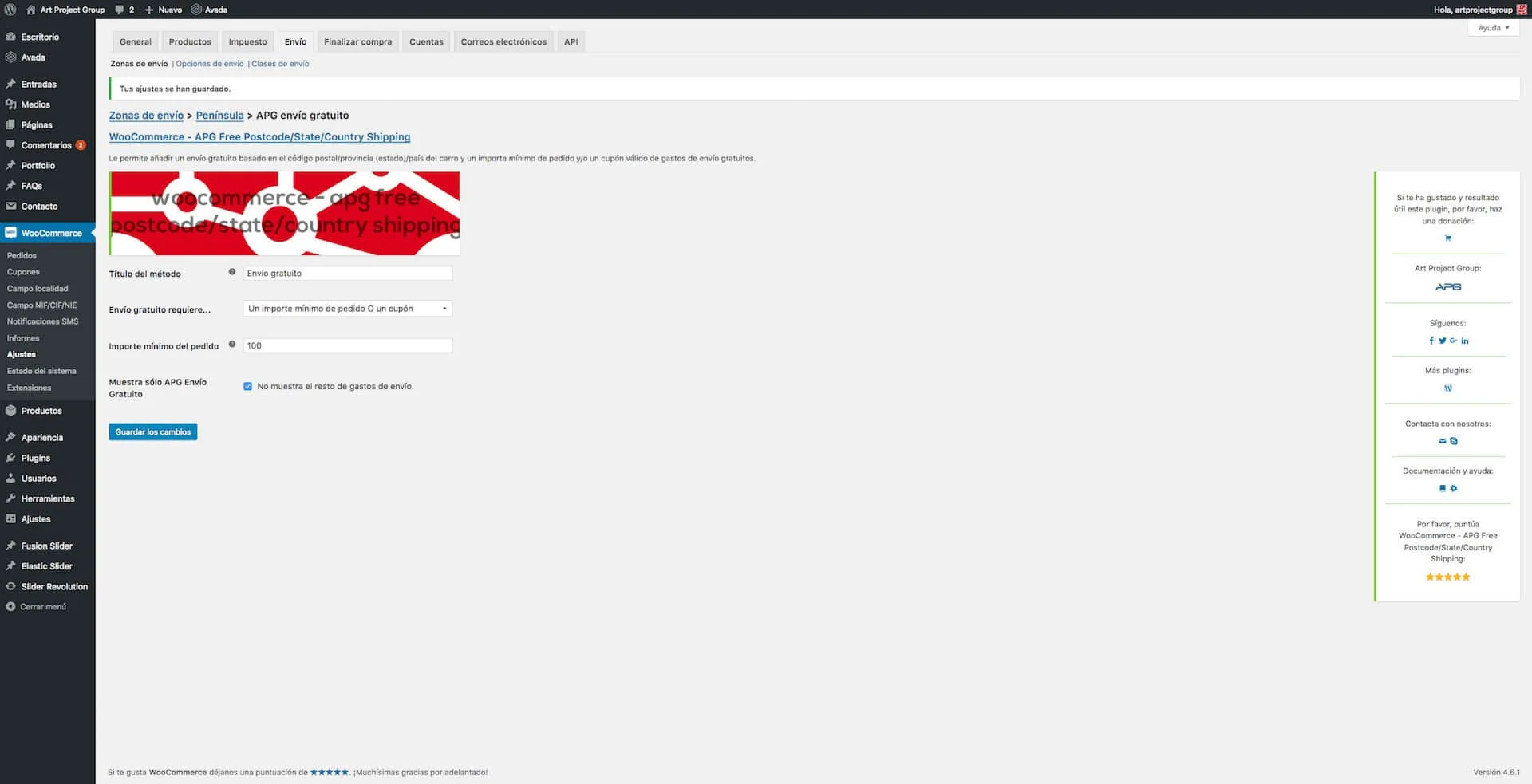 Now we must click on APG free shipping in order to reach the configuration page of WC - APG Free Shipping. There we are going to configure the free shipping cost we need. We will come across the following fields:
- Method title: in this field we must put the title of the shipping method. In our example we have put Free shipping.
- Free shipping requires…: in this field we must select what is required for the free shipping to be activated. In our example we have selected A minimum order amount OR a coupon.
- Minimum order amount: here we must indicate the minimum amount from which we will not charge shipping costs. In our example we have put 100.
- Show only APG Free Shipping: if we tick this field the rest of the shipping costs will not be shown. In our example we have ticked it.
There is an additional field that is only visible if you have shipping classes configured, which is called No shipping (Shipping class). In it you can indicate one, several or all the shipping classes (although there is no sense at all in selecting them all), whose products will not be taken into account when calculating the minimum amount of the order. That is to say that if a shipping class A is selected and the total amount of the order, excluding the products that belong to shipping class A, adds up to €100.00, the free shipping cost will be activated; otherwise it will not, even though the total amount of the order is higher than €100.00.
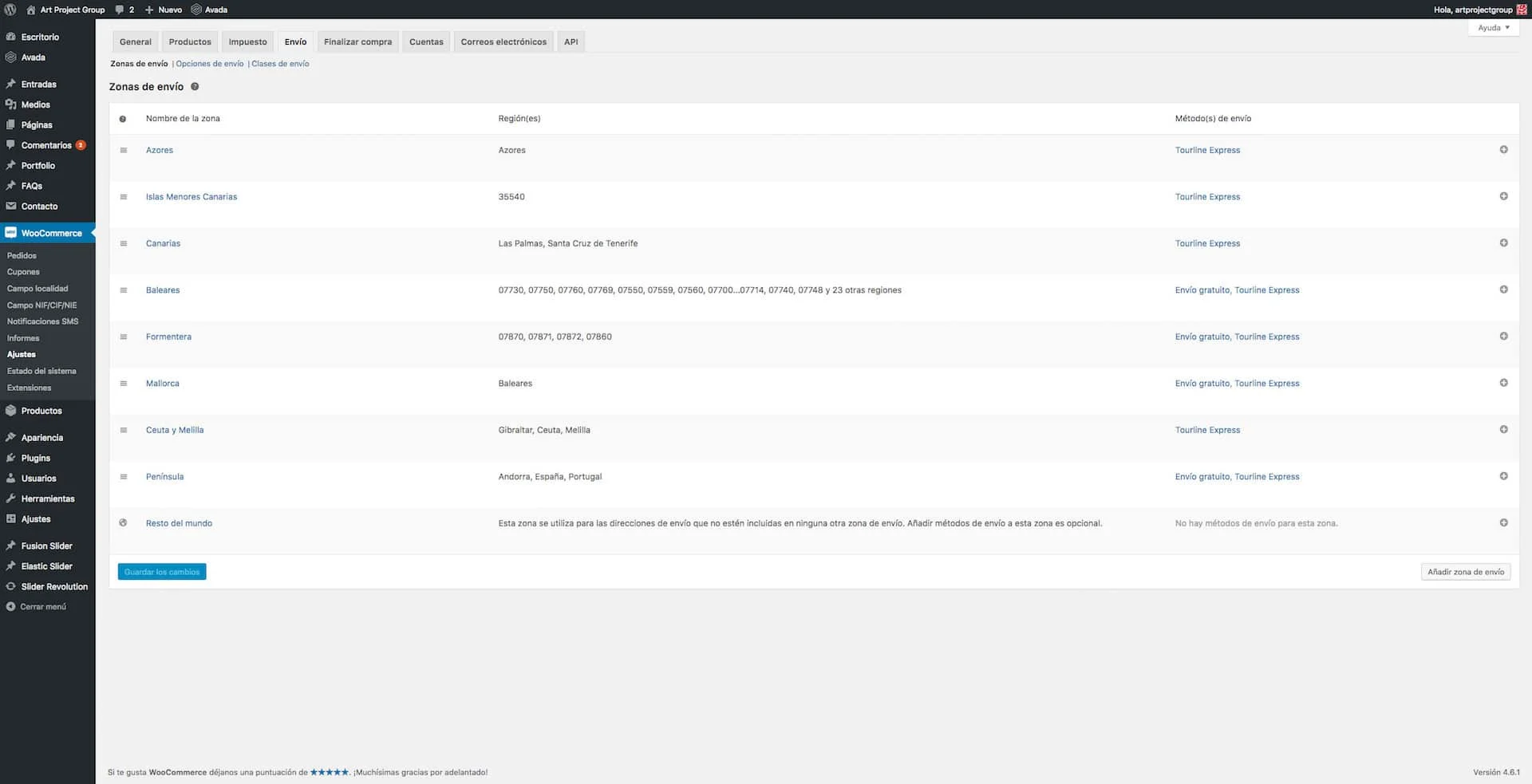
Once the configuration is finished we will already have free shipping costs for orders over €100.00 in Spain, Portugal and Andorra, but, given that our configuration must include the Balearic Islands and exclude the Azores, we still have some configurations left.
To add the free shipping cost in our example, we have to clone this same APG free shipping shipping method in the Balearic Islands, Formentera and Mallorca shipping zones.
Finally we have to create a new shipping zone called Azores, and in order to be able to select this Portuguese district, which does not come by default in WooCommerce, we are going to install and activate the plugin by our friend Marco Almeida Portugal States (Distritos) for WooCommerce. In this shipping zone we will have to clone the shipping costs we had active for Portugal, if they are the same as in our example, so that everything carries on working correctly.
Result
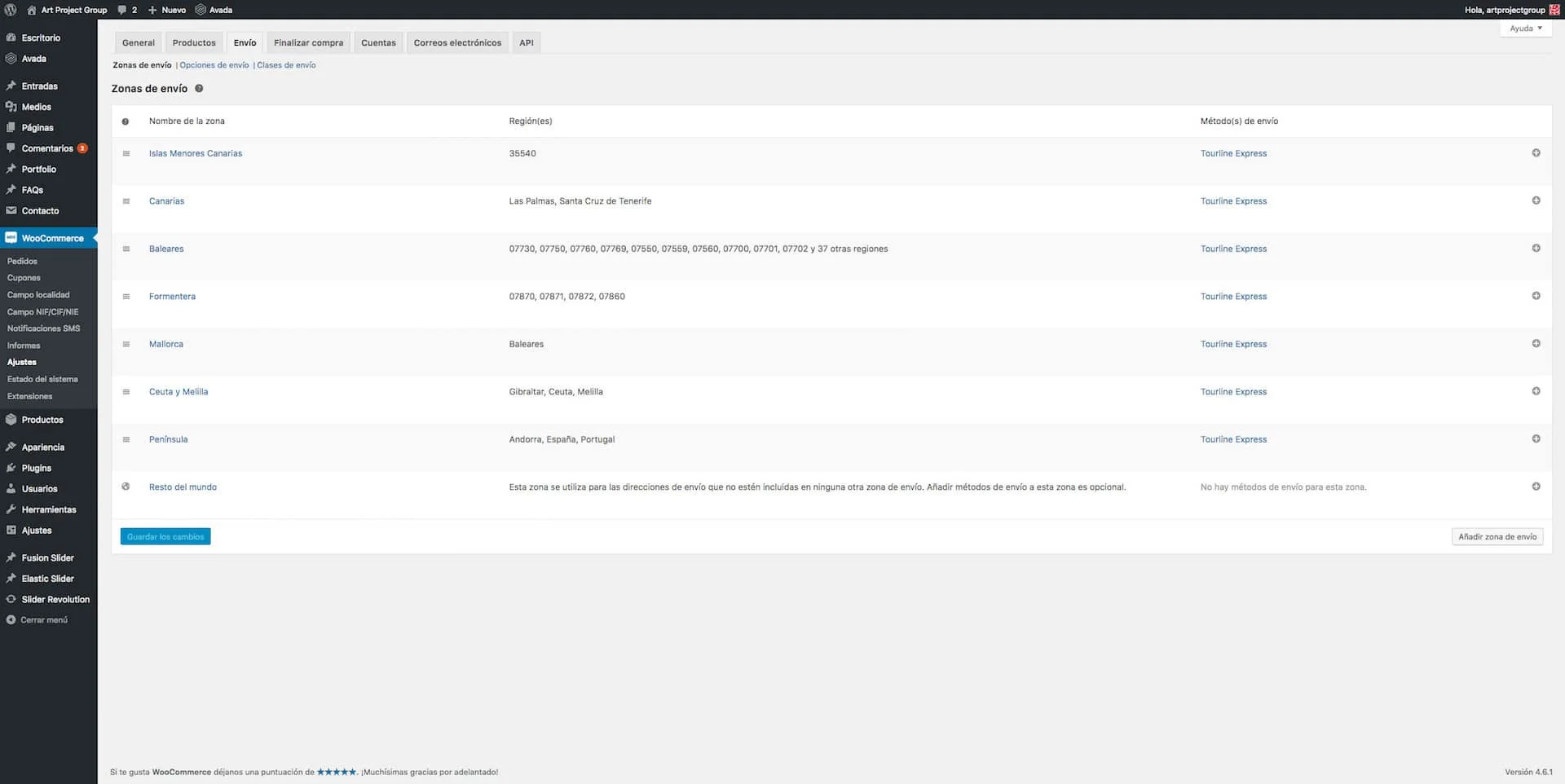
The final result of the configuration of the shipping zones and shipping methods must be similar to this:
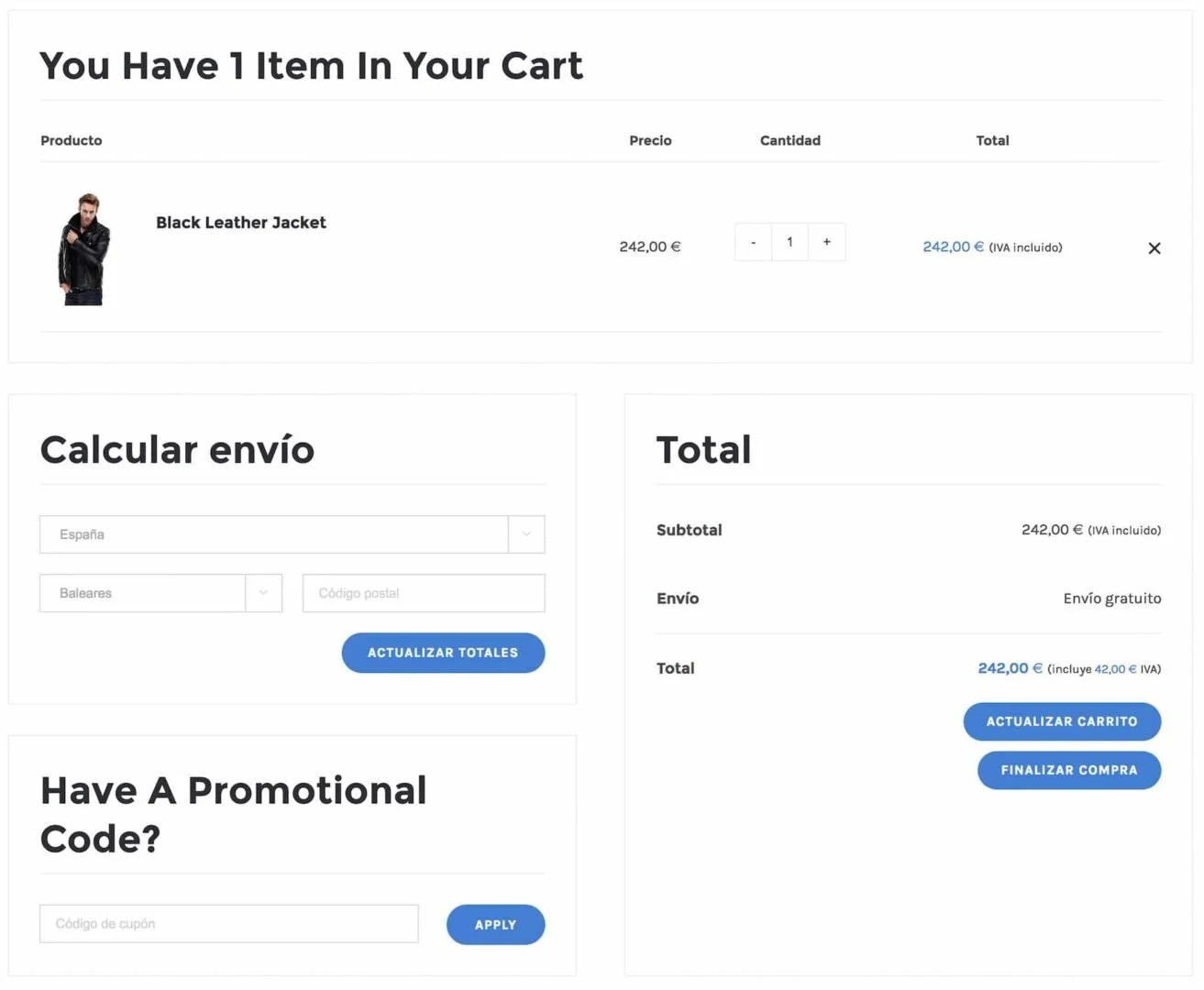
And on the shopping cart page free shipping must appear for orders over €100.00 in all our shipping zones except the Azores, the Canary Islands, Ceuta, Melilla and Gibraltar.
As you will have been able to see, WC - APG Free Shipping is very simple to configure and offers us a great many possibilities. If you come across any problem, you need some improvement or you require our help, do not hesitate to get in touch with APG.
Technical support
If you need help with the configuration and use of WC - APG Free Shipping, or if you come across any kind of problem related to its installation, activation or use, try the flat rate of our technical support and save time.
Help
If you have liked and found WC - APG Free Shipping useful, and if you want to help APG to keep it completely free, you can make a donation to help with its improvement and maintenance.
Related posts




Comments
Products and services
-
 WC - APG ecoSoftWEB
-
 Custom Fields Starter Kit
121,00 €
-
 Virus removal
From: 242,00 €
-
 Data Import Starter Kit
121,00 €
-
 WP Total Updater
From: 42,35 € / MONTH

Art Project Group is now available in English. The whole site is translated: every plugin page, the full documentation and the support centre.
artprojectgroup.com #WordPress #WooCommerce

How do you set up WC - APG Cont4?

¿Cómo se configura WC - APG myGESTIÓN?

¿Cómo se configura APG Multisite Suite?
Se ha publicado #WordPress 7.1.4: actualización de seguridad que corrige vulnerabilidades detectadas en el núcleo.
Al tratarse de una actualización de seguridad, se recomienda actualizar inmediatamente.



Hola,
Magnifico plugin! Y no tuve ningún problema con la actualización. Lo que me está fallando es con la tabla, problema que no tenía antes de la actualización. En mi tabla tengo:
1|6.85|S1
2|7.75|S1
3|9.75|S1
4|11.15|S1
Y tengo seleccionado Overweight- Return Maximun price.
Pero ahora después de la actualización, un producto con peso de 1.8 me pone el costo de 6.85 cuando debe ser 7.75. Parece ser que me redondea hacia abajo cuando antes eso se iba al precio 2.
Espero sus comentarios, muchas gracias!
Esa configuración no es compatible con la versión actual del plugin WC - APG Weight Shipping, y mucho menos con WC - APG Free Shipping :-(
Un saludo.
¿Se puede configurar para que en un carrito que incluya productos virtuales y reales, en los gastos de envío gratuitos a partir de una cantidad, solo tome en cuenta la cantidad total de productos reales ignorando el precio de los virutales?
Puedes usar las clases de envío para eso.
Un saludo.
He actualizado el programa APG Weight and Postcode/State/Country Shipping, y he hecho las modificaciones en woocommerce, pero los pesos de los diferentes productos no no me los suma, es más para un producto de peso 15 kg toma el peso de 5 kg (que es el más pequeño). ¿hay alguna pestaña que no he activado?
Seguramente tendrás algún fallo de configuración dado que el plugin funciona perfectamente y sin problemas conocidos.
Un saludo.
¿Cuál es la manera de poner un envío gratuito siempre y cuando haya un importe mínimo, pero no exceda de un peso máximo? En este caso querría poner que el envío gratuito fuera para más de 70 euros, siempre y cuando no superara los 2 kilos?
Muchas gracias.
Para eso tendrías que usar su hermano mayor WC - APG Weight Shipping.
Un saludo.
Sí. Lo tengo instalado y configurados los pesos, pero no tengo claro como marcar un importe mínimo para el envío gratuito.
Gracias.
Revisa los tutoriales.
Recuerda que no proporcionamos ningún tipo de soporte gratuito y que si necesitas ayuda tienes a tu disposición nuestro Soporte técnico.
Un saludo.
Muchas gracias. He configurado WC - APG Weight Shipping, siguiendo el tutoríal… Una vez revisados los otros no encuentro nada al respecto de cómo configurar el envío gratuito a partir de un gasto mínimo.
Gracias aún así. En el resto de opciones funciona muy bien.
Un saludo.
Hola buenas, tengo instalado este plugins, esta todo perfecto salvo una cosa, mi cliente me pide que en los gastos de envíos hasta 10kg se cobre un base de $3.000(pesos chilenos) y que pasado esa cantidad de kilos se cobre un adicional de $100 por cada kilo, ejemplo si un usuario quisiera comprar 12 kilos de un producto los gastos de envío deberían ser 3.000 + 200(100 cada kilo adicional), se puede hacer esto?????
Les envío un saludo desde Chile.
Con este plugin que has comentado no, con su hermano mayor se puede hacer, pero no automáticamente. Tendrás que configurar los kilos adicionales manualmente.
Un saludo.
Gracias por responder, tengo instalado WC - APG Weight Shipping, puedes darme alguna pista de como configurar el peso adicional para poder sumarle un costo por cada kilo agregado?.
Ya lo hemos respondido alguna que otra vez, así que revisa los comentarios de ese plugin.
Un saludo.
Donde puedo poner el precio del kg adicional?
No existe ninguna opción para esto.
Un saludo.