



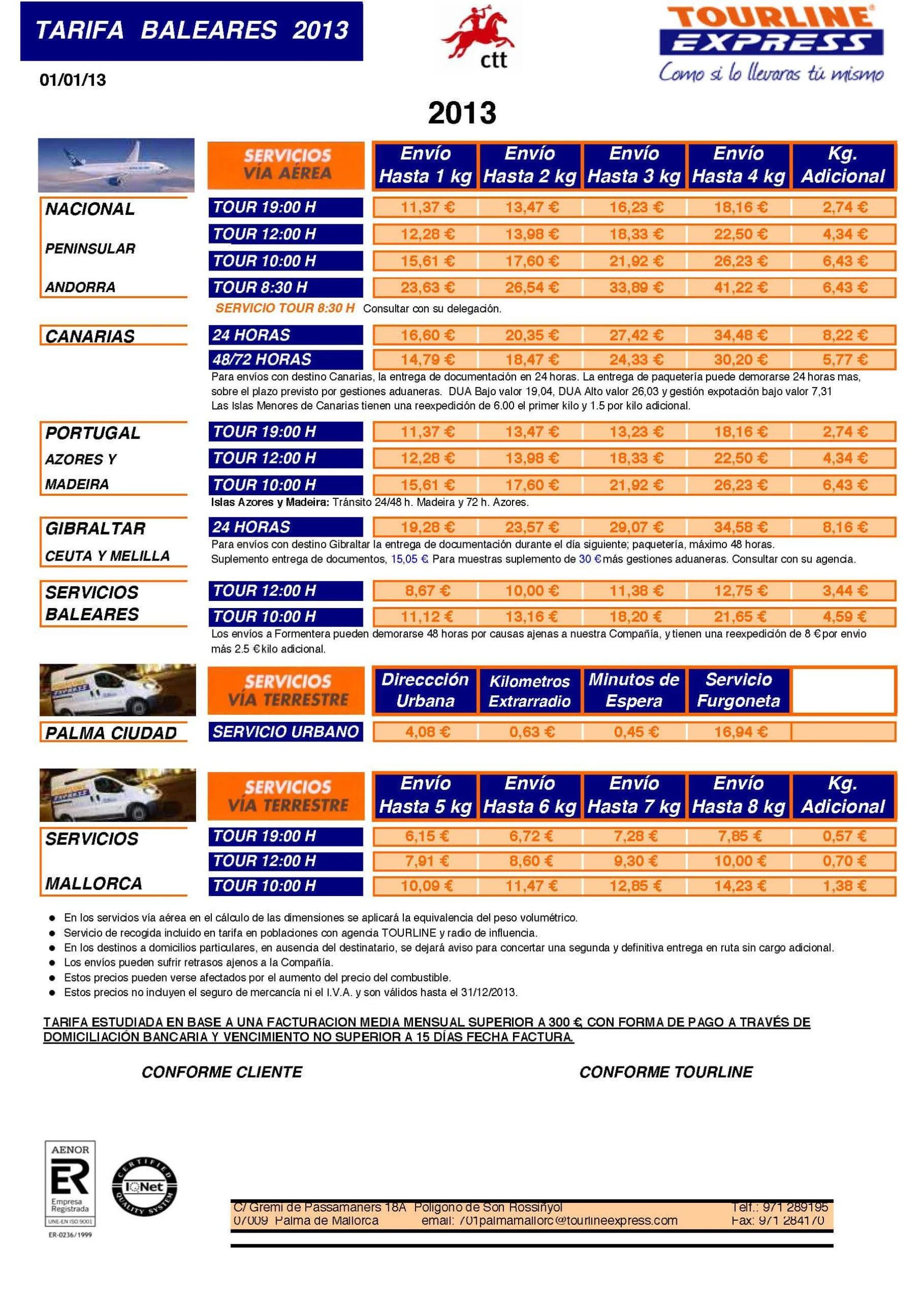
We are going to learn how to configure the WC - APG Weight Shipping plugin starting from a real rate card, in this case from the company Tourline Express, for a company based on the island of Majorca, and which we can see working for real at Herves-Vida.
The first thing we are going to do, if we have not done it already, is to install the plugin. You already know that to do that you have to upload the woocommerce-apg-weight-and-postcodestatecountry-shipping folder to the /wp-content/plugins/ directory, or upload the complete ZIP file via Plugins -> Add New -> Upload in the administration panel of your WordPress installation, or simply search for WC - APG Weight Shipping in Plugins -> Add New.
Once the plugin has been uploaded to the server, you have to activate it through the Plugins menu in the WordPress administration panel.
Now that we have it installed and activated, we are going to configure it by clicking the Settings button, where we will find ourselves straight away on the APG Shipping Costs tab, or through WooCommerce -> Settings -> Shipping, where we will find ourselves on the Shipping Options tab. It is important that, before configuring the shipping costs, we have configured the taxes beforehand. For that we strongly recommend reading How do you configure VAT for the Canary Islands, Ceuta and Melilla in WooCommerce 2.0?.
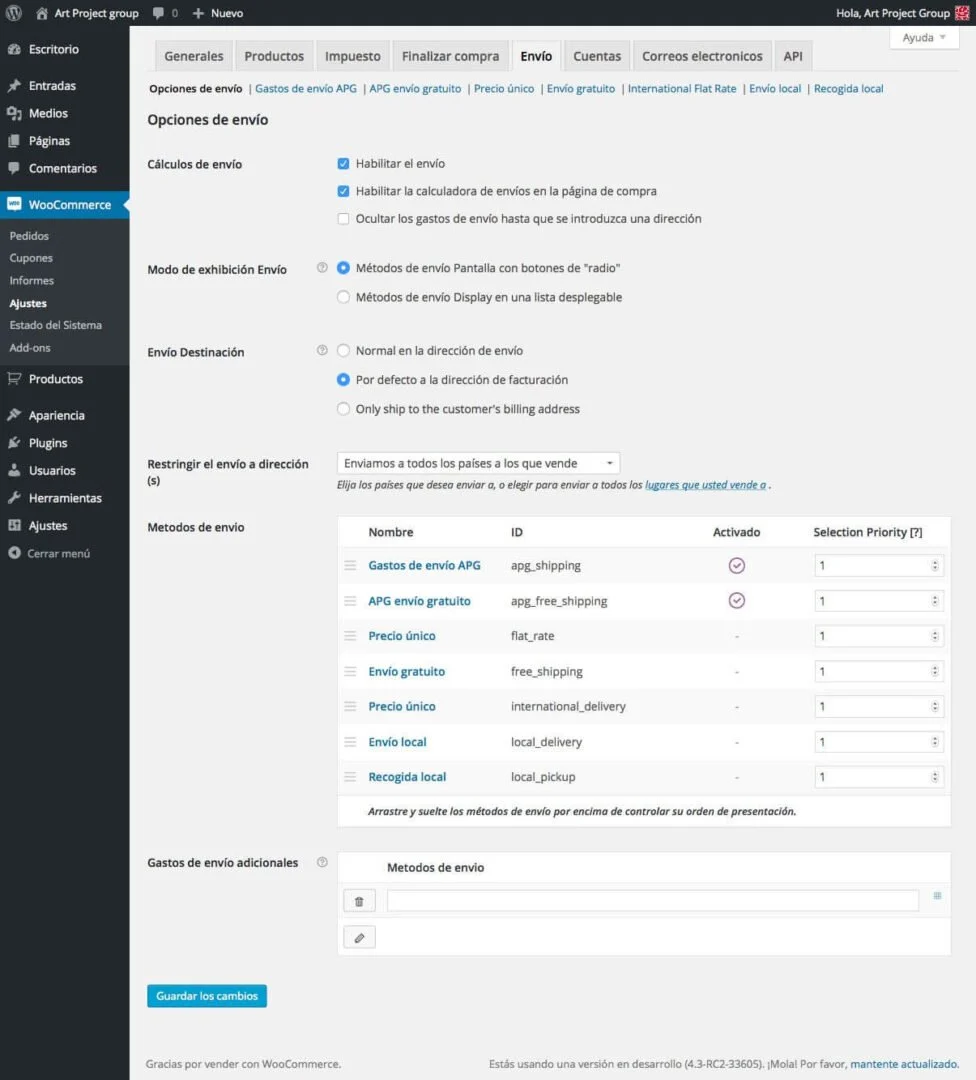
In our example we are going to enable the shipping costs for Spain, including the Canary Islands, Ceuta, Melilla and the Balearic Islands, and Portugal. And we will do it in three simple steps.
In the first place, and to begin with, we are going to enable the shipping method by ticking the Enable/Disable box. In Method title we are going to put Tourline Express and in Tax status we will select Taxable; let us remember that we had already configured it with VAT at 21%, just as we stated in How do you configure VAT for the Canary Islands, Ceuta and Melilla in WooCommerce 2.0?. In Cost per order we can add a fixed handling and packaging cost, although in our case we have not used it. In Additional cost we can add a second fixed or percentage cost; in our particular example we have an additional cost of 8% per order for transport insurance, so we have added it to this field. For the moment we are going to leave Shipping rates and we state the Number of postcode groups, Number of state groups and Number of country groups. In our example we are going to put 3, 3 and 1 respectively, that is, we are going to use three postcode groups, three state groups and one country group.
From version 0.9 of WC - APG Weight Shipping onwards we have set up a system that detects the configuration we have in the Allowed countries and/or Specific countries fields on the General options tab. Depending on the configuration we have, one option or another will appear:
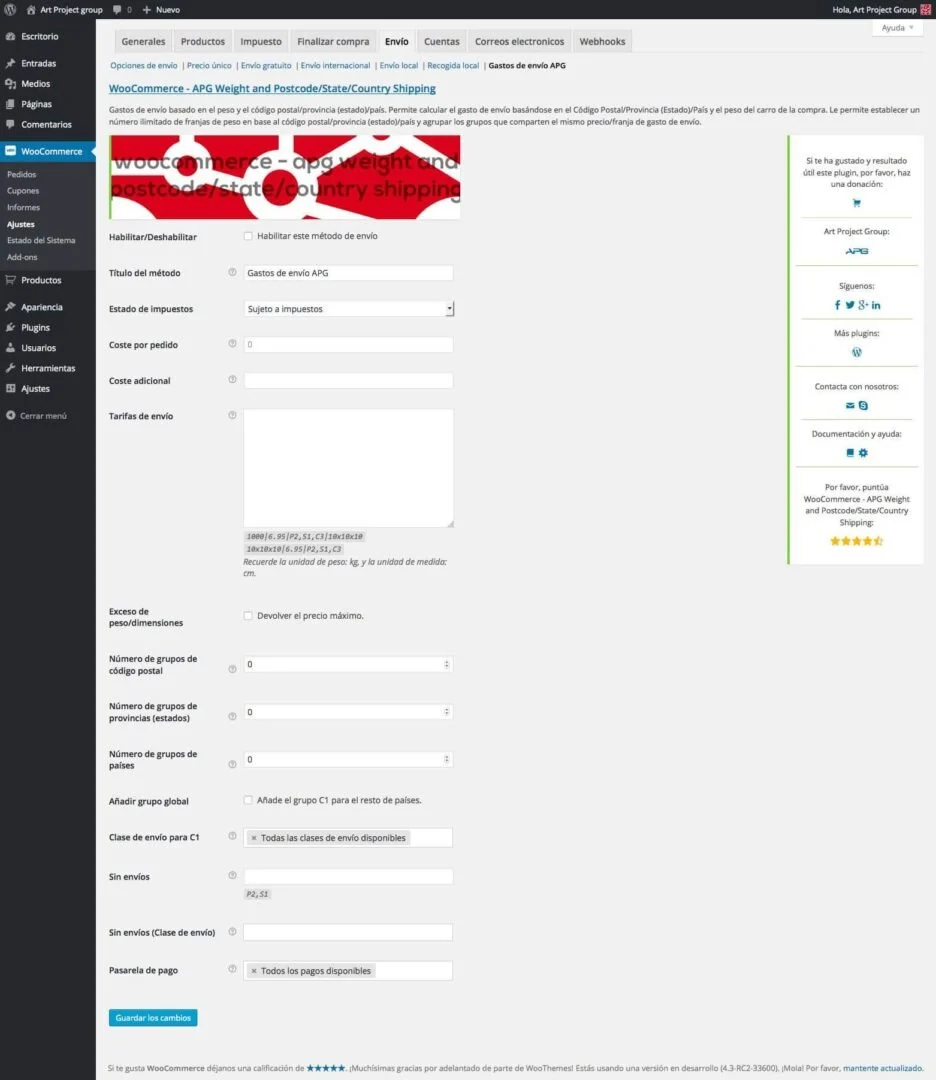
- All countries: if we have selected this option in the Allowed countries field, we will find a field called Add global group.
- Specific countries: if we have selected this option in the Allowed countries field, and we have stated a list of countries in the Specific countries field, we will find a field called Add countries to specific.
In the event that we have the online shop configured to serve all the countries included in WooCommerce and we need to create a global rate to be used in all the countries not included in any of the groups we create, in version 0.8 we have added a new field called Add global group that lets us create the rates we need for those countries grouped into a new group whose code is given to us automatically by WC - APG Weight Shipping.
In Add countries to specific we tick the box so that it automatically updates the Specific countries field on the General options tab. Lastly, before clicking Save changes, we are going to add only the two countries we need, given that we are only going to use a single country group. We will do it in Country group 1 (C1) by selecting Spain and Portugal, and we will leave the Tax class for C1 field at 21%.
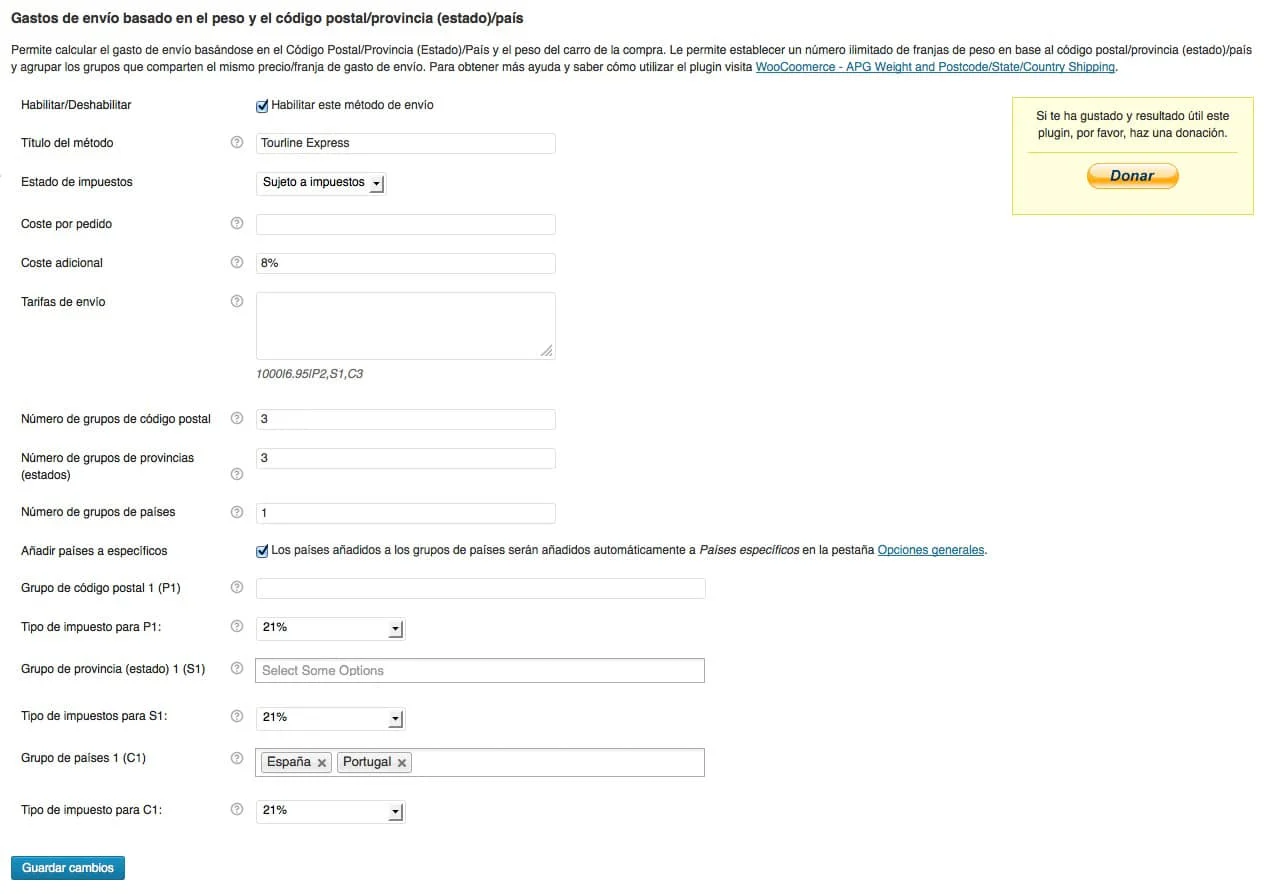
After clicking Save changes, we will proceed with the second step. Now we are going to add the postcode and state groups. In the Postcode group 1 (P1) field, as we want it to affect all of the Balearic Islands except Majorca and Formentera, we add all the postcodes that Ibiza and Menorca have, given that Cabrera does not have a postcode. In our particular case we are going to put 07730; 07750; 07760; 07769; 07550; 07559; 07560; 07700-07714; 07740; 07748; 07749; 07710; 07711; 07713; 07720; 07800; 07814; 07819; 07840; 07849; 07850; 07816; 07820; 07828; 07817; 07818; 07829; 07830; 07839; 07810; 07811; 07812; 07815.
Remember that in the postcode fields we can use the wildcard character (*) to state a whole province, for example 07*, and a range, like the one used in this example 07700-07714, which will be converted automatically by the system into all the postcodes that make it up 07700; 07701; 07702; 07703; 07704; 07705; 07706; 07707; 07708; 07709; 07710; 07711; 07712; 07713; 07714. It is also important to remember that you have to put a semicolon (;) between one postcode and the next.
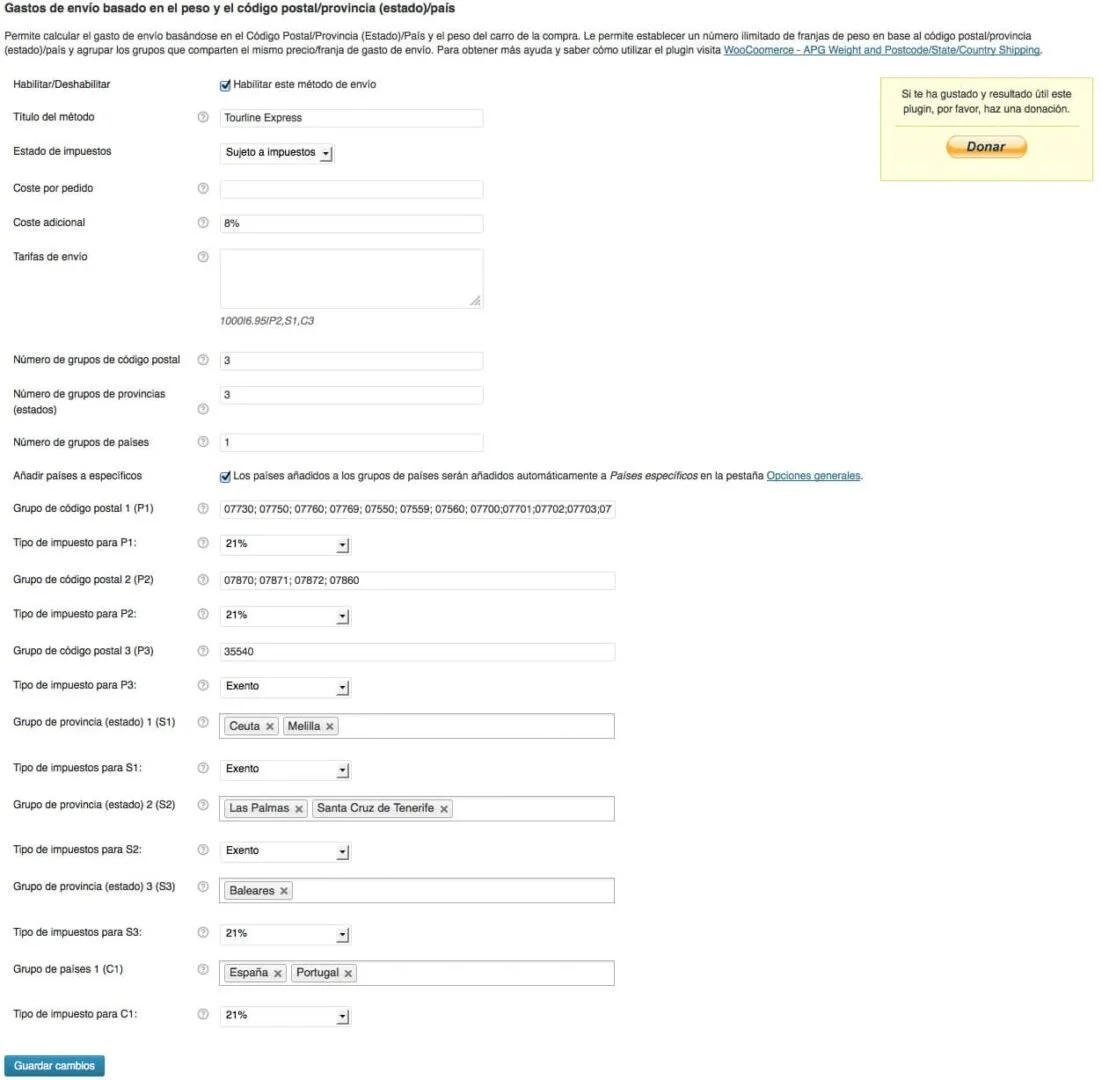
In the Postcode group 2 (P2) field we are going to put the postcodes of Formentera, in this case 07870; 07871; 07872; 07860. And in the Postcode group 3 (P3) field we are going to put 35540, which is the postcode of the island of La Graciosa, which is the only Minor Island of the Canary Islands that is inhabited, and which has, just like the island of Formentera, a special surcharge. In the first two cases we will leave the tax class as it is, at 21%, while in the Tax class for P3 field we will select the Exento VAT class.
Now we only have the State (province) group 1 (S1) field left, where we will put Ceuta and Melilla, State (province) group 2 (S2), where we will put Las Palmas and Santa Cruz de Tenerife, and State (province) group 3 (S3), where we will put the Balearic Islands, so that it only affects Majorca, given that we control the rest of the islands by postcode. In the Tax class for S1 and Tax class for S2 fields we will select the Exento VAT class, so that it does not charge the 21% VAT to Ceuta, Melilla and the Canary Islands. And now we can click Save changes to bring the second step to an end.
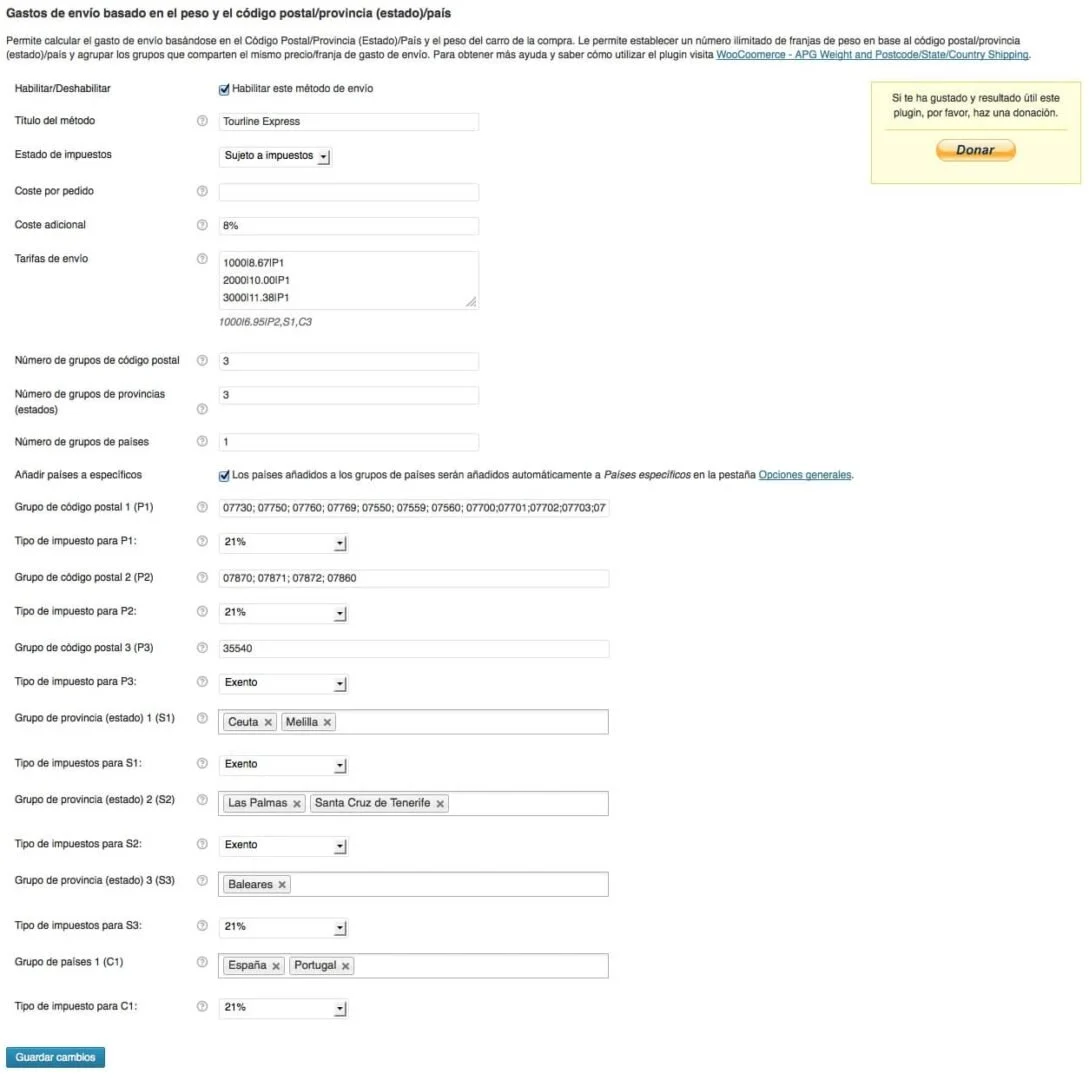
Now that we have finished configuring the name, the costs, the postcodes, the states, the countries and the tax classes we need, we only have to enter the various Shipping rates for each weight, measurement and group.
Remember that the format proposed to us for entering the rates is: 1000|6.95|P2,S1,C3|10x15x30, which is equivalent to: weight|price|group/s|length, height and width. In the event of using the same rate for more than one group, we must separate them with commas.
The measurements are optional and can be entered or not. WC - APG Weight Shipping will remind us of the weight and measurement units we have configured in the shop, so we must adjust the maximum weights and measurements to these units.
As in our particular case we have the gram configured as the Weight Unit of the online shop, remember that it is configured in WooCommerce -> Settings -> Catalog, we will put the weights in grams in bands of 1000 by 1000 up to 10 kilos (10,000 grams).
We are going to start by entering the cheapest rates:
For Postcode group 1 (P1) we are going to use the rates stated under Servicios Baleares in the Tourline Express rate card:
1000|8.67|P1
2000|10.00|P1
3000|11.38|P1
4000|12.75|P1
5000|16.19|P1
6000|19.63|P1
7000|23.07|P1
8000|26.51|P1
9000|29.95|P1
10000|33.39|P1
For Postcode group 2 (P2) we are going to use the rates stated under Servicios Baleares but with an increase of €8.00 per order and €2.50 per additional kilo:
1000|16.67|P2
2000|20.50|P2
3000|24.38|P2
4000|28.25|P2
5000|34.19|P2
6000|30.13|P2
7000|40.13|P2
8000|46.07|P2
9000|52.01|P2
10000|57.95|P2
For Postcode group 3 (P3) we are going to use the rates stated under Canarias but with an increase of €6.00 per order and €1.50 per additional kilo:
1000|20.79|P3
2000|25.97|P3
3000|33.33|P3
4000|40.70|P3
5000|47.97|P3
6000|55.24|P3
7000|62.51|P3
8000|69.78|P3
9000|77.05|P3
10000|84.32|P3
For State (province) group 1 (S1) we are going to use the rates stated under Gibraltar, Ceuta y Melilla; note that in our case we have not used Gibraltar, but we could have configured it as Country group 2 (C2) and added it as S1,C2:
1000|19.28|S1
2000|23.57|S1
3000|29.07|S1
4000|34.58|S1
5000|42.74|S1
6000|50.90|S1
7000|59.06|S1
8000|67.22|S1
9000|75.38|S1
10000|83.54|S1
For State (province) group 2 (S2) we are going to use the rates stated under Canarias:
1000|14.79|S2
2000|18.47|S2
3000|24.33|S2
4000|30.20|S2
5000|35.97|S2
6000|41.74|S2
7000|47.51|S2
8000|53.28|S2
9000|59.08|S2
10000|64.82|S2
For State (province) group 3 (S3) we are going to use the rates stated under Servicios Mallorca:
5000|6.15|S3
6000|6.72|S3
7000|7.28|S3
8000|7.85|S3
9000|8.42|S3
10000|8.99|S3
And finally for Country group 1 (C1) we are going to use the rates stated under Nacional, Peninsular, Andorra or Portugal, Azores y Madeira, which are the same.
1000|11.37|C1
2000|13.47|C1
3000|16.23|C1
4000|18.16|C1
5000|20.90|C1
6000|23.64|C1
7000|26.38|C1
8000|29.12|C1
9000|31.86|C1
10000|34.60|C1
Before finishing we must configure Weight/dimension excess, which gives us the ability to allow customers to place orders that exceed the maximum weight and/or dimensions established. It is enabled by default, so in the event of excess weight or dimensions, WC - APG Weight Shipping will return the maximum rate established for the affected group. In the event that we disable it, and the order exceeds the weight and/or dimensions established, no rate of any kind will be returned.
Now we click Save changes for the third and last time and we now have all the rates we are going to need completely configured.
In the event that we need to configure more than one transport company, we can add it/them in the Additional shipping costs field, available in WooCommerce -> Settings -> Shipping, and click Save changes. Once we do it, the new shipping cost/s will appear and we will be able to arrange them in the order in which we want them to appear and configure them with the rates each company states to us. From version 1.7 of WC - APG Weight Shipping onwards we have changed the interface of this option and we have created a completely new function to manage it.
From version 0.7 of WC - APG Weight Shipping onwards we have added two new options:
- No shipping: in this option we can state all the postcode and/or state (province) groups in which we do not want orders from our online shop to be served. Very useful for those who do not want to serve the Canary Islands, Ceuta and Melilla, for example.
- Payment gateway: in this option we can link the shipping with a specific payment gateway. Very useful for those of you who use cash on delivery. From version 1.2 onwards more than one payment gateway can be selected simultaneously.
From version 0.9 of WC - APG Weight Shipping onwards we have added a new option that will only appear if we have the WC - APG Free Shipping plugin installed and activated:
- Show only APG Free Shipping: which, if it is enabled, will hide the rate we have configured and will show only the free shipping, if it is enabled for the zone, postcode, state (province) or country of the shipping.
From version 1.6 of WC - APG Weight Shipping onwards we have added support for shipping classes, so for each postcode, state (province) and/or country group we will be able to select, as well as the VAT class we want to apply, and in the event that we have any configured, the shipping class we want to apply for each group. In the case of the shipping classes, we will be able to select all the available ones, just one or several at a time, just as we can do with the payment gateways. In How do shipping classes work in WC - APG Weight Shipping? you will find more information.
From version 1.8 of WC - APG Weight Shipping onwards we have added the No shipping (Shipping classes) option to state which shipping classes we do not want the shipping costs to be applied to.
As you have been able to see, WC - APG Weight Shipping is very simple to configure and offers us a great many possibilities. If you come across any problem or need any improvement, do not hesitate to get in touch with APG.
Update: given that the configuration screen has been completely redesigned, the screenshots will not be exactly what you will see on your screen. New features added.
Technical support
If you need help with the configuration and use of WC - APG Weight Shipping, or if you come across any kind of problem related to its installation, activation or use, try the flat rate of our technical support and save time.
Help
If you have liked WC - APG Weight Shipping and found it useful, and if you want to help APG to keep it completely free, you can make a donation to help with its improvement and maintenance.
Related posts




Comments
Products and services
-
 Data Import Starter Kit
121,00 €
-
 Security Improvement
181,50 €
-
 WC - APG Cont4
-
 Multilingual Starter Kit
121,00 €
-
 SEO Optimization
From: 181,50 €

Art Project Group is now available in English. The whole site is translated: every plugin page, the full documentation and the support centre.
artprojectgroup.com #WordPress #WooCommerce

How do you set up WC - APG Cont4?

Se ha publicado #WooCommerce 11.2.2: actualización de seguridad que refuerza las API REST y Store, mejora la validación de CSV y corrige problemas en pagos y pedidos. Incluye cambios en la base de datos.
¡Actualiza cuanto antes!
¿Cómo se configura WC - APG myGESTIÓN?

¿Cómo se configura APG Multisite Suite?



Este plugin pinta muy bien, voy a probarlo…
Hola,
esto es justo lo que necesito :D.
Lo estoy probando, lo he configurado y no me aparece en el momento de la compra… ¿que hago mal?.
Gracias!
En primer lugar, gracias por usar nuestro plugin.
¿Qué no te aparece en el momento de la compra, los gastos de envío?
Los gastos de envío aparecen en el carro de la compra, y si no te aparece ninguno, quizás sea por que en WooCommerce -> Ajustes -> Impuestos, en Dirección de cliente por defecto tengas seleccionado Sin dirección. Si es así, pon Dirección base del negocio y listo.
Si no, danos la URL de la tienda y le echamos un vistazo.
¿Es obligatorio trabajar con impuestos?… no he configurado IVA… pensé poner todo IVA Inc.
la URL (aún no he terminado …. ) es: http://tubabyshop.es/
Un saludo.
En principio no, no es necesario si configuras todo bien.
Tiene pinta de que no has activado los gastos de envío, sólo aparecen:
Y sólo si se selecciona una provincia, lo que nos indica que no has configurado el parámetro indicado anteriormente.
Para habilitar el gasto de envío que hayas configurado, asegúrate de que tienes activado el campo Habilitar/Deshabilitar en WooCommerce -> Ajustes -> Envíos -> Gastos de Envío APG, también estaría bien que en WooCommerce -> Ajustes -> Envíos -> Opciones de Envíos tuvieras activados los campos Habilitar envío y Activar la calculadora de envío en la página del carrito de Cálculos de envíos, y que el gasto de envío configurado esté marcado como predeterminado.
No estaría mal que le echaras un vistazo a la documentación oficial de WooCommerce: http://docs.woothemes.com/document/configuring-woocommerce-settings/#shipping.
Esperamos que te sirva de ayuda.
Voy a revisar todo, además he “borrado caché” y ya veo que calcula bien para Murcia, sin embargo no para el resto de provincias, algo me he saltado.
Gracias por su ayuda y por compartir conocimiento.
Un saludo.
@josecostaros
Ya nos contarás ;-)
Un saludo.
¡Solucionado!, me ocurría que en el precio ponía una coma en lugar de un punto… así que no me hacía los cálculos bien. Por ejemplo ponía: 1000|6,95|S1 en lugar de 1000|6.95|S1
Un “punto” cuenta ;-)
¡GRACIAS! nuevamente por vuestros aportes. Os sigo y comparto .
Un abrazo.
Hello,
I use this plugin to calculate shipping. This seems to work for calculating shipping. But I have this message in my cart: Warning: in_array () Expects parameter 2 to be array, string Given in / URL / wp-content / plugins / WooCommerce-apg-weight-and-postcodestatecountry-shipping / apg-shipping. php on line 349
What should I do to not have this message ?
Thank you in advance for your response.
We fix this bug on version 0.8. We’ll publish it tomorrow.
The problem was generated only on countries without states.
Please, update it, try it and tell us something.
Probably you have any empty field on postcode, state or country groups.
Please adjust the number of groups from 0 to those you need.
Try it.
Thanks for your fast answer.
No, i already adjusted the number of groups. Any other reason for my problem ?
Can you send to us a screenshot?
Gracias a este post tan explicativo lo he conseguido hacer. Llevaba varios días doliendome la cabeza con esto. Muchas gracias por el plugin y la explicación.
Hola
¿Como se hace para configurar el metodo contrareembolso con APG Weight and Postcode/State/Country Shipping?
Gracias.
¿Has probado a utilizar el campo Coste adicional aplicándole el porcentaje correspondiente?
¿Como puedo evitar que salgan ciertas provincias en el calculo?… pongo solo las que quiero (todas menos Canarias, Ceuta y Melilla) y al poner una no puesta muestra precio… ¿?…
Para eso no está previsto…
Le echaremos un vistazo a ver qué podemos hacer en el código.
Ok!, creo que dará valor al plugin…
Ya tenéis las mejoras que necesitáis en la nueva versión 0.7.
Esperamos que os gusten, así como vuestros comentarios, votaciones y donaciones ;-)
Hola, acabo de instalar la version 1.0.1 con la version 3.8 de wp y no veo muchas de las opciones que comentas en las instrucciones. Puedo crear grupos de paises pero de provincias nada, no veo nada. Me interesa por el tema de diferentes gastos de envios para canarias, ceuta… Tiene muy buena pinta. Muchas gracias!
Hola Roca D. Sigue las instrucciones y lo conseguirás, es sencillo. Pon en C1 España por ejemplo y guarda… verás que puedes poner provincias… sigue los pasos, es un plugin genial. Saludos.
Yo entiendo que si, pero una vez puesto españa y guardado lo que veo es esto:
No se que hago mal…
Eso no es correcto, faltan campos. Envíanos un usuario admin por correo electrónico y le echamos un vistazo.
Lee bien la entrada y sigue los pasos que indicamos, ya verás como si que te aparecen todas las opciones.
Hola, yo no se lo que estoy haciendo mal, intento seguir vuestras instrucciones pero solo me sale habilitado el envio gratuito. Lo he mirado todo y creo que esta bien. Otra cosa en shipping rates que barra utilizas para separar ya que yo he puesto / la que tu pones totalmente vertical no se de donde sacarla. Tambien queria preguntarte que en WooCommerce-Ajustes-Envio-opciones de envio, debajo de los metodos de envio me sale Additional shiping y un cuadrado ¿qué he de poner ahi?
Gracias Olga
http://www.illogronio.com.es
En primer lugar, muchas gracias por utilizar nuestro plugin. Efectivamente no aparece ningún gasto de envío, salvo Recogida local.
Mucho nos tememos que si utilizas la barra inclinada o slash (/), JAMÁS funcionará ninguna tarifa, la única forma de que funcione es utilizar la barra vertical (|), la cual depende del Sistema Operativo que utilices y el idioma de teclado, pero suele estar accesible con CTRL + ALT + 1, o ALT Derecho + 1 en OS X. Es fundamental que sigas al pie de la letra las instrucciones de introducción de datos que se muestran en cada uno de los campos y en esta misma entrada.
Por último, el campo Additional shipping, vemos que trabajas con el WordPress en inglés, sirve para añadir más tipos de gastos de envío, muy útil, por ejemplo, si trabajas con más de una empresa de transporte para enviar los pedidos. Si no la necesitas, no debes poner nada.
P.D: debes revisar detenidamente tu plantilla ya que no funciona correctamente, al menos en Mozilla Firefox 26.0 en OS X Mavericks.
Gracias por vuestra respuesta tan rapida, lo soluciné, ya que por muchas vueltas que le daba al teclado no encontraba la barra, pero al día siguiente y con tranquilidad “tachan” la tenia en le nº 1.
Ahora tengo otro problema, yo tengo configurado el IVA en la pestaña de impuestos standar tanto para los cobros del 21% como para los exentos y me va fenomenal me lo calcula bien, pero lo que no me suma el el IVA al transporte. Tambien tengo puesto que lo calcule al envio en la configuracion de los impuestos pero nada.
Como lo puedo solucionar
Gracias
Mírate la respuesta que le dimos a Raquel con el mismo problema en WC - APG Weight Shipping de APG. Seguro que te va a ser de gran ayuda.
Hola,
He instalado vuestro plugin y lo estoy configurando pero tengo un problema… Configuro los gastos de envío para Canarias, Baleares y Ceuta y Melilla y hasta ahí todo bien, pero si intento hacer un pedido para otra provincia fuera de esos grupos (Cadiz o Madrid), aparece este mensaje: “Lo sentimos, parece que no hay métodos de envío disponibles para su ubicación (España). Si necesita ayuda o desea hacer arreglos alternativos, por favor, póngase en contacto con nosotros.”. Si habilito la opción precio único de woocommerce, sí reconoce el resto de provincias, pero aparece tambien para Canarias, Baleares, Ceuta y Melilla (es decir, si hago un pedido para Ceuta aparecen las dos opciones, la configurada con APG que son 18€ y la de woocommerce de 5.00€)… ¿podéis ayudarme?
Gracias de antemano,
Floren
¡Arreglado! No había configurado un grupo de países para España… :)
Buenos días,
En primer lugar felicidades por este recurso, un gran trabajo. Tengo un problema al configurarlo en mi web, cuando procedo al pago de lo comprado y a rellenar los envío, me sale automáticamente un línea de código que no se por qué aparece o como quitar. Saben si es algo que a ocurrido en alguna otra ocasión, y sobre todo que hago mal.
Gracias
¿Puedes enviarnos o publicar una copia íntegra de la línea de código que te aparece?
Warning: in_array() expects parameter 2 to be array, string given in /homepages/8/d484835276/htdocs/csibericos/wp-content/plugins/woocommerce-apg-weight-and-postcodestatecountry-shipping/apg-shipping.php on line 416
Pero me sale sólo cuando elijo envío a Tenerife que es donde se ubica la empresa, y tiene impuestos, puesto que si envías a Madrid no se puede cobrar impuestos
Gracias
Ese error suele aparecer si algún campo está vacío, es decir, si tienes el campo S1 con las provincias seleccionadas y el campo S2 sin ninguna provincia seleccionada, por ejemplo.
Vamos a publicar una actualización que evita la aparición de ese error aún estando mal configurado el plugin, así que actualiza en cuanto te aparezca disponible la actualización.
Buenas Tardes,
Hay alguna manera de configurar gastos de envio gratuitos.Tengo configurado un envio gratuito en woocommerce para la peninsula, apartir de un importe.
Pero para mi provincia me gustaria poder poner otro envio gratuito de menor importe al de la peninsula.
Gracias de amtemano
Échale un ojo a nuestro plugin WC - APG Free Shipping.
Hola, escribo desde Lima-Perú
quisiera saber si se podria crear grupos solo para ingresar costo por envio, x ejemplo:
San Isidro, La Molina, Cercado de Lima = 10.00
He probado otros plugin donde he tenido problemas al inngresar localidades con mas de 2 palabras, ya que no reconocen los espacios en blanco.
Gracias anticipas y por el plugin que se ve muy bueno.
En principio no está pensado para eso, pero puedes crear todos los grupos que necesites y ponerles un peso único muy alto o muy bajo (cero por ejemplo, aunque quizás tendrás que habilitar el campo Exceso de peso/dimesiones) para poder introducir un único costo por envío.
Hola he seguido tus consejos pero me sale este mensaje al momento de hacer el pago
“Lo sentimos, parece que no hay métodos de envío disponibles para su ubicación (Peru). Si necesita ayuda o desea hacer arreglos alternativos, por favor, póngase en contacto con nosotros.”
que podria estar mal ?
saludos
Está claro que no has seguido correctamente las indicaciones de nuestra entrada ;-).
Lo más probable es que no tengas bien configurados los países permitidos, o que no estén incluidas las provincias/estados de Perú en WooCommerce.
Hola, he seguido las indicaciones y funciono correctamente con el grupo1
pero ahora he creado otro grupo2 con el mismo pais con otras localidades y otro precio, pero al momento de hacer una prueba de pago inserto la localidad del grupo 1 y esta jalando el costo del grupo2.
adjunto una imagen con la configuracion que realice, ayuda por favor que ya casi esta lo que necesito!!!!
http://prueba4.marketingconinternet.com/wp-content/uploads/2014/02/muestra.jpg
Vamos a ver.
En primer lugar NO se pueden usar localidades, única y exclusivamente se pueden utilizar códigos postales, tal y como se indica en la ayuda y en la propia entrada. Si introduces localidades es lo mismo que si escribieras en chino, el sistema no lo entiende, sólo procesa códigos postales.
En segundo lugar puedes poner 10 grupos de países iguales, pero sólo se tendrá en cuenta el primero, todos los demás serán ignorados, por lo que en realidad, la única tarifa que te está aplicando es la del grupo C1 para todo Perú. Todo lo demás es ignorado por completo.
Te recomendamos que vuelvas a leer la entrada, ya que no tienes claro el funcionamiento del plugin.
Un saludo.
gracias por la aclaración, una pregunta mas, como se si woocommerce reconoce provincias/estados de Perú ?
gracias de antemano y disculpa por lo incovenientes.
No están, pero aquí puedes descargarte el archivo PHP que necesitas: https://github.com/claudiosmweb/woocommerce/commit/2e037456a529c006a838ec1f397df1d6d7982e20.
Suerte amigo.
Muchas gracias por tu ayuda!
Hola, enhorabuena por el plugin y por el soporte que brindais. Mi pregunta es, ¿hay alguna forma de usar este plugin basando los envíos solo en el codígo postal? Es decir crear grupos de códigos postales y asignarles una tarifa.
Si, puedes seguir las indicaciones de la entrada y aplicarlas sólo para los códigos postales que necesites.
Muchas gracias. Realmente habéis hecho un trabajo excelente.
Hola y enhorabuena por este fantástico plugin!
Tengo un problema; sólo quiero poner gastos por peso. Es decir, vendo gambas y cada “kilo” tiene un gasto diferente… es decir, hasta 3kg tiene un precio, hasta 8kg otro precio.. y así.
Como lo puedo poner en las tarifas de envío ‘incrustado’ en las | ????
Hay que leer la entrada completa, donde viene la respuesta a tu pregunta perfectamente explicada.
En tu caso en concreto, y suponiendo que tienes las unidades de peso en kilos:
3|PRECIO|GRUPO
8|PRECIO|GRUPO
…
Esperamos que te sirva de ayuda.
Hola y gracias de nuevo! Tengo un problema pues introduzco los pesos y su precio como bien me has comentado pero me aparece este mensaje:
“Sorry, shipping is unavailable to Spain. If you require assistance or wish to make alternate arrangements please contact us.”
Tengo seleccionado en la opciones generales que sólo ‘envíe’ a españa y el botón “Los países añadidos a los grupos de países serán añadidos automáticamente a Países específicos en la pestaña Opciones generales.” lo tengo ‘pulsado’.
He puesto las líneas:
Hasta 3kg|13|P1
Hasta 5kg|22|P1
Hasta 8kg|33|P1
Sólo he puesto la opción “gastos de envío APG” en “envíos”.
Es importante notar que cuando estoy en el proceso de pago no me deja elegir país en el “dropdown” para elegir país.
Continua sin darme opción a elegir país… además de que no veo que se apliquen los precios con las franjas estipuladas en vuestro plug in. Os adjunto 2 screenshots… Qué puede estar pasando?¿?
http://www.gambarojamenorca.com/wp-content/uploads/APG-SETTINGS-NO-SPAIN.jpg
http://www.gambarojamenorca.com/wp-content/uploads/APG-ajustes.jpg
MUCHAS GRACIAS DE NUEVO!
YUJUU!! Creo que al fin he conseguido aplicarLo. Como bien dices, me faltaba asignar los paises con el grupo “C”.
Muchas gracias por la paciencia conimgo :D
EnhorabuenA!
Si no sale ningún país disponible, es porque no has configurado ningún país desde donde poder comprar en tu tienda virtual, y eso lo tienes que configurar en WooCommerce -> Ajustes.
En cuanto a la segunda captura, te recomendamos que vuelvas a leer otra vez la entrada, ya que no has entendido bien el proceso de configuración de WC - APG Weight Shipping. No puedes poner el grupo P1 si no tienes creado ningún grupo de código postal, por ejemplo.
Ya verás que si sigues las indicaciones de la entrada te funcionará al 100% y sin ningún tipo de problemas.
Un saludo.
No has puesto lo que te hemos dicho. Sólo tienes que poner esto:
3|13|P1
5|22|P1
8|33|P1
Todo lo que pongas de más te provocará toda clase de errores en WooCommerce.
Hola!!! Estoy teniendo problemas con el plugin desde la útlima actualización de WooCommerce y el mismo plugin, aun teniendolo bien configurado previamente (ya estaba probado y funcionando) desde que lo he actualizado no me aparece a la hora de finalizar el pedido la opción de envio creada con “WC - APG Weight Shipping”, he tratado de encontrar la solución en vuestra web, pero no soy capaz…
La página donde lo estoy empleando: http://www.elenamir.com/ilustracion/shop/
Pantallazos de configuración:
http://www.elenamir.com/ilustracion/shop/wp-content/uploads/pantallazo1.jpg
http://www.elenamir.com/ilustracion/shop/wp-content/uploads/pantallazo2.jpg
Gracias!!!
En el soporte oficial del plugin en WordPress.org respondimos un tema parecido (en inglés). Échale un vistazo, ya que estamos de vacaciones y no podemos responderte como deberíamos.
Un saludo.