



The other day we published version 1.6 of the WC - APG Weight Shipping plugin; in it, besides having changed the way shipping costs are calculated, since we have created a new rate calculation engine, what concerns us today is its new feature: support for shipping classes.
For those of you who do not yet know what shipping classes are, shipping classes are classes that allow us to group similar products together so as to be able to apply some particular rule to them afterwards through the shipping class that groups them, for example, a particular VAT rate.
In the particular case of WC - APG Weight Shipping it allows us to do the same, although taking it a little further, since in the creation of the groups themselves we have the possibility of configuring the VAT rate that is going to affect them, and therefore the shipping classes we select.
So, we are going to see how they work and what we can do with them.
We are going to see it clearly with a real example from one of our clients. Let us imagine that we have two classes of products, some to which we want to apply a particular shipping cost and others which we do not want to charge any kind of shipping cost for. Many of you will answer that Flat rate shipping (the flat_rate class) already exists in WooCommerce for that, and so it does, but what if, on top of that, we want our products not to be purchasable in Ceuta, Melilla, the Canary Islands or the Balearic Islands? Then Flat rate is no longer useful to us, since it does not discriminate between shipping zones, and we do not even want to imagine it if we want to apply different rates to it depending on the weight.
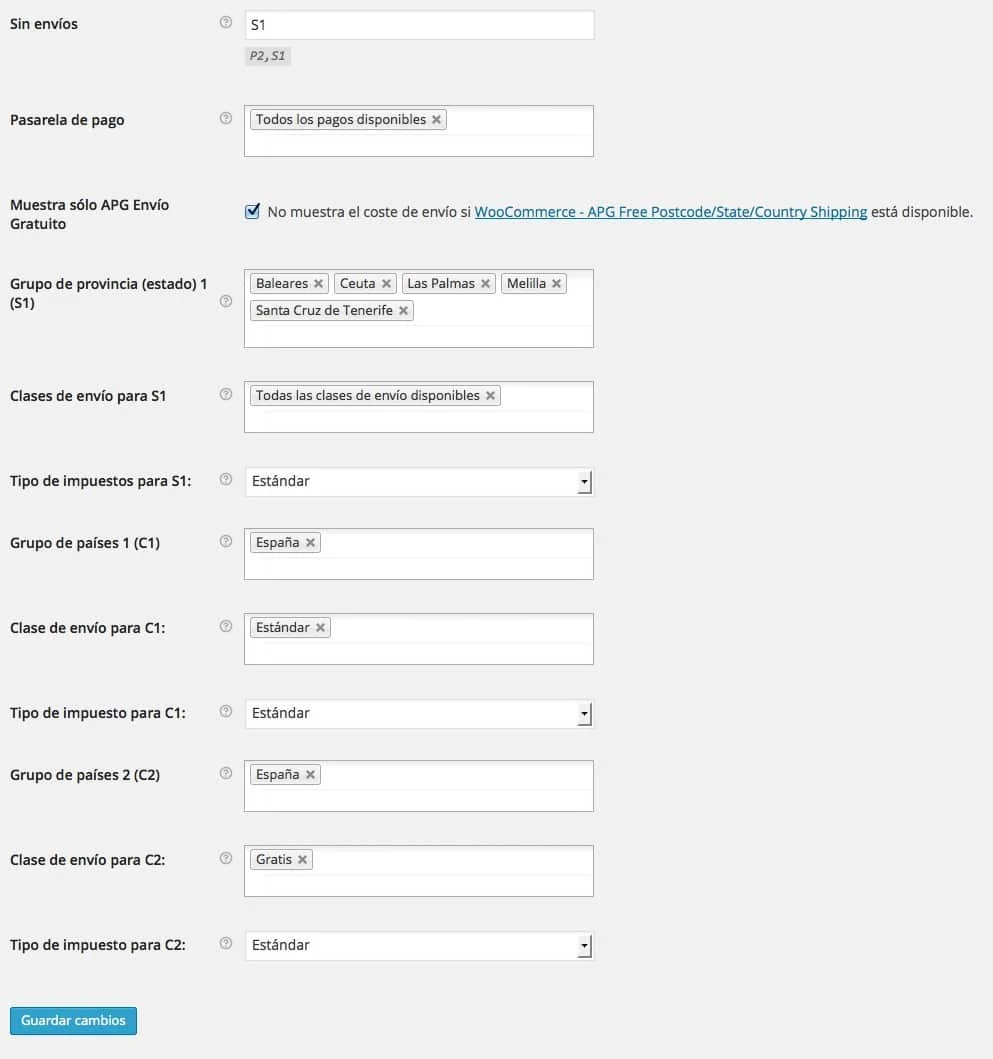
Well then, thanks to the new feature, just as we can see in the screenshot, we will be able to create two groups for the country Spain, and apply to each one the shipping class we want, as well as creating a group of provinces or states where we will put the provinces we do not want to sell to, with the All available shipping classes option selected, in order to add that group in the No shipping field, which will make the purchase impossible for the residents of those provinces.
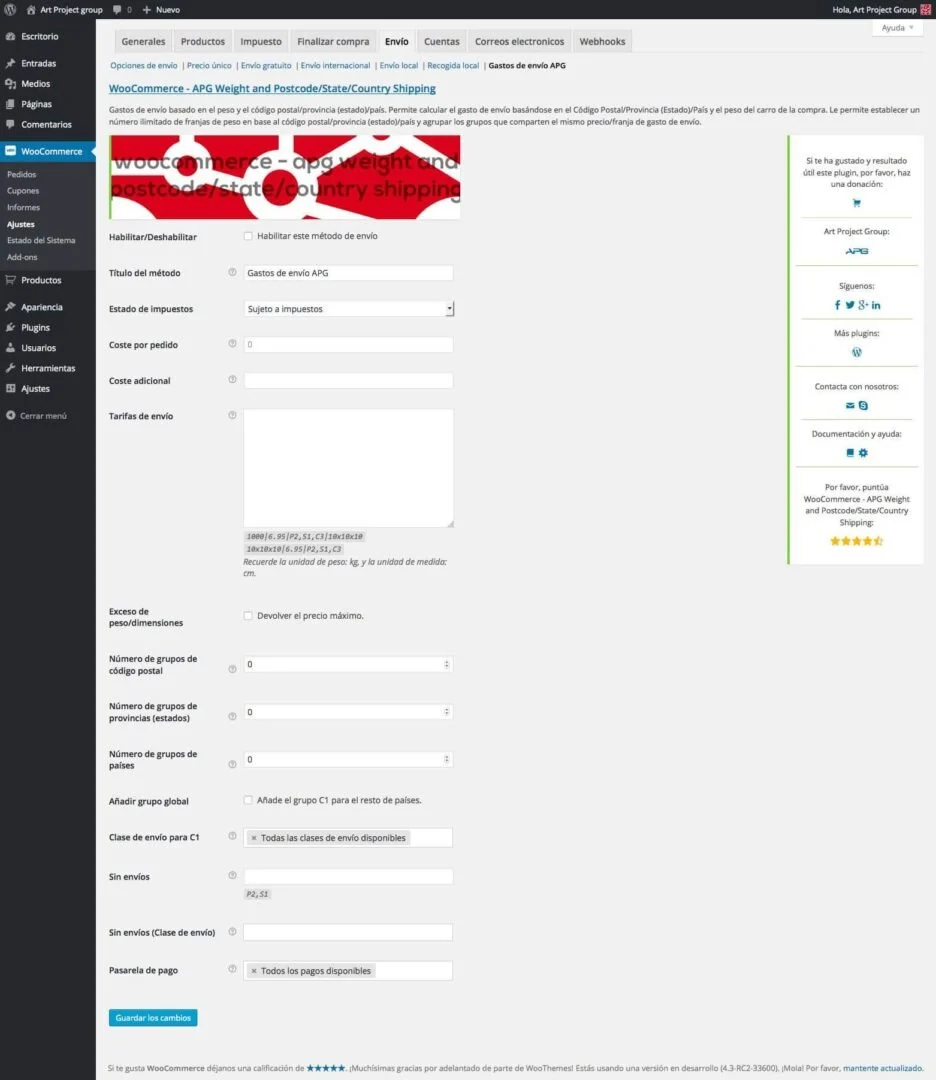
Now all that would be left for us would be to create the rates we need, just as was explained at the time in How is WC - APG Weight Shipping configured?.
And how will the calculation be done then?
Well, the plugin will take from the order all the products that belong to the Standard shipping class and will add up their total weight, and will apply the rate corresponding to that weight, and will add VAT to that rate, so that we will have a partial total for all those products.
On the other hand it will take from the order all the products that belong to the Free shipping class, and will not apply any rate to it, since we have configured it at zero, but let us imagine that it has a series of rates configured: well, WC - APG Weight Shipping will do the same as with the previous shipping class, obtaining a second partial total for those products.
Finally both partial totals will be added together, giving us a shipping cost total to which the corresponding Cost per order and/or Additional cost will be applied, if they have been configured, obtaining in this way the total shipping cost that will be applied to the order.
Thanks to the new calculation engine we can configure as many VAT rates as we need, since they will be applied and added individually to the partial totals, all of them being sent to the WooCommerce engine in charge of calculating the final shipping cost. In addition, we can use for one and the same zone all the shipping classes we need, individually or collectively, and we can have more than one shipping class applied in a single group.
With this we can raise the complexity of the calculations to the maximum possible, so, in the event that we are going to use this feature, it is necessary for us to fine-tune the rates as much as possible, since we can get unpleasant surprises with shipping costs that are too high.
For example, if we sell products that weigh a few grams, we create a couple of groups with two different shipping classes and the first rate we apply is for the first kilo and the second for the second kilo, we can find that the total weight of the order, after adding up the partial weights of both shipping classes, is less than a kilo, and that the resulting shipping cost is the equivalent of the rate configured for two kilos, for example, since the system will apply the most appropriate rate for each partial weight, in this case the one configured for one kilo, even though the partial weight was barely a few grams.
That is why it is more necessary than ever to take the utmost care with the configuration of WC - APG Weight Shipping if we do not want to get unpleasant surprises.
Technical support
If you need help with the configuration and use of WC - APG Weight Shipping, or if you come across any kind of problem related to its installation, activation or use, try the flat rate of our technical support and save time.
Help
If you have liked WC - APG Weight Shipping and found it useful, and if you want to help APG to keep it completely free, you can make a donation to help with its improvement and maintenance.
Related posts




Comments
Products and services
-
 Performance Improvement
From: 181,50 €
-
 Data Import Starter Kit
121,00 €
-
 Technical consulting
145,20 €
-
 Technical support
84,70 €
-
 WP Total Updater
From: 42,35 € / MONTH

Art Project Group is now available in English. The whole site is translated: every plugin page, the full documentation and the support centre.
artprojectgroup.com #WordPress #WooCommerce

How do you set up WC - APG Cont4?

Se ha publicado #WooCommerce 11.2.2: actualización de seguridad que refuerza las API REST y Store, mejora la validación de CSV y corrige problemas en pagos y pedidos. Incluye cambios en la base de datos.
¡Actualiza cuanto antes!
¿Cómo se configura WC - APG myGESTIÓN?

¿Cómo se configura APG Multisite Suite?



Hola,
Estoy intentando hacer que ciertos productos se envíen sin gastos de envío en la península, pero al intentar añadir la clase de envío gratuito para C2 sólo me muestra “Todas las clases de envío disponibles” y no puedo definir ninguna de las clases que tengo creadas.
Estoy empleando WooCommerce 2.1.12, Wordrpess 3.9.2 y APG 1.7.3.7
¿Porque no me aparece ninguna de las clases de envío que tengo creadas?
Hola Jose, es la primera vez que nos comentan algo semejante. De hecho, eso, la visualización y gestión de las clases de envío, funciona perfectamente en todos nuestros usuarios, sobre todo en la última versión que es la que tienes instalada.
Lo único que se nos ocurre es que no tengas bien configuradas las clases de envío.
Un saludo.
Hola, teníais razón no era un problema de vuestro plugin. Estaba utilizando el plugin WooCommerce Pay for Payment para aplicarle una comisión a los pagos contra reembolso y era el que no me dejaba ver las clases de envío que tenía configuradas. Lo he deshabilitado y han aparecido las clases de envío que tenía creadas.
¡Gracias por responder tan rápido!
Hola,
En la cesta de la compra de mi tienda si hay varios productos seleccionados solo aparece el gasto de envio de uno, como hago para que se sumen los gastos de cada producto? y si quiero hacer un descuento por comprar varios productos se puede configurar de alguna manera?
Un saludo
Yo tampoco consigo que se sumen…
Tengo dos tipos de envío, dependiendo del tipo de envío, CONGELADO y AMBIENTE, y el carrito, checkout, etc me salen los dos tipos de envío para seleccionar uno de ellos y yo necesito que se sumen…
Un saludo
No consigues que se sumen por que habrás usado dos gastos de envío diferentes. Si lo configuras correctamente un uno sólo funcionará tal y como necesitas.
Recuerda que siempre tienes a tu disposición nuestro Soporte técnico.
Un saludo.
Hola! Enhorabuena por el plugin! Ya lo usé en una web anterior y os pedí ayuda para configurarlo porque es un pelín complejo pero ahora necesito configurarlo para otra web y no me salen los select de “Clases de envío” y, precisamente quiero hacer lo que mostráis en este ejemplo: hacer envíos sólo a la Península.
Os mando una imagen de cómo lo tengo configurado y lo que veo: http://cicla.youmedia.es/envio-APG.jpg
Gracias!!
No te salen por que no tienes creada ninguna .
Un saludo.
OK! Y cómo se crean las clases de envío? Ya lo siento pero no lo entiendo muy bien… :)
Gracias!
Hay mucha documentación al respecto, pero puedes crearlas en Productos -> Clases de envío.
Un saludo.
Tengo una pregunta. Mi empresa de correo varía sus costos según el peso del paquete, hasta 1kg tiene un precio y hasta 5kg tiene otro mayor. He hecho las dos variables pero cuando pruebo comprar un producto de menos de un kg me devuelve el costo de envío de mayor precio, cómo puedo solucionar esto?
El fallo, 100% seguro, está en la configuración que has realizado, que no es correcta. Revísala y todo funcionará como debe.
Un saludo.
Hello,
I’m finding it very difficult to find what sort of data to enter into the shipping rates box on the setup page. Can you point me in the right direction?
Read our tutorial posts.
Remember that we don’t provide any kind of free support.
Kind regards.