




We have already talked about the Google XML Sitemap for Images plugin and about how to improve it so that web search engines optimize the indexing of our images (WordPress and the various sitemap files). Well then, today we are going to learn how we can optimize the SEO of our images in WordPress.
SEO optimization of images in WordPress
The first thing we have to bear in mind is the name of the image itself, because although it seems an obvious detail, it is not always looked after and it gets overlooked despite being a fundamental detail for web search engines. That is why the first thing we have to do before uploading an image is to change its name. To do that we will always use lower-case letters, with no graphic characters of any kind: ñ, cedillas, accents, brackets, quotation marks…, we can use numbers and we will replace blank spaces with hyphens. This way it is far better to call an image one-bedroom-apartment-in-marbella.jpg than the typical 123456.jpg.
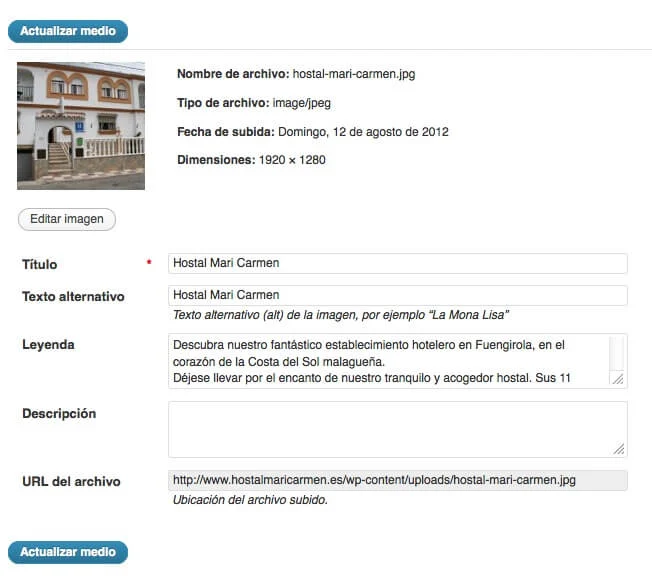
Once we have the image correctly named, we can upload it and we must always give at the very least a Title and an Alternative text. The Title will help us search for it and identify it in the future, and the Alternative text will fill in the ALT attribute of the IMG tag, which makes it fundamental. But the Title and the Caption, thanks to the modification we have created for the Google XML Sitemap for Images plugin, are also fundamental for optimizing our SEO as much as possible.
When the sitemap-image.xml file is created, it uses the URL of the post or page where the image or images appear, the URL of each one of the images that go with it, its title and its description, with a structure similar to this one:
Well then, it takes the title from the Title we have given the image and the description from the text we have added in the Caption, so it is essential to create both with care and attention, even when we are not going to use the Caption in our post or page. Ideally we should use the same Title and Alternative text that we have used as the image name, while in the Caption we can expand on the information we give in the title, introduce the keywords we are interested in, and even make a short summary of the content of the post; the ideal thing, of course, is to make use of the keywords we are most interested in associating with this image and/or post/page. In the image that goes with this post you can see a small real example used on Hostal Mari Carmen.
Thanks to these small details we will make it even easier for our visitors to find us.
Update: Google XML Sitemap for Images has become completely obsolete, so we recommend using the APG plugin APG Google Image Sitemap Feed.
Related posts




Comments
Products and services
-
 APG Multisite Suite
From: 95,59 €From: 71,39 € -
 Custom Fields Starter Kit
121,00 €
-
 WC - APG ecoSoftWEB
-
 Data Import Starter Kit
121,00 €
-
 SEO Optimization
From: 181,50 €

Art Project Group is now available in English. The whole site is translated: every plugin page, the full documentation and the support centre.
artprojectgroup.com #WordPress #WooCommerce

How do you set up WC - APG Cont4?

Se ha publicado #WooCommerce 11.2.2: actualización de seguridad que refuerza las API REST y Store, mejora la validación de CSV y corrige problemas en pagos y pedidos. Incluye cambios en la base de datos.
¡Actualiza cuanto antes!
¿Cómo se configura WC - APG myGESTIÓN?

¿Cómo se configura APG Multisite Suite?


