




The other day our client EuroPalets Group set us an interesting challenge, to set up on their website under WooCommerce 2.3 a shop and an online catalogue at the same time. Specifically, a virtual catalogue for their visitors and an online shop for their registered users.
The problem is that we could not find any plugin for WooCommerce that would let us show an online catalogue to visitors and a standard online shop to registered users.
Solution
The first thing we did was to deactivate the option Enable registration on the “My account” page, which is found in WooCommerce -> Settings -> Accounts. In this way EuroPalets Group makes sure that no visitor registers improperly on the online shop.
Then we created a series of PHP functions in the functions.php file of the child theme that make the add to cart button not be shown on a product or in the product listings. It also completely hides the prices and the cart located in the header, by means of a CSS stylesheet, and sets the cart and checkout pages to Draft status.
Here you have the PHP code used in our case:
And the CSS stylesheet used, in our specific case, inside the catalogo.css file:
Result
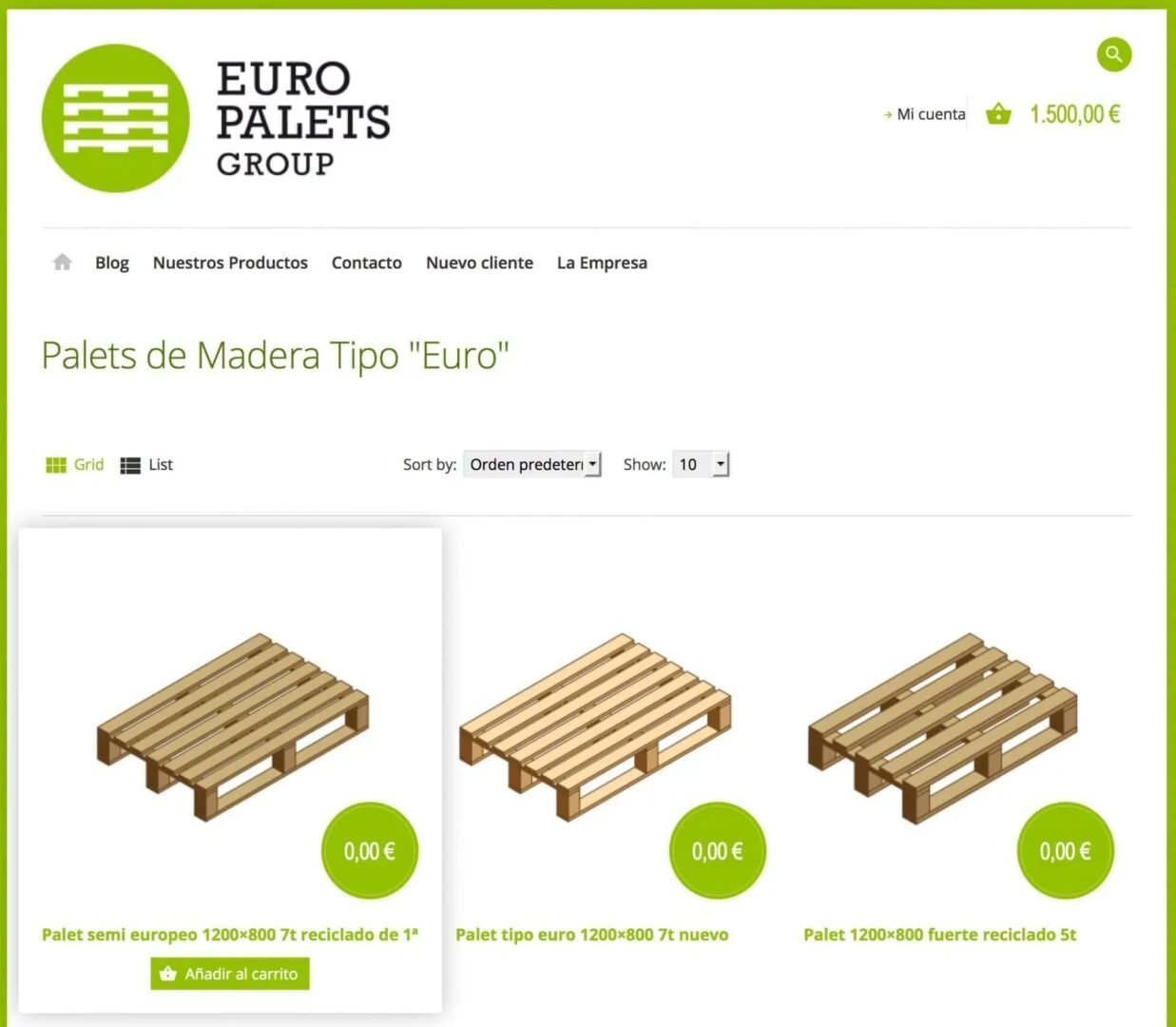
If the visitor is not a registered user they will see an online catalogue similar to this screenshot:

Whereas if the visitor is a registered user they will see an online shop similar to this other screenshot:
Conclusion
In this very simple way we have given a simple and elegant solution to the demand set by EuroPalets Group, creating a catalogue and an online shop at the same time on a single website.
We hope you like this small tutorial and find it useful.
We look forward to your comments and contributions.
Related posts




Comments
Products and services
-
 GDPR compliance
From: 145,20 €
-
 Technical support
84,70 €
-
 All in one
From: 544,50 €From: 484,00 € -
 Website migration
242,00 €
-
 Security Improvement
181,50 €

Art Project Group is now available in English. The whole site is translated: every plugin page, the full documentation and the support centre.
artprojectgroup.com #WordPress #WooCommerce

How do you set up WC - APG Cont4?

Se ha publicado #WooCommerce 11.2.2: actualización de seguridad que refuerza las API REST y Store, mejora la validación de CSV y corrige problemas en pagos y pedidos. Incluye cambios en la base de datos.
¡Actualiza cuanto antes!
¿Cómo se configura WC - APG myGESTIÓN?

¿Cómo se configura APG Multisite Suite?



Hola, si que existen varios plugins que permiten ver los artículos como catálogo si no se está registrado y como tienda si se está registrado. El más conocido el Catalog Visibility Options, pero es de pago. Yo lo he solucionado añadiendo al archivo functions.php el siguiente código:
remove_action( ‘woocommerce_after_shop_loop_item’, ‘woocommerce_template_loop_add_to_cart’, 10 );
remove_action( ‘woocommerce_single_product_summary’, ‘woocommerce_template_single_add_to_cart’, 30 );
remove_action( ‘woocommerce_simple_add_to_cart’, ‘woocommerce_simple_add_to_cart’, 30 );
remove_action( ‘woocommerce_grouped_add_to_cart’, ‘woocommerce_grouped_add_to_cart’, 30 );
Y con esto conseguimos eliminar los botones de “Añadir al carro” de todas las páginas.
En fin, es otra solución. n saludo
Si, ese plugin fue uno de los muchos que estuvimos mirando, pero no terminó de convenceros varias cosas, entre otras el pago anual al que te someten los chicos de WooThemes en sus licencias.
De todas formas gracias por el aporte.
Un saludo.
Gracias por el aporte. Echaremos un vistazo a este plugin que nos comentas.
Un saludo.
Funciona de Maravilla!! Agradecido por el aporte! solo que en mi tema los nombres de las clases css cambian, solo las ubico y las añado al catalogo.css y listo!!