





Having changed the prefix of the database tables (How do you change the prefix of the WordPress database tables?), we are going to carry on improving the security of our WordPress. To do that, today we are going to install three simple plugins.
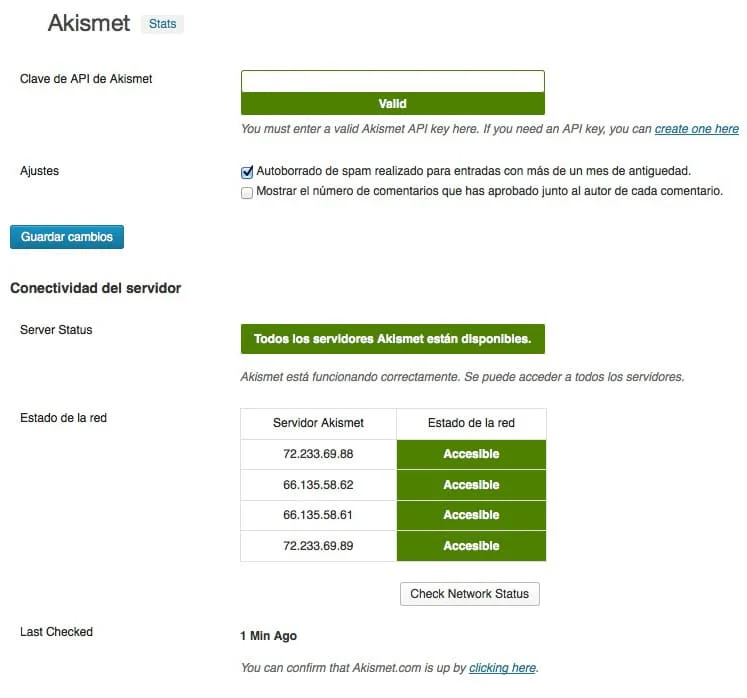
Akismet
We take it for granted that the first plugin is already installed, but, in case it is not, we will go over it. It is called Akismet and it lets us block the mass spam that arrives among our comments. To do that you only have to get an Akismet API key here and that is it, it takes care of absolutely everything. If we already have a key, we can use the same one as many times as we want on different WordPress installations.
Having blocked all the spam we can, let us move on to the second plugin, which is called Wordfence and is a powerful firewall that is going to be very useful to us in preventing those attacks, massive of late, on our WordPress installations. In this plugin we have several options:
- Scan: it lets us scan our WordPress installation looking for corrupt, improperly modified or hacked files.
- Live traffic: it shows us the traffic of our website in real time, where we will be able to filter the traffic by:
- All Hits: all the traffic generated.
- Humans: the traffic generated by our human visitors.
- Registered Users: the traffic our registered users have generated.
- Crawlers: the traffic generated by the Internet search engines.
- Google Crawlers: the traffic Google has generated.
- Pages Not Found: the traffic that has landed on some 404 error.
- Logins and Logouts: all the identification attempts and accesses to our administration panel
- Top Consumers: the visitors that have viewed the most pages, which logically are usually web search engines.
- Top 404s: the visitors blocked for massively visiting non-existent pages.
- Blocked IPs: it shows us the blocked IP addresses, it lets us block one manually and clear the table of blocked IP addresses, releasing all of them.
- IPs that are blocked from accessing the site: IP addresses blocked for making improper use of the website, for being unwanted visitors or for coming from fake sites.
- IPs that are Locked Out from Login: IP addresses blocked for improper access to wp-admin.
- IPs who were recently throttled for accessing the site too frequently: IP addresses blocked for making massive use of our website.
- Country Bloking: this option is only available in the paid version and it lets us block all the traffic coming from a country, for example.
- Scan Schedule: this option is also exclusive to the paid version and it lets us schedule scans of our files.
- Whois Lookup: it lets us find out everything possible about a specific IP address.
- Advanced Blocking: it lets us block a range of IP addresses, a user agent (User-Agent) and state the reason for the block.
- Options: this is where the power of this great plugin lies. In them we can state the blocks we want to be active, the notifications for them, the durations… In our case we use the configuration that can be seen in the screenshot that goes with this post and thanks to it we have cut malicious traffic and improper attempts to access our administration panel down to the bare minimum.
Once we have blocked all the spam and undesirable traffic we can, let us look at the third plugin, which will close the security circle. In this case it is Better WP Security, which lets us do many, but many things. In it we have different tabs:
- Dashboard: Here we have all the information possible about the security of our website, and we can go straight to the main features of Better WP Security. Its appearance is similar to the screenshot we are including, as well as system information and information about the .htaccess file, which we have obviously left out.
- User: here we can change the name of the admin user to a more secure one, and change its ID 1 for a much more secure one. This way well-known WordPress vulnerabilities are avoided and we will make things a bit more complicated for the “bad guys”.
- Away: in this option we can schedule hours and days of access to our administration panel; this way it will stop being available every day and at all hours. In our case, given that our timetables are very anarchic, we do not use it, but for those who always log in at the same hours and/or on the same days, it can be very useful.
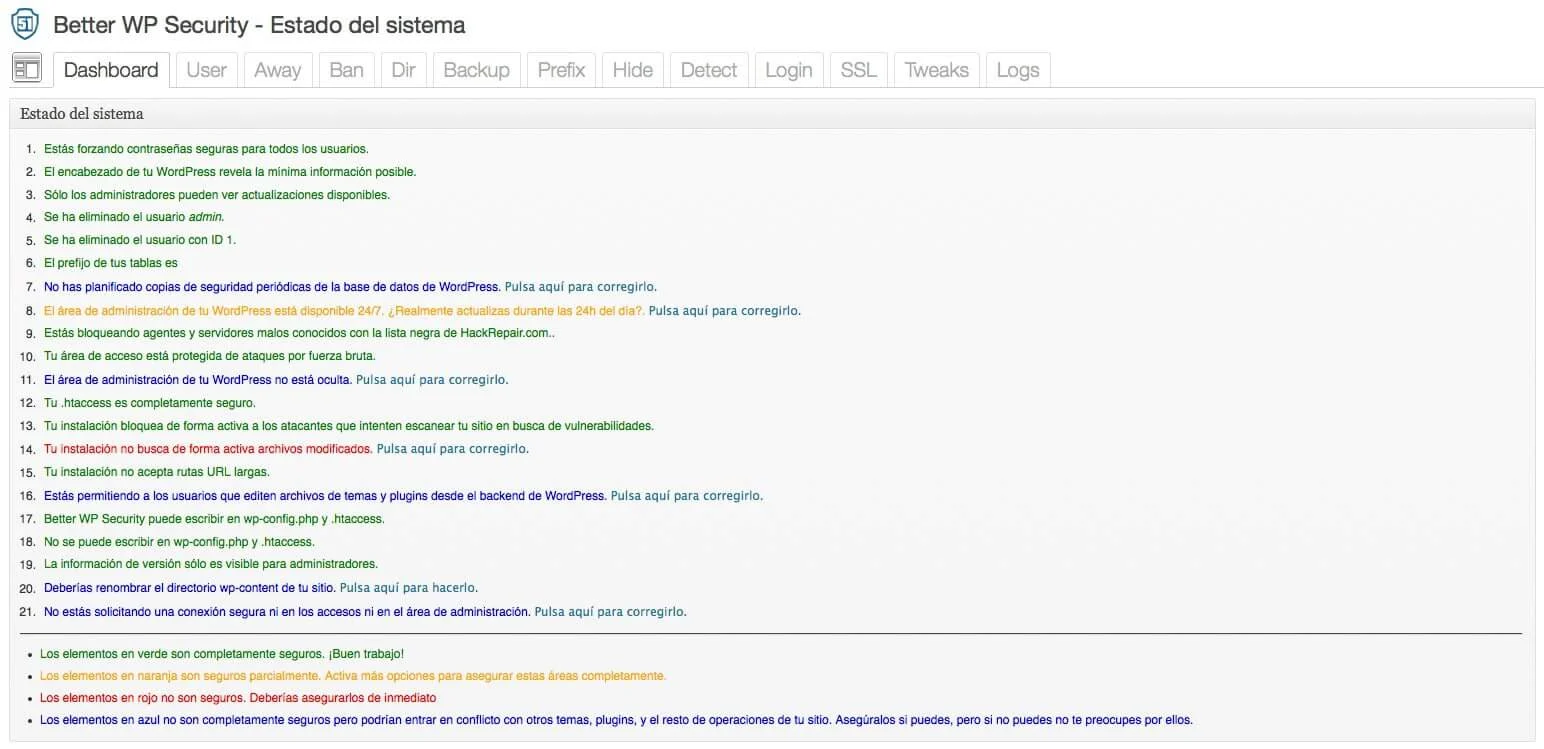
Better WP Security
Ban: here we can block servers and user agents in exactly the same style as what we can do with Wordfence but, given that we already have it installed, the only thing we take advantage of in this option is the HackRepair.com blacklist.
- Dir: in this option we can change the name of the wp-content folder to any other one. Although this considerably improves the security of our installation, we never use it in order to avoid problems with plugins, themes, caches and other options that make use of that folder. If you try it, do tell us about your experience, please.
- Backup: it creates backups of the database for us, but ever since we discovered the fantastic WP-DBManager plugin, we no longer use it. As well as making scheduled backups, this plugin optimizes and repairs our tables on an equally scheduled basis, and it also lets us empty and delete tables, run SQL queries, restore backups… 100% recommended.
- Prefix: it lets us change the prefix of the database tables, something it does completely automatically and at random, starting from the original wp_ but, given that we have already changed it to our liking, just as we explained in How do you change the prefix of the WordPress database tables?, we do not use this option either.
- Hide: this option lets us change the access paths to the administration panel, to registration and to login, but we do not use it either, as we have all improper access blocked thanks to Wordfence. On top of that it has given us the odd problem when activating it but, again, if you try it do tell us about your experience.
- Detect: here we can be informed about intrusions in searches for non-existent pages and about file changes, something Wordfence also does, so you can use both or just one of the two. In our particular case we only use 404 error detection, which we do in both plugins.
- Login: Here, again just like Wordfence, it lets us block a maximum number of access attempts to the administration panel. In our case we use both.
- SSL: it lets us use SSL on the website, on login and on the administration panel. Logically we must have SSL support installed on our web server. In our case, and for the time being, we do not use it.
- Tweaks: this is where most of this plugin’s options are. We activate all of them, except the last one, and we lower the requirement to create strong passwords down to Subscriber. Some of these tweaks have to be put into the .htaccess file and they are grouped into:
- Server tweaks.
- Header tweaks.
- Dashboard tweaks.
- Password strength tweaks.
- Other tweaks.
- Logs: here we have all the records of blocks, improper accesses, 404 errors…, and we can also clean the database and release blocks.
Lastly we still have to put some of the changes into our .htaccess file. The proposal that Better WP Security makes for us after selecting everything we are suggesting to you is this one:
Thanks to the improvements these three plugins give us, we are going to gain in security and, obviously, in peace of mind, so you are already taking too long to install and configure them.
Related posts




Comments
Products and services
-
 WP Total Updater
From: 42,35 € / MONTH
-
 Virus removal
From: 242,00 €
-
 Technical consulting
145,20 €
-
 WC - APG ecoSoftWEB
-
 All in one
From: 544,50 €From: 484,00 €

Art Project Group is now available in English. The whole site is translated: every plugin page, the full documentation and the support centre.
artprojectgroup.com #WordPress #WooCommerce

How do you set up WC - APG Cont4?

¿Cómo se configura WC - APG myGESTIÓN?

¿Cómo se configura APG Multisite Suite?
Se ha publicado #WordPress 7.1.4: actualización de seguridad que corrige vulnerabilidades detectadas en el núcleo.
Al tratarse de una actualización de seguridad, se recomienda actualizar inmediatamente.


