





WooCommerce 2.3 – Handsome Hippo
Barely a few minutes ago the new version of WooCommerce was released, the fantastic WordPress plugin that turns our website into a complete online shop, specifically version 2.3, and after installing and testing it we can already give you our first impressions. By the way, they have called this new version Handsome Hippo, something like a handsome hippopotamus.
The first thing we can confirm is that our WooCommerce plugins: WC - APG Weight Shipping, WC - APG Free Shipping and WC - APG SMS Notifications, work 100% with no problem of any kind detected on WooCommerce 2.3.
The second thing we can also confirm is that it does not bring major code changes that force us to update our theme, as happened with the release of WooCommerce 2.1, which forced us to rewrite the PHP code of our WooCommerce plugins and caused us serious headaches with the source code of the templates.
WooCommerce 2.3
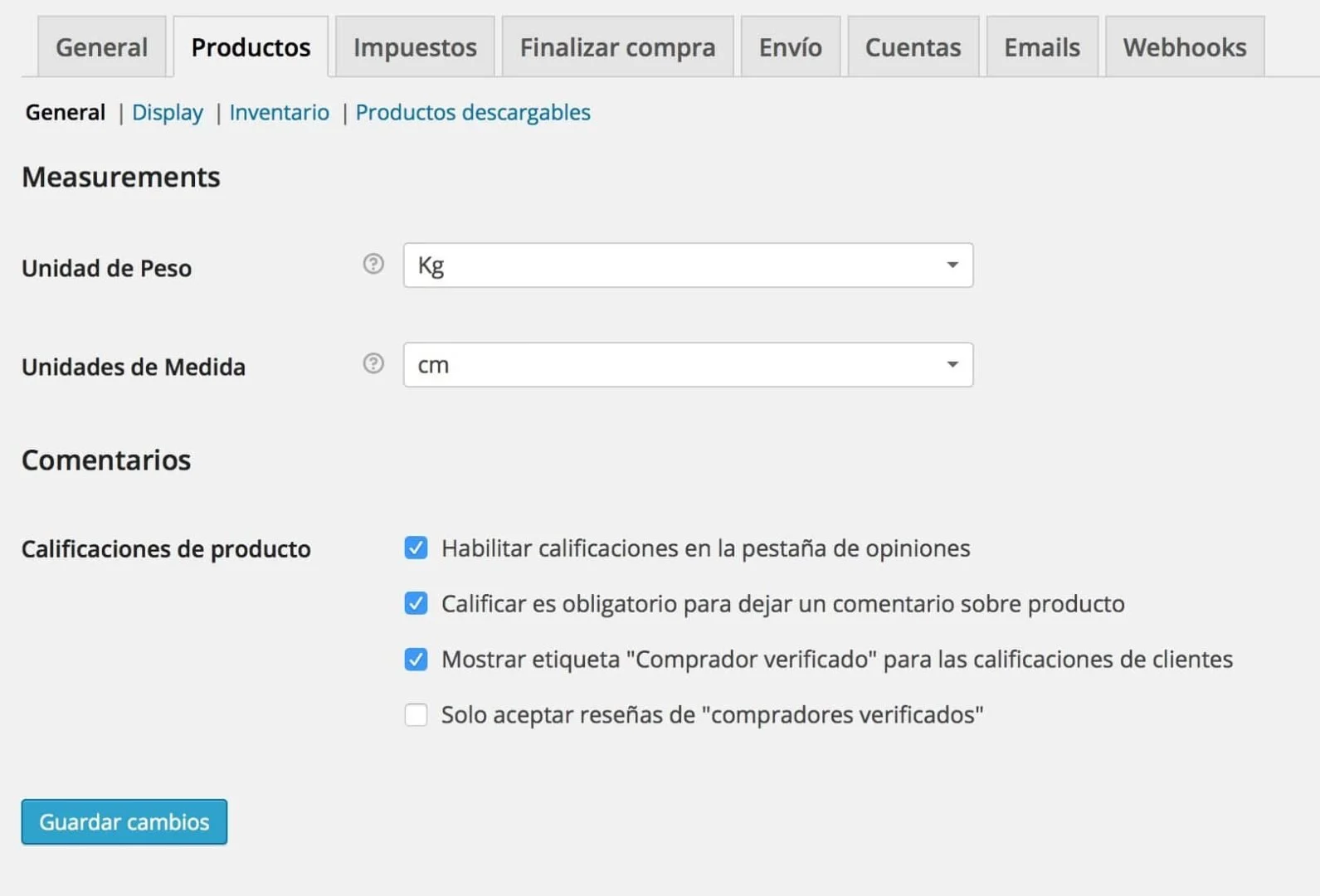
What we have found are slight modifications in the Settings of WooCommerce 2.3, mainly in the Products tab, which has now been divided into four sections instead of the current two.
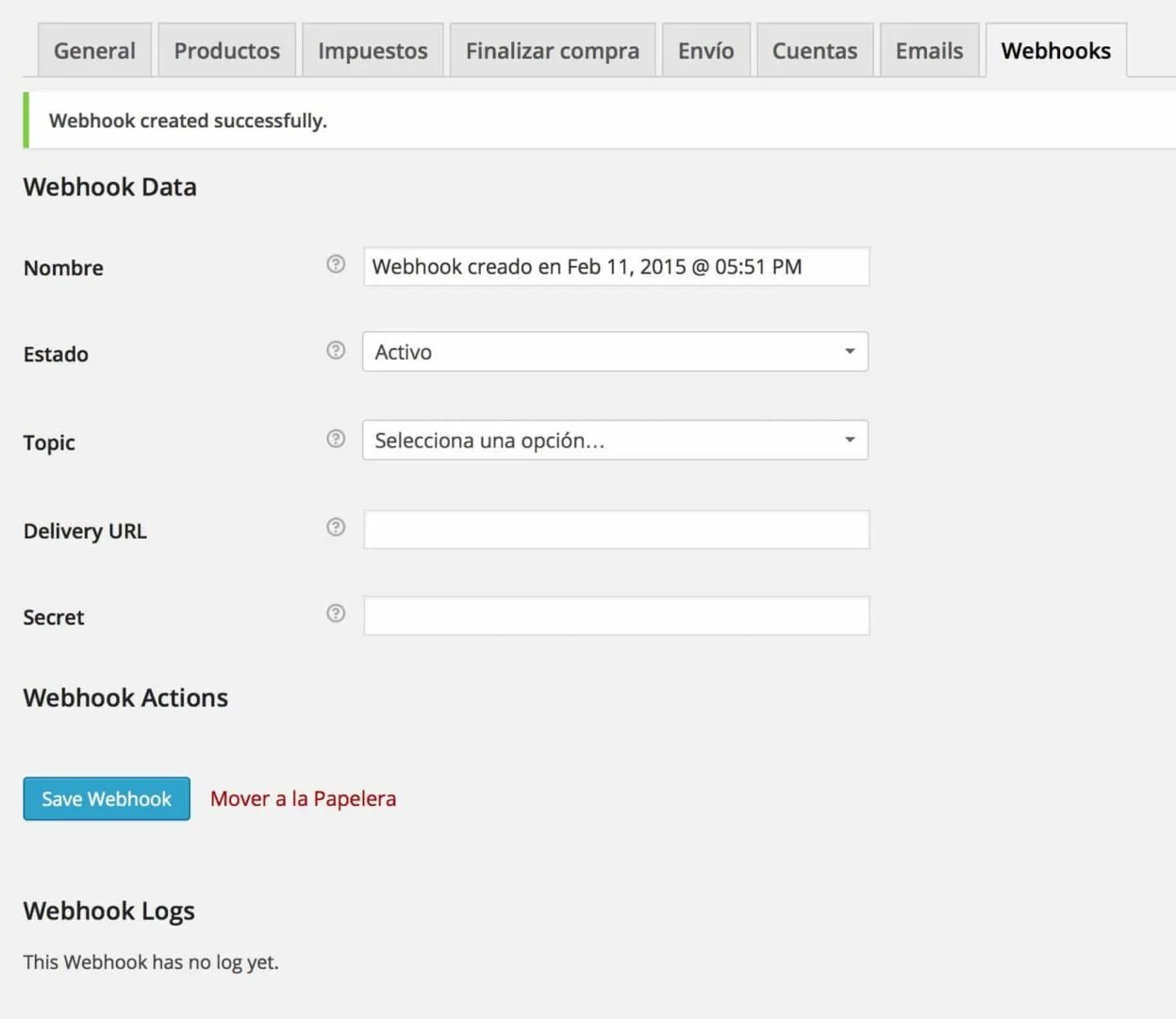
A new tab called Webhooks can also be seen; they have even brought out some very good documentation about this new feature, although in reality it is not new, it already existed in version 2.2; what has happened is that they have now added the graphical interface in Settings, which is why we are devoting these lines to it. Its purpose is to add a notification of an event to a specific URL, very useful for notifying an external application of the creation of a new order, for example.
WooCommerce 2.3 – Webhooks
Although the documentation described in the link explains very well what a Webhoook is and how it is created, basically we need to know that all that is needed is to give it a specific name, a status, the event we want to “capture”, the URL where we are going to notify it and the secret key that will serve to generate the hash, although we can also omit it so that the Consumer Secret of the WooCommerce REST API is used.
The truth is that this new WooCommerce 2.3 comes loaded with small improvements both at the level of the administration panel and of the customer; many of them are almost imperceptible, but they make things much simpler for us. For example there is a new button in the orders that allows us to see more orders from a particular customer, or in the orders listed in My account links now appear in the products ordered, which makes it simpler to add them again to a new order, for example.
Another of the new features is the new design of the WooCommerce template, the one used by default in those themes that do not have a specific design for WooCommerce, leaving it simpler and more neutral, as well as the email template, which has also been revamped.
At customer level it also brings some more new features such as:
- The shopping cart widget now allows products to be removed from the order.
- The shopping cart has changed slightly too, since the buttons to calculate the shipping cost and to go to the checkout have been moved, as well as a new Undo button when a product is removed from the shopping cart.
- The +/- buttons for the quantities have disappeared, since the text boxes have become numeric and show some new buttons specific to this type of element. Even so they can be restored with this new plugin: WooCommerce Quantity Increment.
They have implemented support for some features of Jetpack by WordPress.com, such as Publicize, Omnisearch and Markdown, which is very practical for those of us who use it.
As you can see there are many new features, and this is no more than a small list of many other improvements we have detected, so we can tell you that the update is more than advisable, but, should we update now?, the answer is simple, no. After the madness of version releases in barely hours with the first versions of WooCommerce 2.2, where we did not recommend you to update until version 2.2.3 was released, for the time being we ask you for patience. We will give you the starting signal when we see that, indeed, as it has seemed to us so far, we do not detect any kind of problem.
Stay tuned for the next posts!
Related posts




Comments
Products and services
-
 APG Multisite Suite
From: 95,59 €From: 71,39 € -
 Data Import Starter Kit
121,00 €
-
 Virus removal
From: 242,00 €
-
 Admin recovery
From: 181,50 €
-
 Security Improvement
181,50 €

Art Project Group is now available in English. The whole site is translated: every plugin page, the full documentation and the support centre.
artprojectgroup.com #WordPress #WooCommerce

How do you set up WC - APG Cont4?

Se ha publicado #WooCommerce 11.2.2: actualización de seguridad que refuerza las API REST y Store, mejora la validación de CSV y corrige problemas en pagos y pedidos. Incluye cambios en la base de datos.
¡Actualiza cuanto antes!
¿Cómo se configura WC - APG myGESTIÓN?

¿Cómo se configura APG Multisite Suite?



Falla el plugin Servired Light me da el siguiente error all to undefined method WooCommerce::add_inline_js() in /home/kopyfax/public_html/wp-content/plugins/woocommerce-servired-integration-light/class-wc-gateway-servired-light.php on line 225
Alguien sabe como solucionar este problemilla?
Esa función,
add_inline_js, está depreciada desde WooCommerce 2.1, en su lugar hay que usarwc_enqueue_js.Un saludo.
Hola, soy nueva por aquí. Tengo muchos problemas con la traducción de WooCommerce a castellano, hace parte y parte no, y los emails un desastre. Tengo CodeStyling Localization pero no hay forma. ¿Me dais una pista de que puedo hacer? Gracias, ando desesperadilla.
Échale un vistazo a dos entradas nuestras: Cómo personalizar las traducciones en WooCommerce 2.2 y ¿Cómo traducir cuando Codestyling Localization no puede?.
Un saludo.
Gracias. Voy a ver.
Buenas noches,
Hace poco que encontramos vuestro plugin debido a que en una pagina web que estamos trabajando necesita realizar pedidos en peninsula y baleares.
Estamos configurando el plugin, pero tenemos la ultima version de woocomerce, aplicamos los ajustes de iva como comentais en vuestro articulo, pero a la hora de ponernos a ajustar el envio apg no nos aparecen las provincias a las que hemos aplicado el iva, puede ser esto debido a que son versiones diferentes de woocomerce? estamos un poco desesperados, no somos programadores ni nada y no sabemos que hacer.
Muchas gracias por vuestro tiempo,
Un saludo
Debes asegurarte de que tienes seleccionada correctamente la base de la tienda.
Si no conseguís finalizar la configuración correctamente, recuerda que tienes a tu disposición nuestro servicio de Soporte técnico.
Un saludo.
Hola.
Tengo una web http://www.lanaytelar.es con woocommerce. Ya en su dia, me hiciste unos arreglos en ella y hasta ahora todo perfecto.
Quería hacerte una consulta por si puedes ayudarme.
Tengo una campaña de ADW y quiero llevar el Seguimiento de Conversiones de ADW.
Supuestamente, debo insertar el código de seguimiento de ADW en la pagina de gracias que debería salir después de realizar dicha compra.
El problema que tengo es el siguiente:
De la pagina ……/carro, si quiero finalizar la compra, me lleva a la pagina: ……../finalizar-compra. Esta pagina es la que me pide los datos de facturación y contiene un botón de Realizar Pedido.
Al pulsar este botón, se realiza la compra y me devuelve a la pagina de ….. /carro (no sale una página de Gracias por su compra)
En la página de Finalizar Compra, en el editor, lo único que veo es un código corto: [woocommerce_checkout]
No se como hacer para que despues de pulsar el botón de Realizar el Pedido, me devolviera un pagina de Gracias en lugar de devolverme de nuevo a la pagina de …/carro
Si metiera en esta el código de Canversiones, el dato no seria real pues me daría como conversion, todas aquellas visitas que llegaran al carro y que obviamente no tienen por qué haber realizado la compra (carros abandonados)
Me recomendaron un plugin:
WooCommerce AdWords Conversion Tracking Settings
Pero no he conseguido nada.
Lo suyo seria meter el código de conversiones en la pagina de gracias despues de haber hecho clic en Realizar el pedido. Pero no se como hacer para que salte esta pagina en lugar de devolverme al …./carro.
Podias indicarme como hacerlo
Gracias
Hola Javier.
Si la página Gracias por su compra (thank-you) no te sale puede ser por varios motivos.
Por lo que vemos tienes instalada la versión gratuita del tema Customizr, que no indica en su documentación si es compatible con la última versión de WooCommerce. La última referencia al respecto habla de la versión 2.2.2 y es de septiembre de 2014. En la versión PRO tampoco indica la versión de WooCommerce soportada, pero dado que la última revisión es del 10 de julio, presuponemos que soportará la actual 2.3.13.
Además del propio tema, el problema puede ser provocado por otro plugin, el propio WooCommerce, debido a una incorrecta configuración, o por algún otro motivo producido por el propio servidor, por ejemplo.
La verdad es que poco más podemos decirte sin verlo en profundidad.
Un saludo.